| Product Documentation
HC Marketplace
Installation
Pre-requisites
There are some pre-requisites for installing HC Marketplace on a website. Before being able to use it, these pre-requisites should be met. View them below:
- SQL Server 2008 or above to host Marketplace backend database
- .NET Frameworks 4.5 (on the web server where the site exists)
- IIS7 or above to store Marketplace website (on the web server where the site exists)
- The Marketplace host should be a valid Hosting Controller control panel user. It could be a control panel host or reseller.
Download Folder
A host (admin) can download the Marketplace.zip and extract it in a valid folder in its website. The zip file can be extracted at the root of the website or in a virtual directory.
Configurations
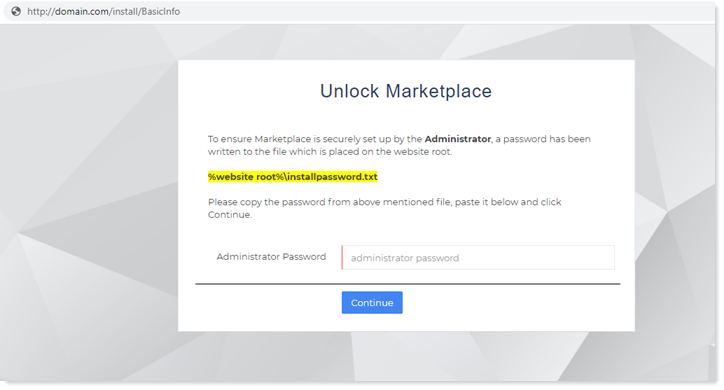
Once the folder has been extracted at the root of the website or in a virtual directory, Marketplace URL will be redirected to an unlock page (https://website.com/Install/BasicInfo). Here the host (admin) will provide a password which is pre-written to a file located at this path %website root%\installpassword.txt. This is a security measure and ensures that the Marketplace has been setup securely by the host (admin) or the reseller. After pasting the password click Continue.
The next screen presents the configurations page. It is here that the host can set the Marketplace admin credentials and configure the Marketplace database connection.
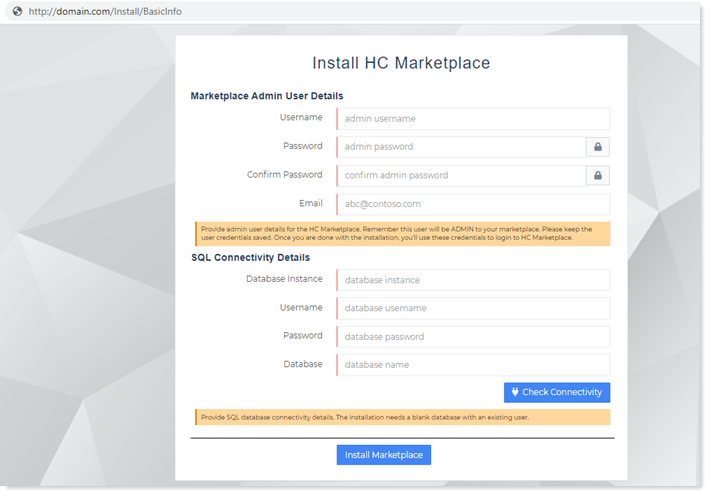
Marketplace Admin User Details
These are the credentials to the Marketplace host (admin). The admin user can configure various settings for the Marketplace and administer it according to its needs. Once the Marketplace is installed, the admin can login to the administration interface with these credentials.
- Username: The username of the admin.
- Password: The password for the admin.
- Confirm Password: Confirm the password.
- Email: Email of the admin.
SQL Connectivity Details
These are the credentials to the database user creating the Marketplace database. The user should have sufficient privileges to create a database in SQL Server and create other users.
- Database Instance: Name of the SQL instance.
- Username: The username of the database user. This user should already exist prior to installing Marketplace.
- Password: The password for the database user.
- Database: Name of the database. This should be an already existing blank database.
- Check Connectivity: Verify connectivity to the SQL Server. The installation will not go through if the user is unable to establish a valid connection.
Creation Summary
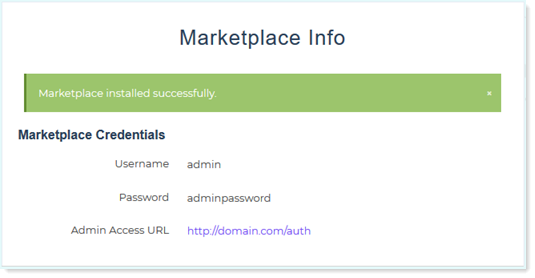
After the Marketplace has been installed successfully, a creation summary giving the host (admin) credentials and access (URL) will be displayed.