| Product Documentation
Resources
HC Skype for Business Datasheet
What is HC Skype for Business?
HC Skype for Business provides an all-inclusive web interface to the provisioning and management of Skype for Business accounts. It simplifies the overall process of creating Skype for Business users, SIP domains and segregated tenants, allowing service providers a better chance to offer IM, conferencing, presence information and enterprise-class telephony to their customers.
Why HC Skype for Business?
Automated Process
The single biggest advantage of using HC Skype for Business is the automated provisioning of Skype for Business accounts. From the initial stage of ordering a Skype for Business service plan through to the creation of a tenant, HC Skype for Business sees the orchestrated execution of provisioning work flows for the fulfillment of the end-to-end setting-up process.
Channel Support
Sometimes it’s beneficial to go to market via value added intermediaries and let these resellers sell downstream to their customer base. HC Skype for Business let’s service providers leverage this power of multiple reseller sales channels. Internet Telephony Service Providers (ITSPs) and other VSPs can quickly reach out to their end customers through these powerful sales channels exposing themselves to new revenue streams.
Customizable Storefront
Facilitates seamless Skype for Business account sign-up via customer facing online store and a fully automated sign-up process. Customers arriving at the store can pay online and signup for Skype for Business services without the need for manual intervention on the part of the provider and the store is completely white labelled.
Relevant Service Packages
Tailor-made service plans for Skype for Business resources. Bundles telephony, users, SIP domains, response groups, response queues, workflows and a number of other resources into priced hosting packages. Users can purchase packages most relevant to them.
Web Provisioning
Let’s customers provision Skype for Business users, SIP Domains, Organization Units (O.Us) and much more through the web, using a browser of choice. This means no more logging in to the Skype for Business Server Control Panel or Skype for Business Server Management Shell for the purpose of provisioning. This also means creation of SIP Domains without the need of manually updating topologies with topology builder.
Detailed Reporting and Analytics
Reporting lies at the heart of Microsoft’s SPLA program. HC Skype for Business provides accurate reporting for Enterprise usage. Using HC Skype for Business’s advanced reporting feature, providers can safely report their SPLA usage every month and be charged for only what they have consumed.
Better UX
Simplifies the overall user experience design to such an extent that Skype for Business customers often find it hard to work without Hosting Controller UI.
Active Directory User Creation
Automatic creation of a user in Active Directory (A.D.) and enabling of Skype for Business on it. No manual intervention required.
Share Organization’s Users
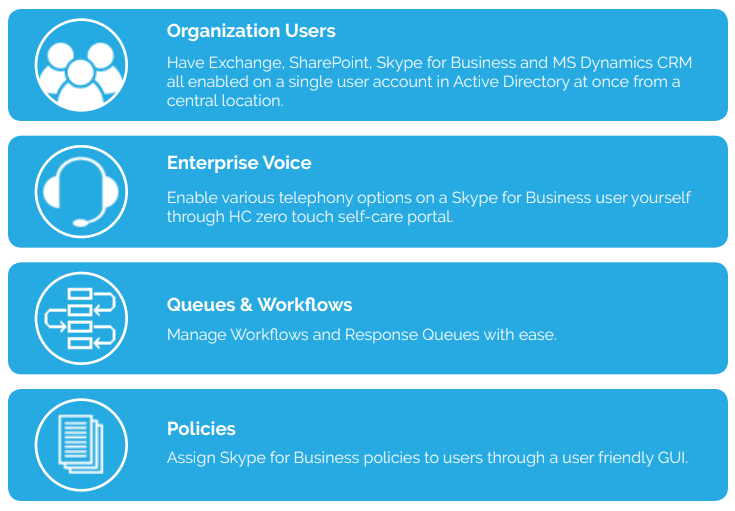
At a time have multiple services, Exchange, SharePoint, Skype for Business and MS Dynamics CRM enabled on a single user account in Active Directory.
Billing
Bill your Skype for Business customers for the resources they have used, complete with automatic invoicing
About Hosting Controller
Starting out as Windows web hosting automation solution, Hosting Controller over the years has evolved into a leading cloud automation solution. The notion pivotal to HC is “all under one umbrella”. Centered on this HC endeavors to bring a granular, role based orchestration software. A solution that allows:
• Hosting Service Providers
• Saas Providers
• Datacenters
• Telcos
to effectively manage their private, public and hybrid clouds. With special emphasis on Microsoft Enterprise Applications, HC enables datacenters and SaaS providers literally of any size to deploy and swiftly launch a broad range of on-demand software within no time. Besides Microsoft Exchange, SharePoint, Lync, Skype for Business nd Dynamics CRM, HC provides a coherent, multi-tenant, self-served web interface to a wide range of out of the box applications. To top it all,HC is home to a world class Virtualization suite sanctioning an easy and scalable way to provision and manage Virtual Private Servers (VPS).
Key Features
1) Multi-tenancy
Prevents Skype for Business users of one organization from viewing the presence information of users in other organizations. Nicely separates tenants and their management into compact containers of their own.
2) Single Interface
A market-ready wrapper facilitating the management of Active Directory, Skype for Business and Invoicing from a single interface.
3) API Availability
A strong API allowing integration with external applications and interfaces.
Features
With an elaborate feature set HC Skype for Business Module puts you precisely in control of your Skype for Business resources. Here is a complete list of features that fortifies the overall provisioning process.
Simple URL Naming Options
Select a Simple URL Naming option of choice
Active Directory Management
- Create/delete/disable Skype for Business user in Active Directory
- Create/delete Skype for Business users in bulk
- Enable SIP services on an existing AD user
- Modify user’s general profile
- Change Skype for Business user’s password
- Display SIP user’s status
- Define telephony options for user
- Define policy for user
- Configure call forwarding for user
- Create/delete Skype for Business enabled organizations (O.U)
- Enable multiple services, Exchange, SharePoint and Skype for Business services on a single AD user
Telephony Options for Skype for Business User
- PC to PC
- Enterprise Voice
- Audio Video Disabled
- Remote Call Control
- Remote Call Control Only
Policies for Skype for Business User
- Conferencing Policy
- Client Policy
- Client Version Policy
- Location Policy
- Archiving Policy
- External Access Policy
- PIN Policy
- Persistent Chat Policy
SIP Domains
Create/delete SIP domains in specific organizations
Line URIs
- Add/delete Line URIs
- Assign Line URI(s) to customers
- Check the current status of URI, which customer the URI is assigned to
Skype for Business Server Pools
- Assign Server Pool to resellers
- Assign Server Pool to Skype for Business users
Skype Application Services
- Assign Skype Application Service to customers
SIP Federated Domains
- Add/delete SIP Federated domains
- Allow/block domain type
Response Groups
- Add/delete Skype for Business Response Groups
- Modify Skype for Business Response Groups
- Modify Participation Policy
- Modify Routing Method
- Set Alert time
- Include/remove Enterprise Voice members
Response Queues
- Create/delete Response Queues
- Modify Response Queues
- Modify Timeout settings
- Modify Overflow settings
- Include/remove Route Calls to Agents (Groups)
Workflows
- Create/delete/disable Skype Workflows
- Modify Workflow general Information
- Define Workflow Type (Managed/Unmanaged)
- Include/remove Managers
- Enable/disable Welcome Message
- Select a file for Recording
- Text To Speech
- Define music for callers placed on hold
- Configure Interactive Voice Response (IVR) Workflow
Skype for Business Service Plans
- Create/sell priced Skype for Business service plans
Reports
- Generate Enterprise usage/SPLA reports
- View Skype for Business server report
- View total number of SIP domains
- View total number of SIP users
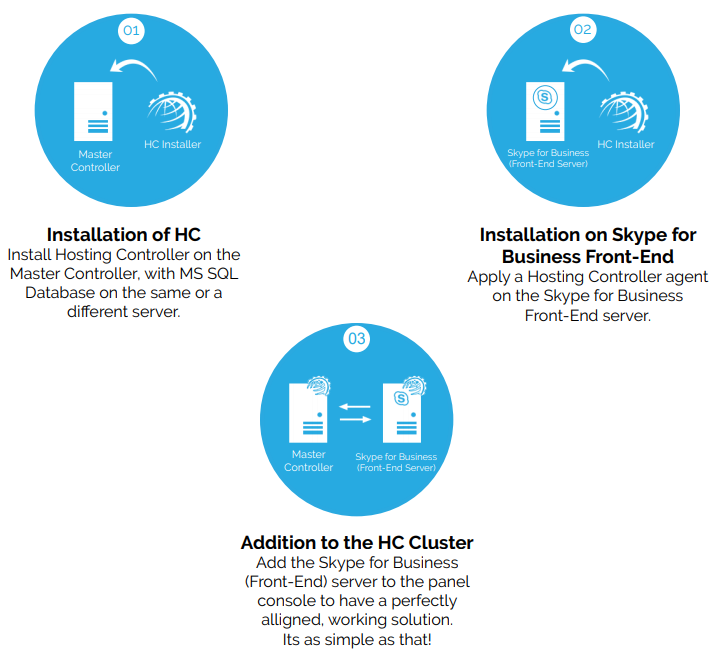
How it works?