
| Product Documentation
AD Connect Sync
Configuring AD Connect Sync for AWS
Customers may have a requirement to sync their on-premises local AD to AWS Managed Microsoft AD that may include the ability to grant users access to external cloud applications and allow on-premises AD users to manage and have access to resources in the AWS cloud. To cater such requirements, HC AD Connect Sync introduces the capability of syncing objects, attributes and passwords from on-premises Active Directory to AWS Managed Microsoft Active Directory.
Sync objects from local AD to Amazon Managed Microsoft AD
You can easily install and configure HC AD Connect Sync to handle this synchronization. Follow the below steps to install HC AD Connect Sync.
1) AWS Managed AD must be created properly with the help of below instructions:
https://docs.aws.amazon.com/directoryservice/latest/admin-guide/ms_ad_getting_started_create_directory.html
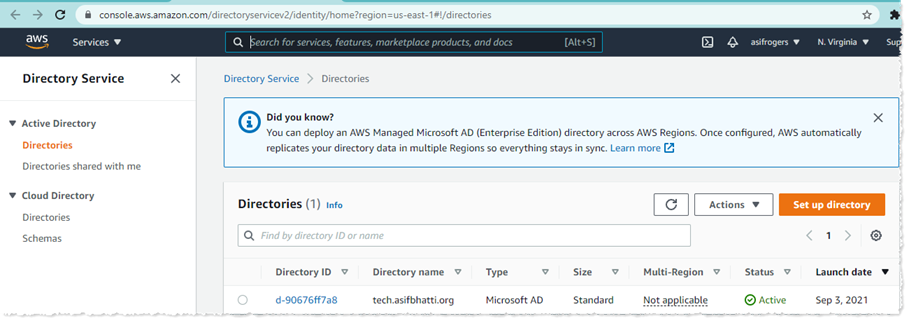
2) Amazon EC2 instance must be connected to the AWS Microsoft Managed Active Directory. To do so, follow the below link:
https://docs.aws.amazon.com/directoryservice/latest/admin-guide/ms_ad_use_cases.html.
3) Ports must be allowed from your on-premises network to the VPC containing your AWS Managed Microsoft AD. Therefore, make sure to follow the below instructions:
https://docs.aws.amazon.com/directoryservice/latest/admin-guide/ms_ad_tutorial_setup_trust_prepare_mad.html.
4) Installation of HC AD Connect Sync tool will be performed on the EC2 instance mentioned in step # 2. To learn how to install HC AD Connect Sync on EC2 instance, see:
https://docs.hostingcontroller.com/Products/AD-Connect-Sync//AD-Connect-Sync-Tool/Installing-HC-directory-synchronization.
5) On the Source Active Directory, secondary setup of HC AD Connect Sync must be performed. To learn how to install this setup on Source AD, see:
http://portal.hostingcontroller.com/kb/a3395/password-syncing-requirement-for-aws-managed-microsoft-ad.aspx.
6) Now configure both Source AD settings, and AWS Managed Microsoft AD settings in the AD Connect Sync tool under Local AD Settings tab and Cloud AD Settings tab respectively using the Domain Admin credentials. To learn how to configure these settings, see:
https://docs.hostingcontroller.com/Products/AD-Connect-Sync//AD-Connect-Sync-Tool/Configuring-HC-directory-synchronization.