
| Product Documentation
Mail Data Migrator
How it Works
Mail Data Migrator is a unique and universal utility as it performs seamless migration from any Source Mail Server to any Target Mail Servers irrespective of the platform. It is based on IMAP Protocol which is used for moving mails from the source to target. Given below are the details of what it covers :
- Email Transfers: MDM transfers emails data using the IMAP protocol. This protocol only transfers emails data and there is no way to use this protocol to transfer Exchange/Google contacts, calendars, and tasks. However, a separate mechanism is adopted for moving these objects in the MDM tool.
- Contacts/Calendars/Tasks Move: For Exchange contacts, calendars and tasks, it is assumed that the customer has provided the correct source and target server details that provide connectivity over both IMAP and EWS.
- Emails Move Migration Process: MDM tool connects to the source (e.g. fabrikam.net) and target (e.g. contoso.com) servers over IMAP protocol and transfers email data. Data is moved in multiple iterations and the maximum number of emails transferred in each iteration is 300.
- Emails are kept on transferring from source to target until all of the emails are transferred to the target server.
- The raw IMAP protocol is used for migrating email that provides maximum default transfer speed. There is no other mechanism for increasing the data transfer speed.
- In case the customer is transferring 1GB of email data then it will be transferred from source server to mediation server first and then from mediation server to target server. Here the mediation server is the one where we have installed MDM.
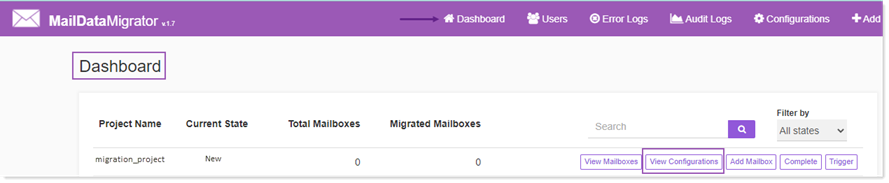
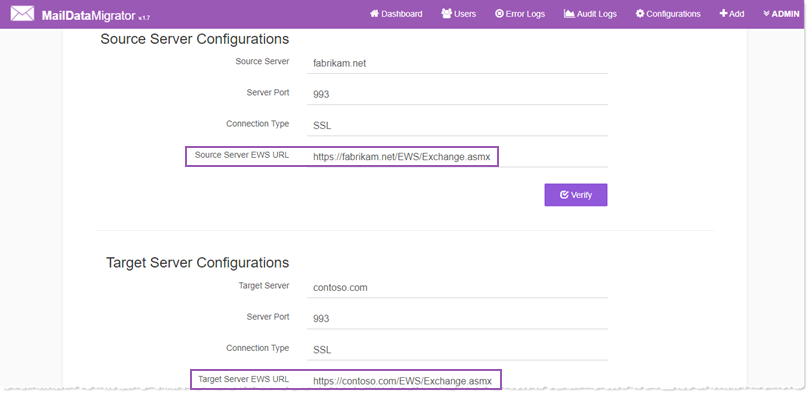
- For Exchange contacts, calendars and tasks, it is assumed that both source and target servers will connect over EWS and so we create EWS access points as https://fabrikam.net/EWS/Exchange.asmx and https://contoso.com/EWS/Exchange.asmx and connect both access points to transfer contacts, calendars, and tasks. We perform this only once and move all contacts, calendars, and tasks.
- For Google contacts, calendars and tasks, we ask for access tokens for all three separately. See below links for more details:
- Migrating Google Calendars: https://portal.hostingcontroller.com/kb/a3365/migrating-calendars-from-google-mail-to-ms-exchange-server.aspx
- Migrating Google Tasks: https://portal.hostingcontroller.com/kb/a3364/migrating-tasks-from-google-mail-to-ms-exchange-server.aspx
- Migrating Google Contacts: https://portal.hostingcontroller.com/kb/a3360/migrating-contacts-from-google-mail-to-ms-exchange-server.aspx