
| Product Documentation
Mail Data Migrator
Main Screen
A successful login displays the dashboard or the main screen of Mail Data Migrator as:
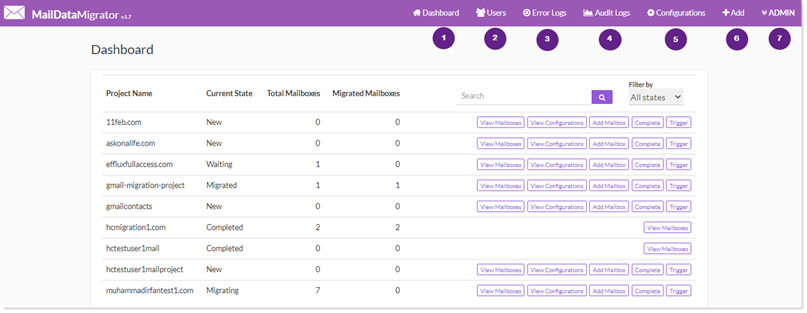
- Dashboard: shows dashboard/home page of Mail Data Migrator. It displays all the pertinent menus and controls, required for the overall working of the utility.
- Users: shows all of the existing administration users. These are the application admin users that exist in the database of Mail Data Migrator. There are two types of admin users:
- Super Admins
- Project Admins
- Error Logs: capture and display all the exceptions generated during the various migration processes and spawn when the Mail Data Migrator scheduler runs.
- Audit Logs: provide a convenient way to track down operations performed by Mail Data Migrator users and to record various events. The audit trail includes actions performed and time stamps besides other useful details.
- License: shows licensing details.
- Add: allows user to add mailbox/mail domain/admin user.
- Admin: Displays the user logged-in currently and further allows the user to logout of the system.