
| Product Documentation
Efflux Migrator
Configurations
The configurations tab is the most vital section of the migrator. It permits input of mandatory information for the source and target Exchange environments. Information can be inserted by clicking the Click to Change button.
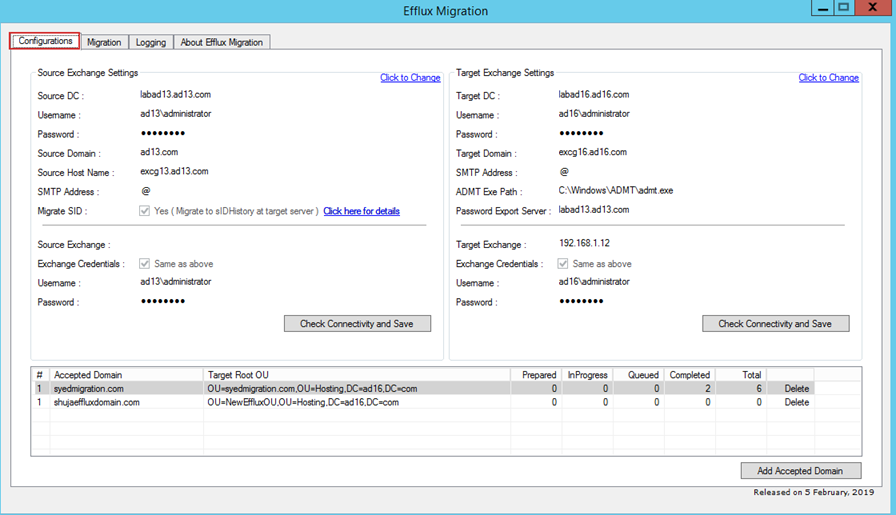
- Accepted Domain: Accepted mail domain whose mailboxes are to be migrated. This mail domain must exist on the target Exchange server. Efflux is capable of migrating more than one accepted domains at a time.
- Target OU: Organization unit in target AD, where mailbox users will be created by Efflux during the move. It is written in the format of the Distinguished Name (DN) of the OU.
Source Exchange Settings
- Source DC: The source Domain Controller name or FQDN of the source environment.
- Username: The domain admin of the source domain.
- Password: Password of the domain admin.
- Source Domain: The source Domain Controller name (without FQDN) of the source environment.
- Source Host Name: The Exchange host name. Normally it is the same URL used to access OWA e.g. https://mail.yourdomain.com. Ensure that with this host name, the EWS URL (https://yourdomain.com/EWS) can be accessed from the machine where Efflux is installed.
- SMTP Address: Optional field in case a mail domain alias is to be specified. Some organizations require additional SMTP address in the mailbox which is to be migrated. Additional mail domain name can be inserted e.g. yourdomain2.com. Efflux will automatically include mailboxname@yourdomain2.com when it prepares and moves mailbox to target environment.
- Migrate SID: Option in case the source user’s objectSid is to be added to the target user’s sIDHistory attribute. Checking the check box will map the source SID to the target user’s sIDHistory attribute during the move. See, Requirements for moving Security Identifier (SID) attributes from source to target.
- Source Exchange: The Exchange host name. Normally it is the same URL used to access OWA e.g. https://mail.yourdomain.com or IP which will be used by Efflux to connect to the Exchange server. Efflux communicates with the Exchange server through Remote PowerShell therefore PS Remoting should be enabled on the Exchange server.
- Exchange Credentials: Credentials to connect to Exchange PowerShell remotely. They must have domain admin privileges.
- Username: Administrator user in case a domain admin is not used.
- Password: Password to that administrator.
- Check Connectivity and Save: Connectivity check to verify all entries above are correct. Save entries.
Target Exchange Settings
- Target DC: The target Domain Controller name in the destination forest to where the mailboxes are to be migrated.
- Username: The domain admin of the destination domain.
- Password: Password of the domain admin.
- Target Domain: The target delivery domain.
- SMTP Address:
- ADMT Exe Path: The Microsoft Active Directory Migration Tool (ADMT) exe path. Required only in the case of export of mailbox passwords from source to destination.
- Password Export Server: Reference to the server in the source environment where Microsoft Password Export Server is installed.
- Target Exchange: IP of the target Exchange server. Efflux communicates with the Exchange server through Remote PowerShell therefore PS Remoting should be enabled on the Exchange server.
- Exchange Credentials: Credentials to the target Exchange server. Keep checked if want to use the domain credentials.
- Username: Administrator user in case a domain admin is not used.
- Password: Password to that administrator.
- Check Connectivity and Save: Connectivity check to verify all entries above are correct. Save entries.