
| Product Documentation
Efflux Migrator
Target Exchange Settings
Target settings permit input of mandatory information for the target Exchange environment. Target environment can be an on-premises Exchange environment or Office 365. Information can be inserted by clicking the Click to Change button.
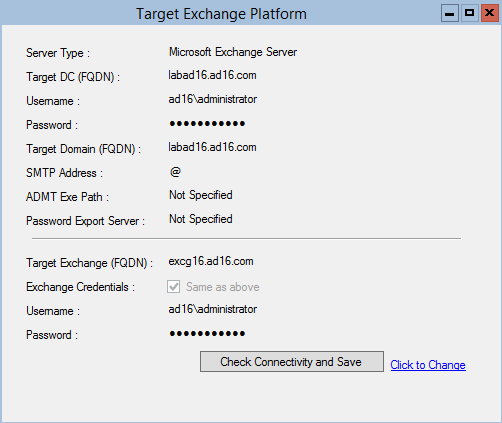
- Server Type: Server type indicating if its an On-premises Exchange server or Office 365.
- Target DC: The target Domain Controller name in the destination forest to where the mailboxes are to be migrated.
- Username: The domain admin of the destination domain.
- Password: Password of the domain admin.
- Target Domain: The target delivery domain.
- SMTP Address:
- ADMT Exe Path: The Microsoft Active Directory Migration Tool (ADMT) exe path. Required only in the case of export of mailbox passwords from source to destination.
Password Export Server: Reference to the server in the source environment where Microsoft Password Export Server is installed. - Target Exchange: IP of the target Exchange server. Efflux communicates with the Exchange server through Remote PowerShell therefore PS Remoting should be enabled on the Exchange server.
- Exchange Credentials: Credentials to the target Exchange server. Keep checked if want to use the domain credentials.
- Username: Administrator user in case a domain admin is not used.
- Password: Password to that administrator.
- Check Connectivity and Save: Connectivity check to verify all entries above are correct. Save entries.