
| Product Documentation
AD Self Service Portal
Hosted Entities
An entity is basically an Active Directory. Entities that are part of the LAN of the ADSS Portal are known as hosted entities. In other words, entities that are discoverable on the network of the portal machine are hosted entities. On the other hand, entities not discoverable on the network of the portal machine are referred to as private entities.
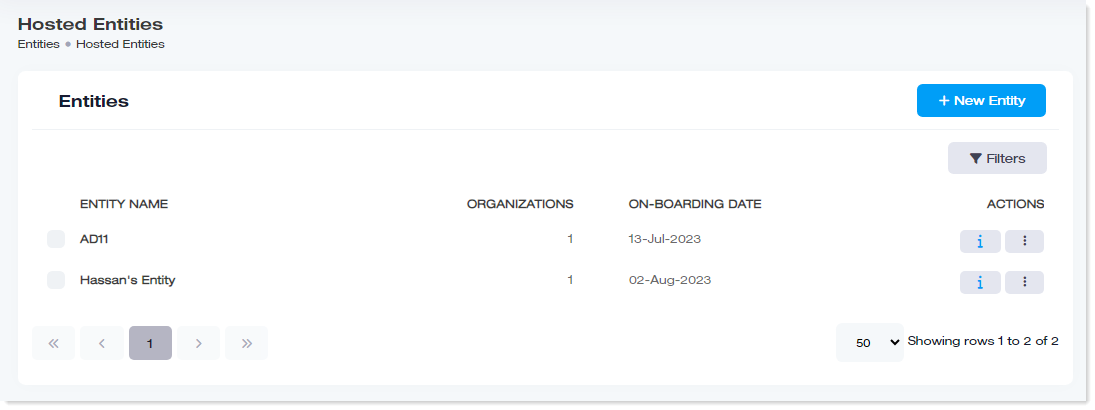
To manage entities, navigate to the left menu, under the Main section, and click Hosted Entities
|
Manage Entities page shows the following information:
|
Search an Entity
To search any entity, click Filters. Specify name or suffix to search the required entity.
Add New Entity
To add a new entity, click + New Entity. Specify the required information and click Save.
- Entity Name: Specify a friendly name for the hosted Active Directory.
- Domain Controller: Type the IP or FQDN of the domain controller of the hosted Active Directory.
- Domain Admin: Provide the domain\administrator account for the domain associated with the domain controller.
- Password: Provide the password for the domain\admin.
- Security Type: The ADSS portal can use both the LDAP and LDAPS protocols to speak to the hosted Active Directory. While LDAP transmits data without encyption, LDAPS on the contrary tansmits all data over TLS/SSL. Therefore, LDAPS is more secure than LDAP. All Active Directory operations performed by ADSS use these two protocols.
- Check Connectivity: As the ADSS portal uses LDAP or LDAPS protocol to establish a secure connection with the hosted Active Directory. the check connectivity button establishes a valid connection with the hosted Active Directory through LDAP or LDAPS.
Manage Organizations
Here organizations are all the organizations (OUs) that exist under the hosted Active Directory. Clicking the organizations button redirects to the organizations section, fetching and displaying only those organizations that exist under the hosted entity.
To manage organizations, under the Actions column, click  and then Organizations. For details, refer to the Organizations page.
Edit a Hosted Entity
To modify any hosted entity, under Actions column, click and then Edit. Modify information as required and save the details.
Set License Quota
Each entity can be assigned licenses. ADSS Portal licenses are based on the number of AD objects. Licenses limit the number of AD objects in an entity that can avail management and self-service.
To set license quota, click under Actions column and click Set License Quota.
- Entity Name: It is the name of the entity to which licenses are being assigned.
- Available License Limit: It shows the licenses available from the total licenses purchased by the company.
- Limit Used by Entity: It shows the total licenses used by the entity. It includes licenses used by all the organizations under the entity.
- Limit Assigned to Orgs: It shows the licenses assigned to all the organizations under the entity.
- Limit Assigned to Entity: It shows the total licenses assigned to the entity.
Delete a Hosted Entity
To remove any entity, under Actions column, click and then Delete.