
| Product Documentation
AD Self Service Portal
Users
AD Self-Service Portal presents three types of administrative users. The three types of administrative users are created as security groups in the Active Directory and members of these groups can log in to ADSS Portal with their credentials. ADSS Portal works on the principle of group authentication and authenticates group members from Active Directory. A fourth type of user is also available but can only view reports. It is known as the Report Admin. The Report Admin is not exactly an administrative user and can only view reports across all Active Directories in the AD Self-Service Portal system or can view reports for a specific entity.
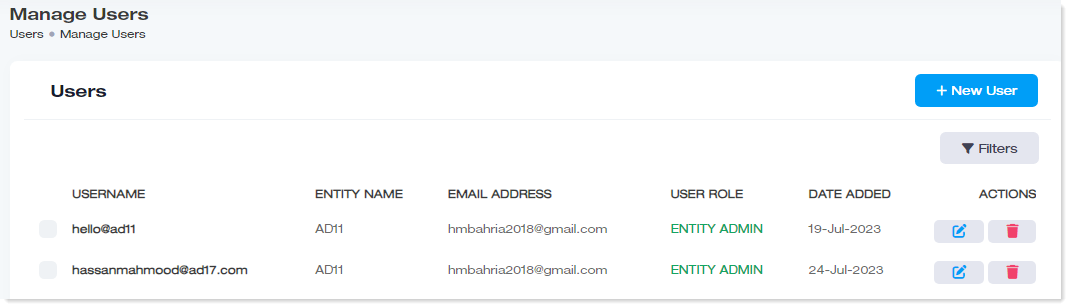
To manage users, navigate to the left menu, under the Main section, and click Users
|
Manage Users page shows following information:
|
Portal Admin
Portal Admin is an admin with the highest level of control from amongst the admins of the system. It is kind of a super admin with privileges to administer Active Directories (hosted and private) in the AD Self-Service Portal system. It can not only manage Active Directories and organizations in the system but can also configure other top-level settings that other admins cannot. It can define the portal URL, activate licenses, and enable security to name a few.
The Portal Admin has its own Active Directory and is authenticated through it using LDAPS. The Active Directory is referred to as the portal Active Directory. It is the same Active Directory, the setting for which is taken in the System Auth Settings under Security. All members of the Portal Admin security group can log in to ADSS Portal with their Active Directory credentials. Basically, they log in with their User Principal Names (UPN).
Entity Admin
Entity Admin is an admin of an Active Directory. It can be the admin of a hosted (local) Active Directory or a remote Active Directory. Creating an Entity Admin through ADSS Portal will create a security group of the same name in the same Active Directory that the Portal Admin uses. In other words, Portal Admin and Entity Admin share the same Active Directory.It is referred to as the portal Active Directory.
The members of this security group can log in to ADSS Portal (with their UPN) and manage their respective Active Directory. They can further create OU Admins and AD Objects for their Active Directory.
Members need to be added manually to the security group at the backend in the portal Active Directory. Once they are added, they can log in to ADSS Portal with their respective UPNs.
OU Admin
OU Admin is the admin of an organization. Creating an OU Admin through ADSS Portal will create a security group of the same name in Active Directory. The members of this security group can log in to ADSS Portal (with their UPN).
OU Admin Authentication Process
Unlike Portal Admins and Entity Admins, OU Admins are always authenticated through their own Active Directories (hosted or private). When an OU Admin is created, a security group of the same name is created in the respective Active Directory (hosted or private).
Each OU being managed by an OU Admin can be assigned a UPN suffix.
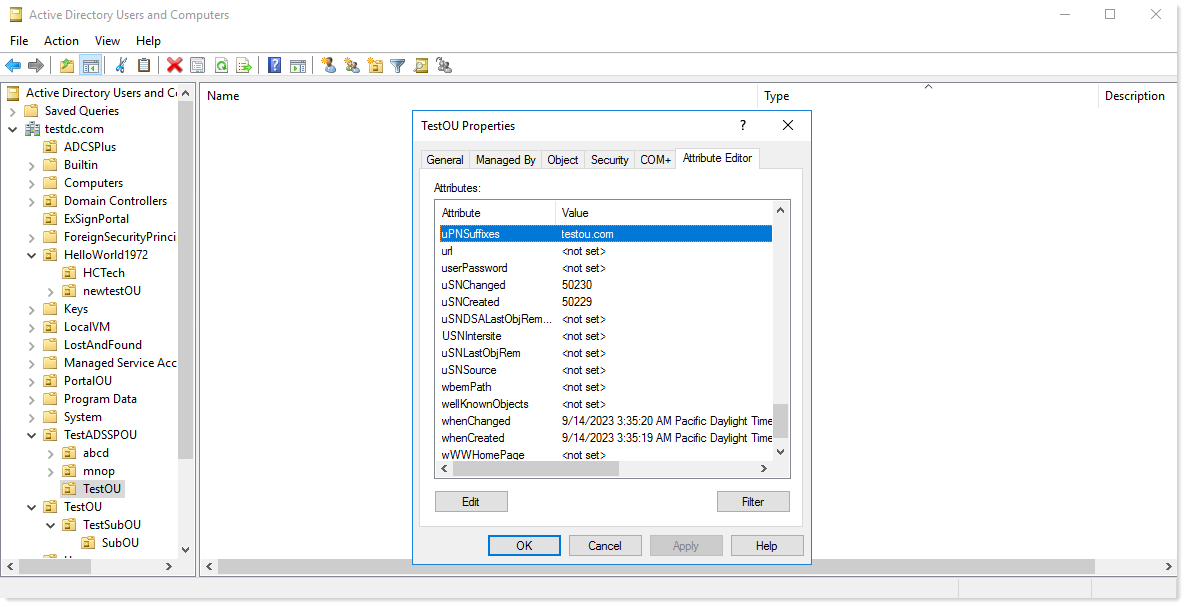
After these OUs are assigned UPN suffixes, the same UPN suffixes should also be listed against the organizations in the ADSS Portal.
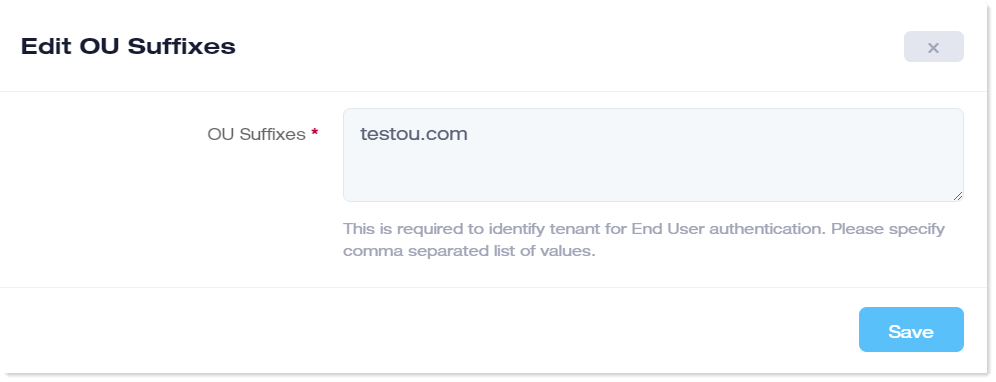
As OU Admins always log in with their UPNs, whenever an OU Admin logs into ADSS Portal, it will match the UPN suffix of the OU Admin with the suffixes listed in ADSS Portal. If the UPN suffix matches any of the suffixes listed against the organization in ADSS, the OU Admin will be allowed to log in. Otherwise, it will be prevented from logging in.
Report Admin
Report Admin can only view reports. There are two types of Report Admins:
- Super Report Admin: A Super Report Admin can view reports across all Active Directories (hosted and private) in the AD Self-Service Portal system.
- Entity Report Admin: An Entity Report Admin can only view reports specific to its own Active Directory (hosted or private) in the AD Self-Service Portal system.
Creating both types of Report Admins through ADSS Portal will create security groups of the same name in the same Active Directory that the Portal Admin uses. Members of these security groups can log in to ADSS Portal (with their UPN) and view their reports.
Delegation of Authority
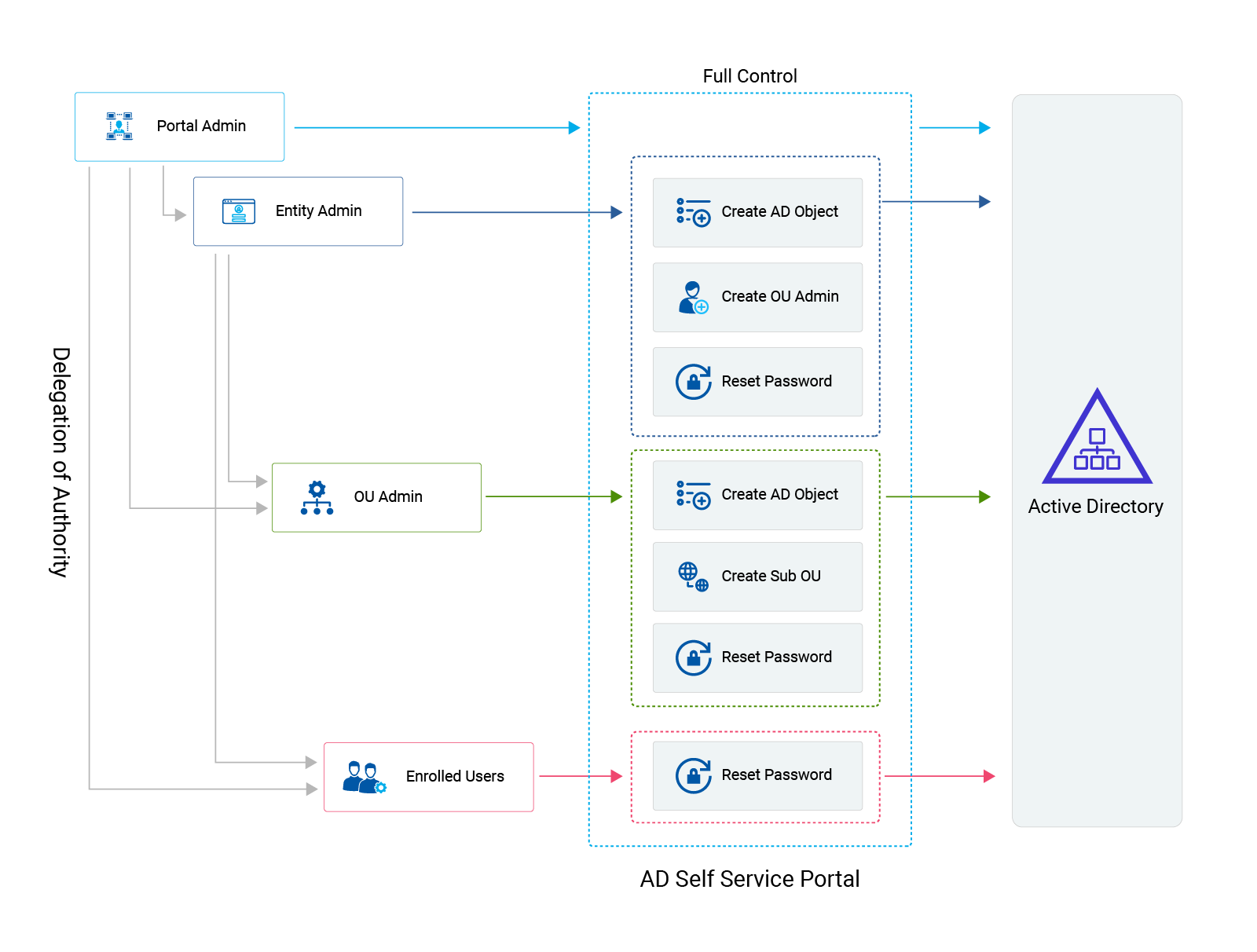
One of the most vital features of the ADSS Portal is the delegation of authority. ADSS Portal allows the top-level administrator to delegate authority to lower-level administrators simply giving them the right to perform tasks autonomously. This not only reduces the burden on the top administration but also empowers the lower levels to exercise initiatives independently, saving valuable time in the process.
Role-Based Access Control
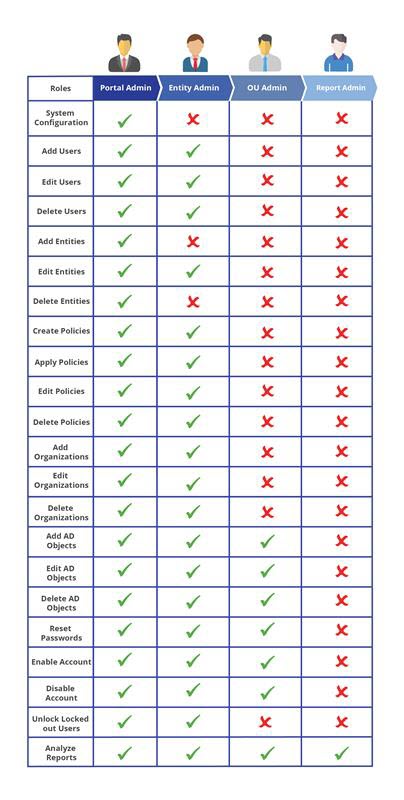
Delegation of authority is the natural outcome of the role-based access control built into the ADSS Portal. Top-level users in the ADSS Portal have more privileges, while lower levels have fewer privileges. Based on their roles and privileges, top-level users have access to more features within the ADSS Portal, while lower-level users have access to fewer features. The role-based access control and user privileges built into the ADSS Portal can be viewed below:
Search a User
To search any user, click Filters. Specify name to search the required user.
Add a New User
Administrators can add new users in the following sequence:
- Portal Admin: The Portal Admin, a kind of super admin, can add an Entity Admin, OU Admin, and Report Admin through its interface.
- Entity Admin: The Entity Admin, the administrator of a particular Active Directory, can add an OU Admin and Report Admin through its interface.
- OU Admin: The OU Admin, an organization administrator, can not add any administrator through its interface.
To add a new user, click + New User and specify details.
- Select User Role: Select role of the user from the list.
Available Options:
- Entity Admin - This option, if selected, permits adding an entity administrator.
- OU Admin - This option, if selected, permits adding an OU administrator.
- Report Admin - This option, if selected, permits adding a report administrator.
- Select Entity: Select an entity from the list. This option is only available to the Portal Admin as he is the super admin. All entities are visible to it, and it can choose any entity from the system. If the Portal Admin refrains from choosing any entity during the creation of a Report Admin, the user will be created as a Super Report Admin, and reports across all entities will be visible to it. However, if the Portal Admin selects a particular entity during creation, the user will be created as an Entity Report Admin, and reports specific only to that entity will be visible to it.
- Username: Type username.
- Email Address: Type email address of the user.
- Phone Number: Type phone number of the user.
- Description: Type brief description.
Edit a User
To modify details of any user, under Actions coulumn, click  and modify details as required.
Delete a User
To delete any user, under Actions coulumn, click  and Yes, delete it to remove the user.