
| Product Documentation
AD Self Service Portal
ADSS Agent Configurations
ADSS agent desktop utility presents a configuration interface for the input of various settings. ADSS agent can be installed on a mediation server (standalone server) in the network of a private entity or on one of the Domain Controllers of the private entity. Once it's installed, it authenticates itself with the ADSS portal through an authentication token. After the token is validated, it communicates with the portal server through a secure channel.
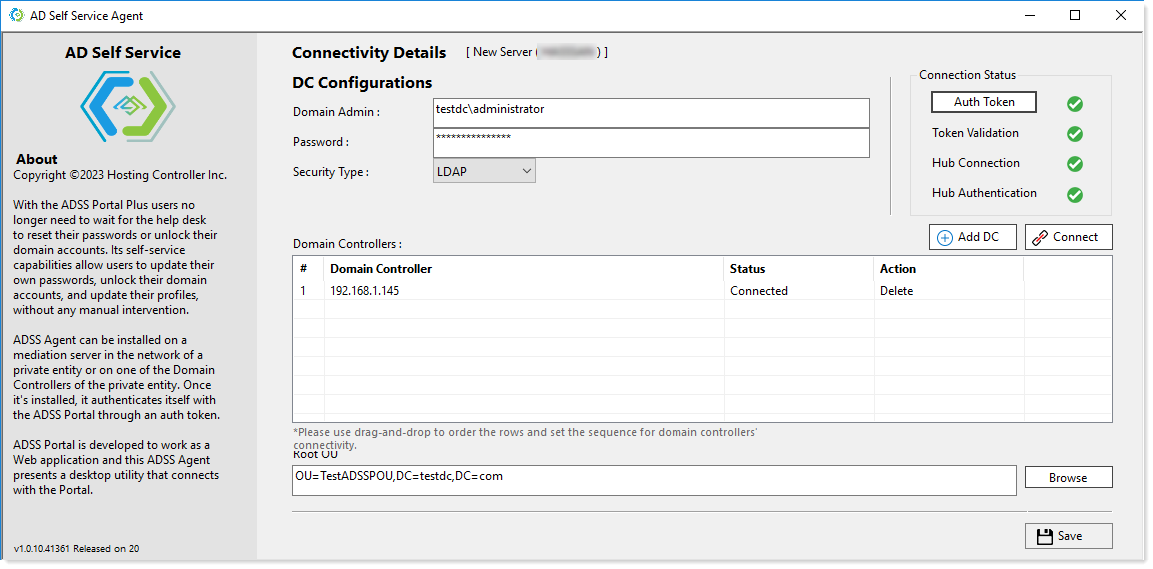

Connectivity Details
- Authentication Token: Mediation servers are onboarded to ADSS Portal by generating a unique authentication token. This token is used for authenticating the mediation server with the control server. To onboard a mediation server an admin logs in to the ADSS web portal and adds a new server. The newly added server remains in a disconnected state until authenticated with the control server. To authenticate the server an authentication token is generated in the web portal. This token is then copied and pasted into the configuration interface of the ADSS Agent (on the mediation server). Once the token is validated the status of the mediation server turns “Connected” in the web portal and it starts communicating with the control server.
The validate button triggers a request and response sequence which ultimately authenticates the mediation server with the control server and switches the status of the server from “Disconnected” to “Connected” in the web portal. The request and response sequence goes as follows:
- Token Validation: This validation ensures that the token has been properly decrypted on the mediation server. Successful decryption is marked with a green tick. Failure, however, is marked with a red cross.
- Hub Connection: Hub connection is an API Hub connectivity call from the ADSS Agent to the web portal. Successful call delivery is marked with a green tick. Failure to send the call is however marked with a red cross.
- Hub Authentication: Hub authentication is the response received from the web portal. A successful response is marked with a green tick. Failure to receive a response, however, is marked with a red cross.
Domain Controller Configurations
These are the Domain Controller details of the entity (Active Directory). As the ADSS Agent is responsible for connecting a private entity to the ADSS web portal, it needs to connect to the Domain Controller of that entity. To make a valid connection with the Domain Controller, it sends a call to the Domain Controller.
There can be more than one Domain Controllers for high availability. If one of the Domain Controllers goes down due to a disaster, ADSS Agent automatically fails over to the next Domain Controller, ensuring constant uptime.
- Add DC: This button adds Domain Controllers of the entity to the interface. More than one Domain Controllers can be added for high availability.
- Domain Admin: The domain\administrator account for the Domain associated with the entity.
- Password: Password for the domain\admin.
- Security Type: The ADSS Agent can use both the LDAP and LDAPS protocols to speak to the Active Directory. While LDAP transmits data without encryption, LDAPS on the contrary transmits all data over TLS/SSL. Therefore, LDAPS is more secure than LDAP. All Active Directory operations performed by ADSS Agent use these two protocols.
- Root OU (for Tenant Auth): As the rules are segregated on the basis of organizational units (OUs) it’s necessary to indicate the root OU under which the Tenant OUs will lie.