
| Product Documentation
Hybrid Control Panel (v10)
Creating an AD user
An AD user is a domain object, which comprises of information that defines the domain user. This information includes user name, password, and groups of which the user is a member. These users are stored in an AD.
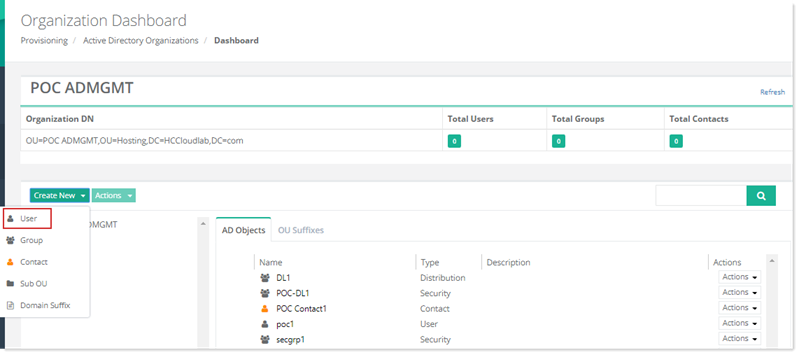
To create an Active Directory user, click Create New and then User. Specify required information to proceed.
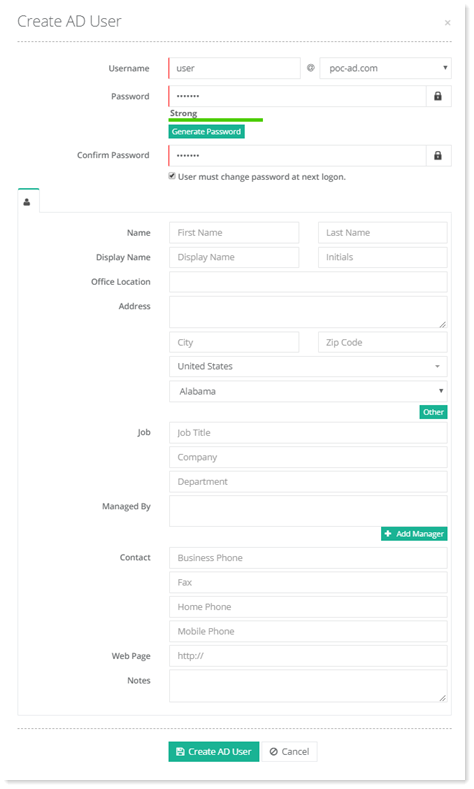
- Username: This is the username of the AD user.
- Password: Specify the password for the AD user.
- Confirm Password: Confirm the password.
- Control Account Expiry:Control account expiry of AD user. If checked user must change password at next logon.
- (
 ) User Profile: These are the general settings for the AD user.