
| Product Documentation
AD Connect Sync Plus
AD Connect Sync Plus Agent Configurations
AD Connect Sync Plus Agent desktop utility is a front-end component of the AD Connect Sync Plus Agent. It is a mediation agent that is used to connect AD Connect Sync Plus Portal with intended source and target DCs. AD Connect Sync Plus Agent is installed on a mediation server (standalone server), and this server needs to be a part of the network of the DC which will utilize the services of the AD Connect Sync Plus Portal. After its installation, it is connected to the AD Connect Sync Plus Portal through the use of an authentication token. This authentication token is generated while adding an entity on the AD Connect Sync Plus Portal. Once the authentication token is validated and the connection to the AD Connect Sync Plus Hub (or just Hub) is authenticated, the Agent is successfully connected to the AD Connect Sync Plus Portal.
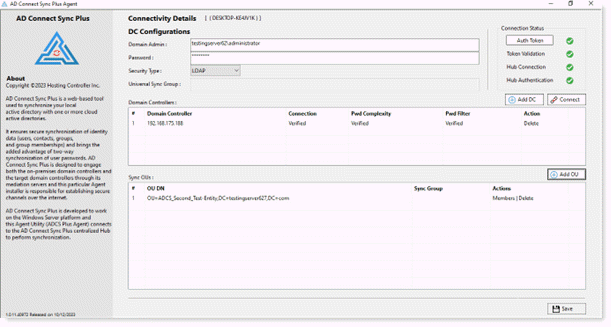
Connectivity Details
This is related to the connectivity between the AD Connect Sync Plus Portal and AD Connect Sync Plus Agent. Since both components are connected via an authentication token, the connectivity settings and status are displayed in the top right of the Agent’s GUI under the Connection Status heading.
- Authentication Token: The authentication token is generated from the AD Connect Sync Plus Portal and validated at the AD Connect Sync Plus Agent for connection between the Portal and intended DC. Please note that for connecting different DCs on different Agents, different tokens need to be generated from the Portal. To enter the authentication token, click on the Auth Token
- Token Validation: This validation ensures that the token has been properly decrypted on the mediation server. Successful decryption is marked with a green tick. Failure, however, is marked with a red cross.
- Hub Connection: Hub connection is an API Hub connectivity call from the AD Connect Sync Plus Agent to the AD Connect Sync Plus Portal. Successful call delivery is marked with a green tick. Failure to send the call, however, is marked with a red cross.
- Hub Authentication: Hub authentication is the response sent from the AD Connect Sync Plus Portal to the Agent. A successful response results in the green tick. Failure to receive the response, however, results in the red cross.
DC Configurations
These are the domain controller details of the entity that will be connected to the AD Connect Sync Plus Portal via AD Connect Sync Plus Agent. Since the Agent is responsible for mediating communications between the Portal and DC, hence the Agent is needed to be connected to the DC that will avail the services of the AD Connect Sync Plus Portal.
For high-availability purposes, more than one DC can be added with the same authentication token.
- Domain Admin: The domain\administrator account for the Domain associated with the entity.
- Password: Password for the domain\admin.
- Security Type: The AD Connect Sync Plus Agent can use both the LDAP and LDAPS protocols to communicate to the Active Directory of the added DC. While LDAP transmits data without encryption, LDAPS on the contrary transmits all data over TLS/SSL, which means that it is a more secure protocol. All Active Directory operations performed by AD Connect Sync Plus Agent use these two protocols.
- Universal Sync Group: By default, whenever a DC is added to the AD Connect Sync Plus Agent and a sync OU is selected, a synchronization security group is created in that OU. This group is used to synchronize AD objects that are added to the group and are part of the same OU. But if the user wishes, it may create a universal sync group manually. AD objects that are required to be synchronized are to be added in the universal sync group or else the objects will not synchronize successfully. The same applies to the default sync group should the user choose not to create a universal sync group manually.
- Add DC: This button adds Domain Controllers of the entity to the interface. More than one Domain Controllers (with the same authentication token) can be added for high availability.
- Connect: Click on this button to connect to the added DC using Domain credentials specified in the Agent.
- Add OU (for synchronization purposes): Add OUs that will be synced with other DC’s OUs. A sync group is created by default whenever an OU is added.