This report provides a detailed overview of users, groups, contacts and devices within each department, including their respective Active Directories and mappings.
To view Department Report, go to Reports and select Department Report to proceed.
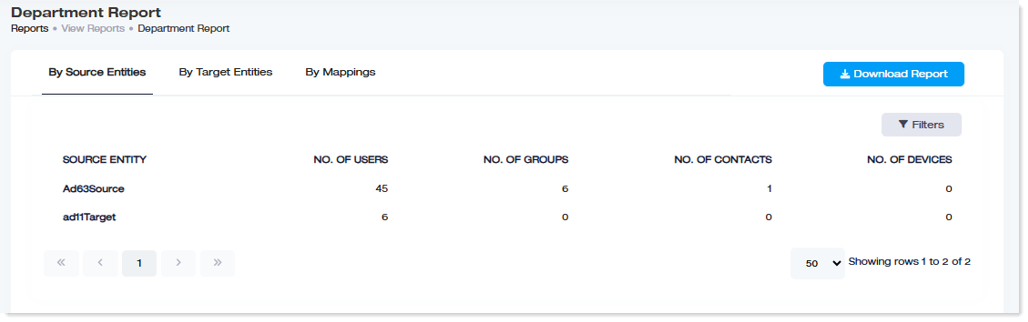
By Source Entities
|
Source Entity: This field shows the name of source Active Directories.
No. of Users: This field shows the total number of users within each source Active Directory.
No. of Groups: This field shows the total number of groups within each source Active Directory.
No. of Contacts: This field shows the total number of contacts within each source Active Directory.
No. of Devices: This field shows the total number of devices within each source Active Directory.
|
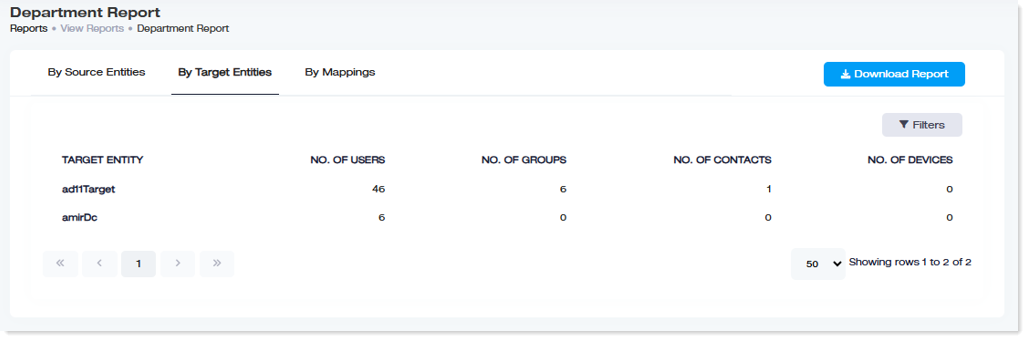
By Target Entities
|
Target Entity: This field shows the name of target Active Directories.
No. of Users: This field shows the total number of users within each target Active Directory.
No. of Groups: This field shows the total number of groups within each target Active Directory.
No. of Contacts: This field shows the total number of contacts within each target Active Directory.
No. of Devices: This field shows the total number of devices within each target Active Directory.
|
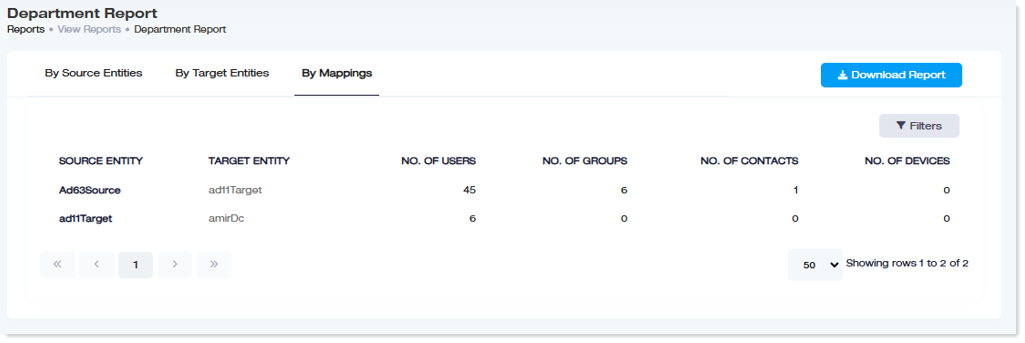
By Mappings
|
Source Entity: This field shows the name of source Active Directories within each mapping.
Target Entity: This field shows the name of each target Active Directories within each mapping.
No. of Users: This field shows the total number of users within source Active Directory.
No. of Groups: This field shows the total number of groups within source Active Directory.
No. of Contacts: This field shows the total number of contacts within source Active Directory.
No. of Devices: This field shows the total number of devices within source Active Directory.
|
