
| Product Documentation
AD Connect Sync Plus
ADCS Plus RabbitMQ Setup
Pre-reqs
Before installing the ADCS Plus Portal, we need to set up RabbitMQ. Please note that the following installers are required to be installed before proceeding to this step:
• Erlang/OTP v27.3.4
• RabbitMQ v4.1.0
Before installing the ADCS Plus Portal, we need to set up RabbitMQ. Please note that the following installers are required to be installed before proceeding to this step:
• Erlang/OTP v27.3.4
• RabbitMQ v4.1.0
Configuration Process
- While configuring RabbitMQ for the first time, while running commands on RabbitMQ Command Prompt, it will throw an error that states “Error: unable to perform an operation on node 'rabbit@{{ServerName}}'.”
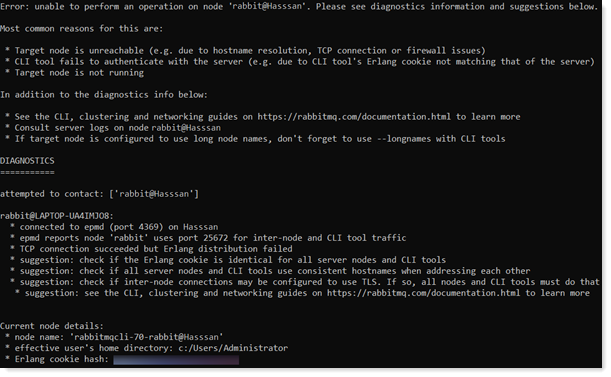
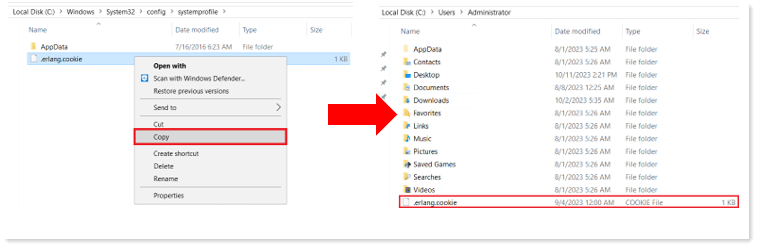
To rectify this error, copy the C:\Windows\System32\config\systemprofile\.erlang.cookie file to C:\Users\Administrator\.erlang.cookie.
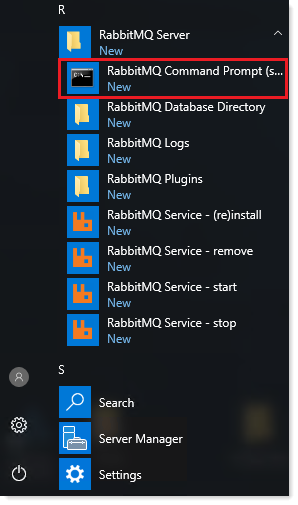
- Open RabbitMQ Command Prompt (sbin dir) from the Start Menu.
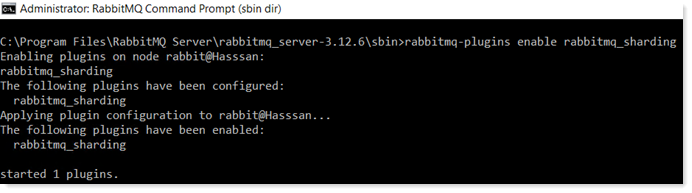
- Execute the following commands in the sequence provided:
- rabbitmqctl add_user {{username}} {{password}}

- rabbitmqctl set_user_tags {{username}} management

- rabbitmqctl set_permissions -p / {{username}} ".*" ".*" ".*"

- rabbitmq-plugins enable rabbitmq_sharding
It is recommended to delete guest user because this is a default user with a known password. - rabbitmqctl delete_user guest

Change the placeholder values “username” & “password” in given commands.
- rabbitmqctl add_user {{username}} {{password}}