
| Product Documentation
HC Marketplace
Billing
Billing manual is the basic source of information that should be referred to, for understanding Marketplace billing. It provides comprehensive understanding about billing and all the processes involved in it. Billing comes included as part of the greater HC Marketplace and extends vital billing functionality to hosts and customers. It basically allows hosts to invoice its customers and receive payments from them but includes all necessary features that are required of a recurring billing system. It allows transactions only between two levels (hosts and customers) but also permits the host to delegate tasks to additional staff members from its organization. This section introduces and discusses all the core concepts of billing in terms of HC Marketplace.
| Terms | What they mean |
| Host | The admin of the Marketplace who bills its customers and receives payments from them. The host launches the Marketplace and configures it according to its needs such as branding it according to company look and feel. |
| Customer | The user who purchases various services from the host. |
| Staff Member | Additional admin from the same organization. It has the same privileges as the host. |
| Product | Service Plan |
| CResource | Composite resource. It is a readymade price template that can be sold to companies which require pre-defined price package of fixed size. |
| Subscription | Product purchased by customer. |
| Gateway | A software that processes credit card payments for e-businesses. HC allows a number of payment gateways to be configured for facilitating online transactions. |
| Order | Formal placement of online order by customer for a purchase transaction. It reflects the total amount for all the products ordered. |
| Dashboard | Marketplace GUI Control board. Dashboards are available both for the host and the customer. |
| Invoice | Formal bill issued by host to customer, for purchases made by the customer. |
| Payment | Fund added to the wallet as payment for the issued invoice. |
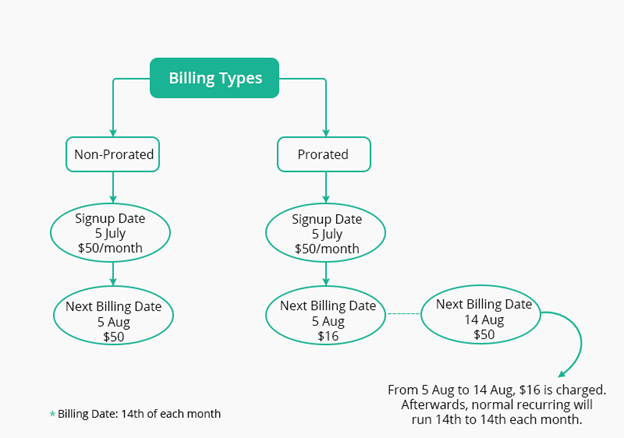
| Prorated | Billing type where the billing system charges a complete month and then first recurring is prorated. |
| Non-prorated | Billing type where recurring is done on the date of signup e.g. 5th of each month. |
| Wallet | Type of pre-paid account in which a customer can store its money for any future online transaction. |
| Coupon | Discount voucher for applying discount to various online store products. |
| Nameservers | DNS servers |
Billing Type
There are two kinds of billing i.e. prorated and non-prorated. Each of them is explained as follows:
Prorated
Prorated billing is a common billing method in the hosting industry. If the billing type is prorated then the billing system charges a complete month and then first recurring is prorated. For instance if a user signs up to a $50 plan on 5th July and his billing day is 14th, he would be charged $50 for a complete month i.e. 5th July – 5th August. On 5th August he will be charged $16 for the period 5th August – 14th August (prorated) and onward billing will be from 14th to 14th each month.
Non-prorated
In Non-prorated billing the recurring is done on the date of signup e.g. 5th of each month.
Billing Precision
Billing Precision indicates the number of decimal places in the billing amounts. Suppose you select 2 from the drop-down list box then only 2 spaces after the decimal point would be considered and not the entire value e.g. 5467.98769 (769 would be ignored while billing). The billing precision once set, carries throughout the billing transactions.
Maximum Declined Transactions Attempt
Some Gateways charge extra for each declined credit card transaction therefore it’s necessary to determine the max number of attempts in case of declined credit card transactions. Set the maximum number of attempts that should be made to charge the credit card.
Email Alert Days
Sometimes it’s very helpful to send an impending payment alert email to Customers before their invoices become due. This serves to notify Customers well in advance. You can specify the number of days here or may choose not to send the alert. Select Never in case you don't want to send the alert.
Email Reminder Days
Reminders are sent after the invoices have been generated, notifying Customers to pay especially if the invoices are yet to be cleared. You can specify the number of days here or may choose never to send the reminder.
Billing Life Cycle
There are certain safeguards in place, in case due bills are not cleared by customers. These safeguards manifest themselves in the form of a user life cycle. A vendor can trigger the user life cycle as soon as any customer’s bill falls in the due category, passing the customer through the different stages of the life cycle. The life cycle makes certain restraints available at each stage in case of non-payment, until the final restraint i.e. a user delete notification. The host can define a billing life cycle globally for all customers or it can specify individual life cycles for each customer. In case there is a life cycle defined globally and the host goes in and specifies a separate life cycle for an individual customer, the individual life cycle will override the global cycle. In case there is no life cycle defined globally, only the cycles specified individually will apply.
Grace Days
Customers may be allowed a grace period to clear their due bills. If the dues are cleared within the stipulated grace period they are relieved from facing the next stage. However if the dues remain outstanding, customers enter the next level of the life cycle which restricts their access to the panel. The grace period is extended in terms of days and after expiry of grace days if any, the Marketplace restricts the panel access. You may choose to channelize all of the customers into the grace period or a selected few of them.
Access Lock Days
If after the expiry of the grace period dues still remain pending, the Marketplace locks down the panel access. This is known as the “Access Lock”. Customers will be able to login with their credentials but will be displayed only a payment form, without being able to carry on any further panel operations. The access lock comes secured in terms of days and after expiry of these days if any, the Marketplace marks customers for termination. You may choose to channelize all of the customers into the access lock period or a selected few of them.
Users Termination Enabled
If the previous restriction goes unheeded, the host reserves the right to delete the customer. Customer termination is the third and the final level in the life cycle. If after expiry of access lock days, customers still don’t pay, Marketplace sends a mail to the host listing all the defaulters. The host can then choose which customers to delete. The delete operation will delete customer data, denying the customer login access to its account.
Invoices and Payments
Invoices are generated against the services used by the customers. It hold details of kind of service used, its frequency and quantity. While Payments are your paid invoices/bills.