| Product Documentation
HC Marketplace
Invoices
Invoices are formal bills issued by host to customer, for purchases made by the customer. Whenever a customer purchases a subscription from the Marketplace or the host sells a product to the customer an invoice is generated.
If the customer has sufficient funds in its wallet, the wallet is automatically debited for the purchase and the status of the invoice turns paid. However if the wallet has insufficient funds, the invoice enters the due category. When the customer funds the wallet again, the due invoices convert to paid. In case the wallet does not have enough funds to cover the full amount of the invoice, it covers the invoice partially and the Marketplace generates a partially paid invoice.
Types of Invoices
HC Marketplace offers four types of invoices as:
Paid Invoices
The invoices raised for new purchases, automatically fall in the paid category, if the customer has enough funds in its wallet. The wallet covers the cost of the new purchase and the status of the invoice automatically turns paid. Marketplace displays all paid invoices in green. The host can see all its paid invoices in one place.
Due Invoices
If customer wallet does not have sufficient funds to cover the cost of purchase the invoice falls in the due category. This means the invoice is unpaid. Marketplace displays all due invoices in red. When the customer funds its wallet again, due invoices convert to paid. The host can see all its due invoices in one place.
Partially Paid Invoices
Sometimes the customer wallet fails short of adjusting the full amount of a due invoice. In this case the Marketplace generates a partially paid invoice. Marketplace displays all partially paid invoices in orange.
Cancelled Invoices
At times host administrator mistakenly generate and issue incorrect invoices to customers. Once these invoices are identified as invalid, host cancels them and such invoices are termed as Cancelled Invoices.
To manage invoices navigate to the left menu and then Invoices section.
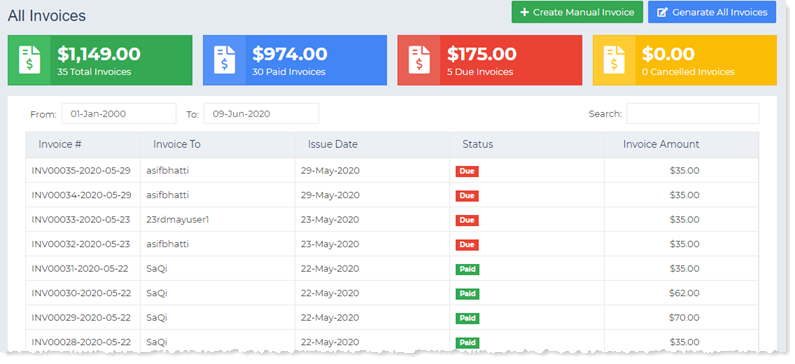
Create Manual Invoice
This option permits the host to generate a manual invoice for the customer. To create a manual invoice specify the following.
- Pay To: The field specifies the customer, for the whom the invoice is being raised.
- Line Items:
- Item Name: Invoices are always raised against the purchase of products. Therefore the item name here signifies the name of the Marketplace product against which the invoice is being raised.
- Description: It is a brief description of the product.
- Price ($): It is the price of the product.
- Quantity: It is the quantity of the product instance for which the invoice is being raised.
- Discount (%): It signifies the amount of discount to be applied, if any. Discount is applied as a percentage, to the price of the product.
- Net Price: It is the price after deducting discount.
- Sub Total: It is the total price of all the products in the invoice.
- Tax: It is the amount of tax to be added. Tax is added to the sub total.
- Grand Total: It is the total amount to be paid inclusive of taxes.
Generate All Invoices
Normally the Marketplace scheduler runs every 12 hours and generates all recurring invoices in que. If the host wants to generate all scheduled invoices before the scheduled time, it can do so. The Marketplace allows the host to forcefully generate all invoices at any point in time, beforehand. To generate all invoices click Generate All Invoices.
Invoice Details
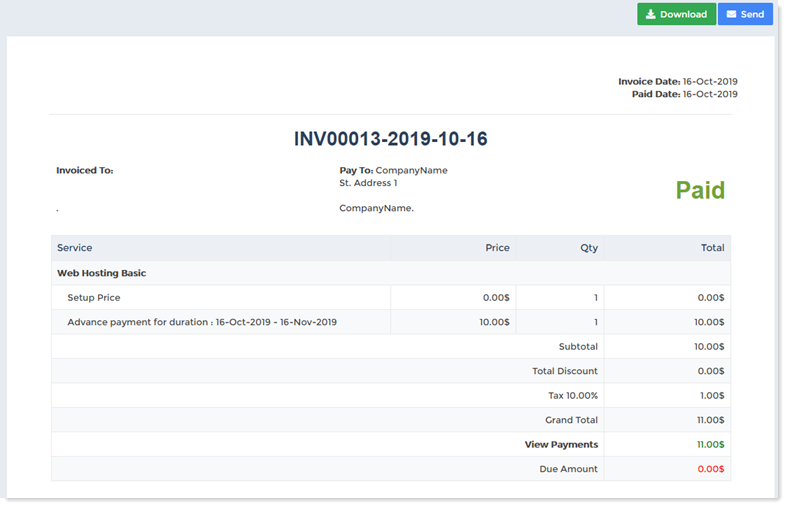
To view invoice details click Details.