
| Product Documentation
HC Marketplace
Sold Products
A product can be sold more than once. Marketplace refers to the copy of a sold product as an instance. If the same product has been sold twice, two Instances of the product have been sold. Marketplace keeps complete track of all products sold with their dates.
To manage sold products from the left menu navigate to Product Catalog >> Sold Products. The last column here contains the possible tasks that can be done to manage your sold product like you can view its details or delete it. You can place your mouse over any product name and the available actions can be viewed.
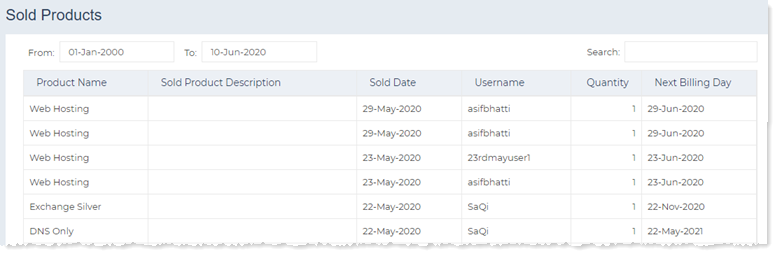
View Sold Product Details
To view sold product details click View to proceed. Product details can be seen as:
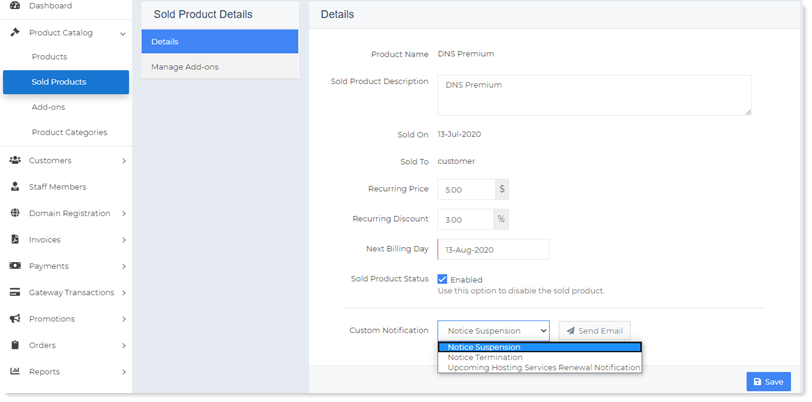
Details
This section shows all the details regarding the sold product such as its name, the date it was sold, to whom it was sold, recurring discount if any, the next billing due date and it status as disabled/enabled. For example, a client '14thoctsignupuser' has purchased a product 'allinone' on 'October 14, 2019', having '0 %' recurring discount. It would billed next on 'November 14, 2019'. The host can disable a sold product any time. Its just a control given to the host. If for some reason, such as non-payment, the host decides not to allow further provisioning, it can disable a sold product. If a sold product is disabled the customer would not be able to create further resources for that product. The already provisioned resources will keep running but new resources can not be provisioned.
Details section allow hosts to specify/modify following information as:
- Custom Notification: Hosts generally need to send out suspension or termination notices to customers on non-payment of dues. If customers don’t pay their dues on time, their accounts can be suspended or terminated. Marketplace enables the host to send out suspension or termination notices for unpaid products. These notices are sent out in the form of emails. Marketplace also furnishes email templates for these notices, which can be customized as per need. Even after sending notices, if customers still don’t pay, their products can be disabled. Similarly such notices can be dispatched in case of upcoming renewals. Marketplace allows the host to notify the customer well in advance, if a product is up for renewal. The host can send an upcoming hosting services renewal notification in this case.
For more information on email templates, see Emails.
Managed Add-ons
This section allows the host to manage its add-ons. The host can sell an add-on as well as view its details like name, quantity, and date when it was sold.
Manage Add-ons section allows host to sell Add-ons as well as view the entire list of sold Add-ons. To sell an Add-on, specify following information as:
- Add-ons: Add-ons are sold to sold products. Before selling an add-on its necessary that the add-on is allowed for the product. Add-on can be allowed for the respective product in the Applicable Products section on the Add-ons page. When the add-on is allowed for the product it will be visible here.
- Quantity: This indicates the number of instances of add-ons to be sold.
Setup Discount: A setup discount can be applied to the setup price of an add-on. Setup discount can only be applied at the time of selling of the add-on. - Recurring Discount: A recurring discount can be applied to the recurring price of the add-on. As add-ons are billed with the products, the discount will be applied on each recurring. Whenever the customer is invoiced for the recurring, the discount will be applied.
Delete Product
To remove product click Delete.