| Product Documentation
HC Marketplace
Orders
Placing an order consists of the process of selecting Marketplace products on the online store and making payment for them through a debit/credit card. The customer selects its required products, adds them to cart, specifies the provisioning details and checks out, paying for the chosen subscriptions. When a customer places an order, an invoice is generated. The Marketplace categorizes orders as:
- Approved Orders
- Pending Orders
- Rejected Orders
Types of Orders
HC Marketplace categorizes orders as:
Approved Orders
When customers place orders, they get approved after receiving complete payment. Such orders are termed as Approved Orders. If the host decides to keep the Marketplace in an ‘Authorized’ mode, a new order will not be processed until it is approved by the host (admin). Once the host approves the order, its resources will be provisioned and it will be assigned a ‘Successful’ status. Approval will only be required for new customers. Existing customers are verified customers and don’t need approvals. Their orders will be processed without asking for approval.
Pending Orders
If the Marketplace is in ‘Authorized’ mode, new orders orders are kept in a pending state until approved by the host. Such orders are termed as Pending Orders. All pending orders either get an approval if payment is processed or they may not be approved by the host. Pending orders are assigned an ‘Awaiting Approval’ status.
Rejected Orders
In case host (admin) does not approve an order and cancels it for a reason, such orders are termed as Rejected Orders. If an order is not granted approval and is rejected for a reason, it is assigned a ‘Cancelled’ status.
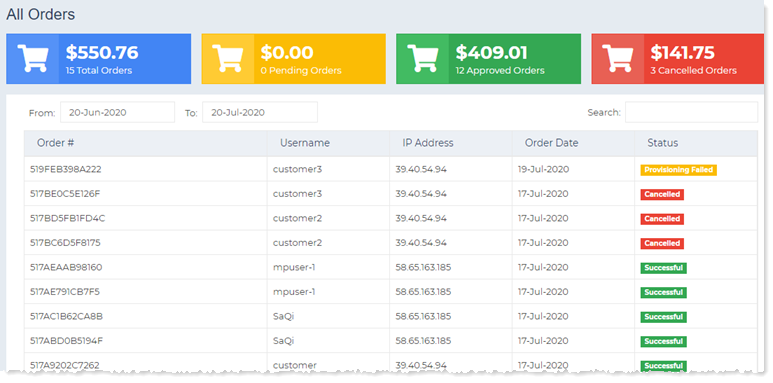
To view orders navigate to the left menu and then Orders section.
Status
Each order can have the following statuses.
- Successful: When an order goes through successfully it’s assigned a successful status. In a successful order payment is processed and resources are provisioned instantly.
- Awaiting Approval: If the Marketplace is in ‘Authorized’ mode, the first order from a new customer requires approval. Only after the host approves the order, can the resources be provisioned.
- Provisioning Failed: When the payment is processed successfully but the Marketplace fails to provision resources, the order is assigned a ‘Provisioning Failed’ status. Provisioning is to be done in HC at the backend. Provisioning may fail due to several reasons. Following can be the probable causes of failure:
- HC services are down.
- HC API’s are not working.
- HC API site is down.
- Website on which Marketplace is installed is stopped.
- SQL Server is not connecting.
- Cancelled: When the host rejects an order its assigned a ‘Cancelled’ status.
View Order Details
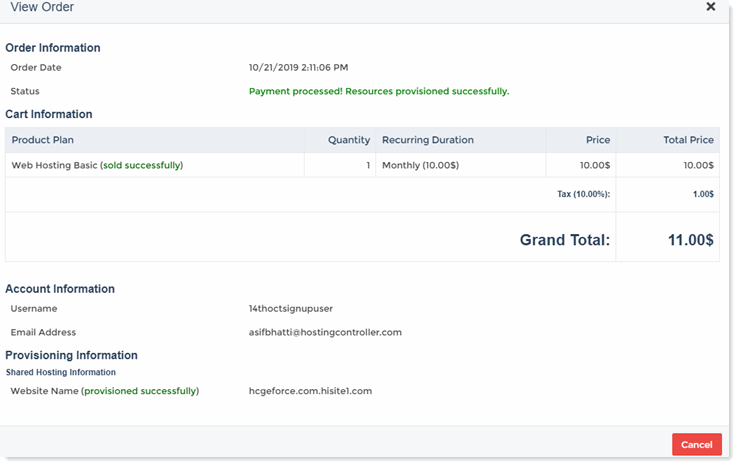
To view order details click Details.