
| Product Documentation
HC Marketplace
Product Catalog
Products are service plans. A plan is a set of resources and comes with a price tag. Creating and offering different service plans is a common industry standard in the E-commerce world. Hosts display products on their E-commerce stores and customers purchase them. Customers can include products to their shopping carts and pay for them online through their credit cards.
Marketplace host can manage all its products centrally through its admin interface. To manage products from the left menu navigate to Product Catalog >> Products. This page shows complete list of existing products with other information like their names, brief descriptions, category, status, and sold subscriptions if any.
Add New Product
To add a new product from the left menu navigate to Product Catalog >> Products. Click + Add Product and specify the following.
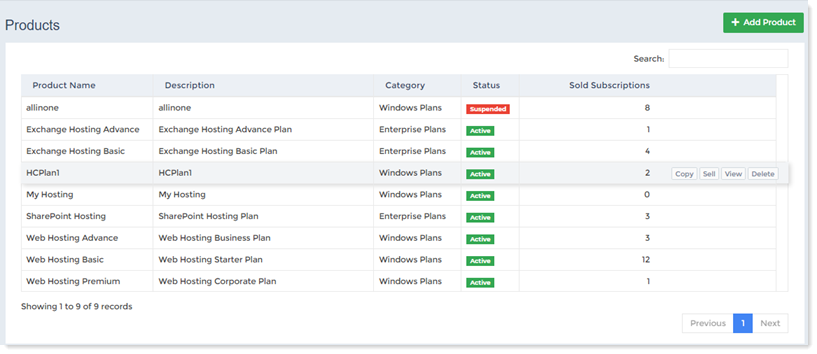
- Product Name: This gives the name of the product.
- Description: A valid description can be assigned to any Marketplace product. Descriptions are useful for highlighting the distinguishing features of products.
- Category: Marketplace products are divided into four broad categories. 1. Windows Plans 2. Linux Plans 3. Enterprise Plans 4. Virtualization Plans. Every product must fall in one of these categories.
- Status: The status of the products can be Active or Suspended. Suspended products do not list on the online store.
- Sold Subscriptions: The host can sell products to its customers. This column lists the number product instances sold.