
| Product Documentation
HC Marketplace
Add-Ons
Customers can add additional resources to their products termed as Add-ons. These are individual resources such as bandwidth, disk space etc. that can be added to a product. At times customers may run out of a certain resource and require additional amount of only that resource. Instead of selling a whole new product to the customer, the host (admin) can just sell the lacking resource. For example consider a sold product with a limit of 1 GB disk space. If later the customer demands 1 GB more disk space under the same product then instead of selling a new product, an add-on of 1 GB can be sold.
To manage add-ons from the left menu navigate to Product Catalog >> Add-Ons. The last column here contains the possible tasks that can be done to manage your add-ons like you can view their details or delete them. You can place your mouse over any add-on name and the available actions can be viewed.
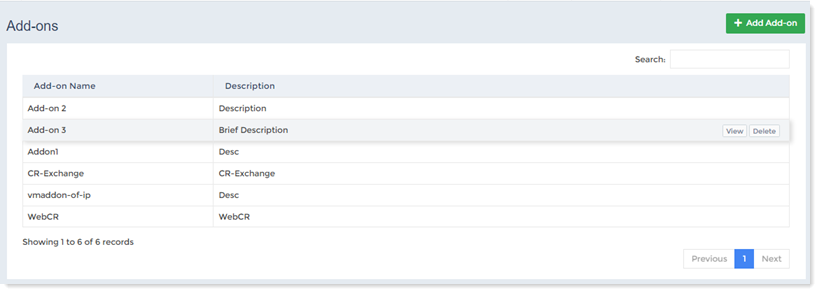
Add Add-on
To add a new add-on click + Add Add-on and specify the followings.
- Add-on Name: Type name of the add-on.
- Description: Type brief description about the add-on.
View Add-on Details
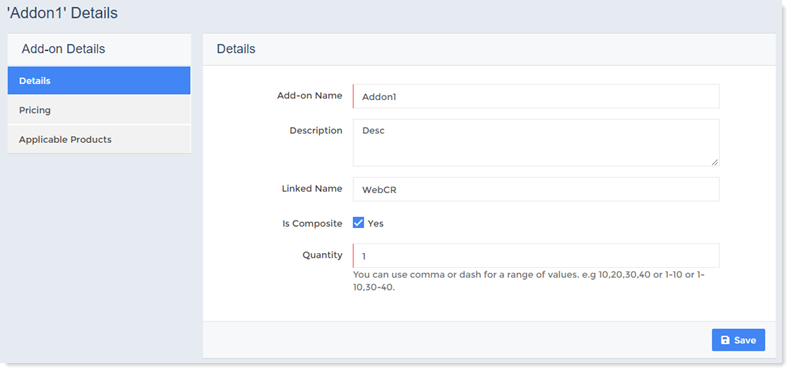
To view add-on details click View to proceed. Details can be seen as:
Details
This section allows you to view/modify details of add-on such as
- Add-on Name: Type name of the add-on.
- Description: Type brief description of the add-on.
- Linked Name: Marketplace add-ons need to be associated with HC control panel add-ons. Provisioning will not succeed without valid association. This field should contain the exact name of the associated add-on, as is displayed in HC.
- Is Composite: In HC composite resources can also be sold as add-ons. The host needs to indicate if this add-on is a composite resource. Enabling the check box will ensure that the add-on being sold is in fact a composite resource.
- Quantity: Type quantity of the add-on.
Pricing
This section allows you to view/modify pricing details of add-on such as:
- Setup Price: Type one time setup price of the add-on.
- Recurring Price: Type recurring price of the add-on.
- Billing Method: It shows billing method.
Applicable Products
For customers to purchase add-ons, it necessary that the add-ons are applied to the respective products. Customers will be able to purchase only those add-ons that have been applied to the product. This section allows hosts to select applicable products for an add-on.
Delete Add-on
To remove add-on click Delete.