
| Product Documentation
HC Marketplace
Domain Registrars
Domain name registration refers to the process of reserving domain names on the internet. With the help of supported Domain Name Registrars, the Marketplace lets customers register, renew, transfer, check availability etc of domains.
To configure domain registrars in HC Marketplace, login as a host and from the top, navigate to Configurations >> Domain Registrars.
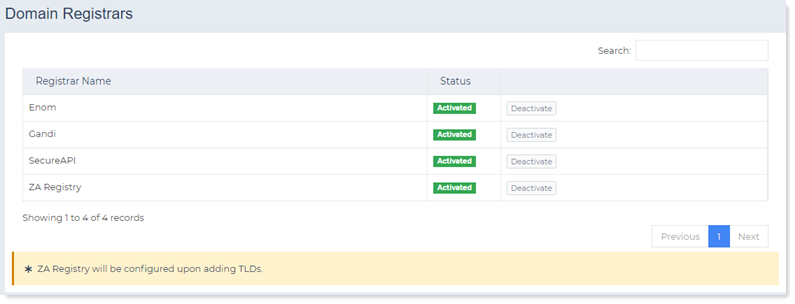
Configure Registrar
Before domain names can be registered through Marketplace, its important to configure domain registrars. Marketplace supports four domain registrars namely 1. Enom 2. Gandi.net 3. SecureAPI 4. ZA Registry.
Enom
To configure Enom provide the following:
- Reseller Account ID: This is the Login ID of the Enom account.
- Account Password: This is the password for the Enom account.
- Confirm Password: Here the above password has to be retyped.
- Test Transaction: The Yes check box indicates that all domains being registered under the account are being registered in the Enom test environment rather than in the live environment.
The Enom test environment is a development environment where all transactions are executed and all data is stored in a special testing environment. The test environment cannot connect to the Internet. Any domain registered in this environment will be displayed on the customer’s domain name information screen but the customer will not be charged for the domain by Enom. However the Marketplace will still charge the customer for the test domain and will deduct funds from its wallet, if available.
Gandi.net
To configure Gandi.net provide the following:
- Gandi API Key: Every call to the Gandi API requires authentication. That is why all its methods take a unique Gandi API Key as first argument.
- Test Transaction: The Yes check box indicates that all domains being registered under the account are being registered in test mode.
SecureAPI
To configure SecureAPI provide the following:
- Reseller ID: This is the unique ID of the reseller e.g. R2644
- API Key: This is a unique 32 character key e.g. f35a2bc72dfdc2aae569a0c7370bd7f5
- Test Transaction: The Yes check box indicates that all domains being registered under the account are being registered in the SecureAPI test environment rather than in the live environment.
Edit Registrar
This option permits the host to manage the Top Level Domains (TLDs) of a registrar. Through this option the host can either add a new TLD, modify the pricing of an existing TLD or delete an already added TLD.
Manage TLDs
Host can add, edit and delete TLDs for a registrar.
Add a TLD
To add a TLD, click + Add TLD and specify the following:
- Top Level Domain: This is the name of the TLD such as .com, .net, .org etc.
- Transfer Price: This indicates the transfer price for the TLD, from current registrar to a new registrar.
- Registration Price: This is the domain registration price. Domains can be registered for a period from 1 through 10 years. Different prices can be set for different periods e.g. $12.99/ year or $24/ 2 years.
- Renewal Price: This is the price for domain renewal. Domain renewal is the process of paying a fee to renew the ownership of a domain and hence prevent it from expiring. Domains can be renewed annually or for periods of 2, 3, 5 years etc.
Edit a TLD
To modify TLD information, click Edit under Actions column.
- Top Level Domain: This indicates the TLD, to be modified.
- Transfer Price: This is the transfer price, to be modified.
- Registration Price: This is the domain registration price, to be modified.
- Renewal Price: This is the renewal price, to be modified.
Delete a TLD
To remove a TLD, click Delete under Actions column.
Manage ZA TLDs
The ZA Central Registry (ZACR) is a South African domain name registrar managing various .ZA second level domains, such as co.za, net.za, org.za and web.za. Configuring ZA Central Registry comprises of steps such as adding TLDs, specifying prices for domain registration, renewal and transfer.
Marketplace host can add, edit and delete ZA TLDs for ZA Central Registry.
Add a ZA TLD
To add a ZA TLD, click + Add TLD and specify the following:
- EPP Server URL: Extensible Provisioning Protocol (EPP) is a new way of registering and maintaining domain names. This is the hostname of the EPP server and is provided when registering for an account with ZA.
- EPP Server Port: This is the port of the EPP server.
- Username: This is the username for connecting to the EPP server.
- Password: This is the password for the user.
- SSL Certificate:
Edit a ZA TLD
To modify a ZA TLD information, click Edit under Actions column and modify information as required.
Delete a ZA TLD
To remove a ZA TLD, click Delete under Actions column.
Manage Contacts
When a domain name is registered the registrar is supplied with accurate and reliable contact information so that it may have an opportunity to contact the owner of the domain. The contact may be an actual person, a company, an organization or a position within a company. Typically, there are four types of contacts for a domain:
- Registrant: The registrant is the official owner and the highest authority for a domain name. It can be an actual person or an organization.
- Administrative Contact: The administrative contact is the registrant’s appointed agent for the domain name. In case the registrant is a company, the administrative contact should be an employee of the company. The administrative contact has full authority, almost equal to that of the registrant, over the domain name therefore the registrant should take special care in selecting an administrative contact. This contact has full authority to request and authorize any necessary decisions and updates on behalf of the registrant, including contact information, name server information and transferring ownership.
- Technical Contact: The technical contact is the person responsible for the technical administration of the domain name such as maintaining the nameservers associated with the domain name and attending to the technical administration of the domain files on the server. The technical contact does not have the authority to transfer ownership or administrative rights of the domain.
- Billing Contact: The billing contact is the person responsible for paying registration and renewal fees for the domain name.
The same person or organization can be all the four contacts or all four can be different. While registering a domain, these contacts will be used as the contacts for the domain name. Host can add, edit and delete contacts for a registrar.
Add a Contact
Each contact is added with a NIC (Network Information Center) handle. A NIC handle is a unique alphanumeric character sequence (e.g. C1001-ENOM) that is used to identify the owner of a domain name. When a new domain name is registered, a NIC handle is assigned by the registrar to the information about that domain name (such as who has registered it and a contact e-mail address). The handle can then be used further to search/edit information regarding that domain. To add a contact, click + Add Contact and specify required contact information.
- Assigned to Client: Each contact can be assigned to a customer. To assign to a customer select a customer from a drop-down list.
- Full Name: Type name of the contact.
- Email Address: Type email address of the contact.
- Password: Type password.
- Family:
- Telephone:Type contact number.
- Country: Select country from the drop-down list.
- Province/State: Select province or state from the drop-down list.
- City: Type name of the city.
- Street Address: Type postal address.
- Zip/Postal: Type zip or postal code.
- Fax: Type Fax number.
Edit a Contact
To modify contact information, click Edit under Actions column modify information as required.
Delete a Contact
To remove a contact, click Delete under Actions column.