
| Product Documentation
HC Marketplace
Promotions
Ecommerce businesses regularly issue incentives to their customers in the form of discounts or credits that may be applied to the purchase of various online store products. Marketplace refers to these promo discounts as coupons. These coupons apply discounts to the order totals. After the customer has added products to cart, it can apply a valid coupon to the order and receive discount on the subtotal. To manage your coupons navigate to the left menu and then Promotions >> Coupons.
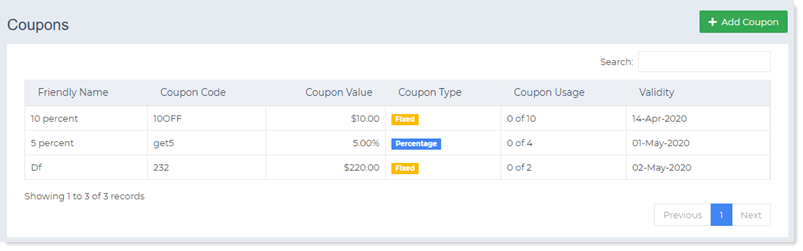
Add Coupons
This option permits the host to add new coupons. To add a new coupon specify the following:
- Friendly Name: This is a friendly name for the coupon. The friendly name displays in the order detail.
- Coupon Code: This is the code of the coupon. The code needs to be entered while placing the order. Discount is applied to the order only on entering the code.
- Maximum Usage Limit: This reflects the maximum number of times the coupon can be used. The discount coupon can be used a limited number of times for instance 5 times. It cannot be used further, after expiry of this limit.
- Coupon Value: This gives the value of the coupon. The value depends on the coupon type. For a fixed discount the value is applied as a fixed value in integers. For a percentage discount the value is applied as a percentage of the subtotal of the order.
- Coupon Type: The coupon can be of the type Fixed or Percentage.
- Start Date: This indicates the starting date from which the coupon is valid.
- End Date: This indicates the date till which the coupon remains valid. It expires after this date.
Edit Coupons
This option permits the host to modify coupon details. To modify details of each coupon click Edit.
Delete Coupons
This option permits the host to delete coupons as required. To remove any coupon click Delete.