
| Product Documentation
HC Marketplace
Payment Gateways
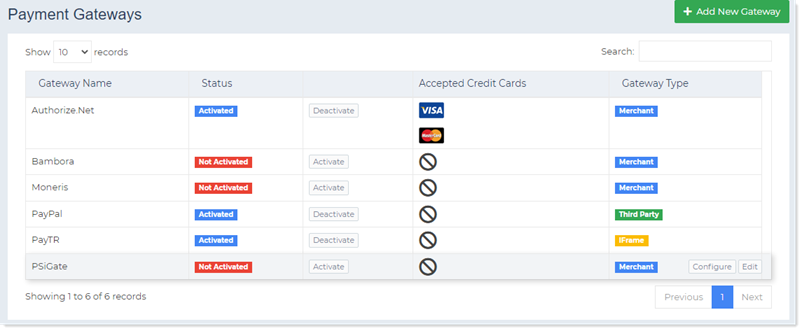
Payment gateway is a software that processes credit card payments for e-businesses and traditional brick and mortar stores. Marketplace allows a number of payment gateways to be configured for facilitating online transactions. Customers can fund their wallets through credit cards but in order to make payments into wallets through these credit cards, payment gateways need to be configured. Marketplace supports both Third Party and Merchant gateways.
Types of Gateways
Marketplace supports two types of payment gateways.
Third Party Gateways
These gateways direct the customers away from the Marketplace, taking them to the payment gateway’s website. Here customers fill in their payment details, and after paying, are redirected back to the Marketplace to complete the checkout process. A popular example of a Third Party Gateway is PayPal.
Merchant Gateways
These gateways process the payments remaining within the Marketplace. They use the securely stored credit card information from Marketplace database and process payment within Marketplace. An example of a Merchant gateway is Authorize.Net.
Supported Gateways
There are five payment gateways integrated tightly with Marketplace. However more will be supported with time. Some of these supported gateways are Third Party and others are Merchant. The supported gateways are:
- Authorize.Net
- Bambora
- Moneris
- PayPal
- PayTR
- PSiGate
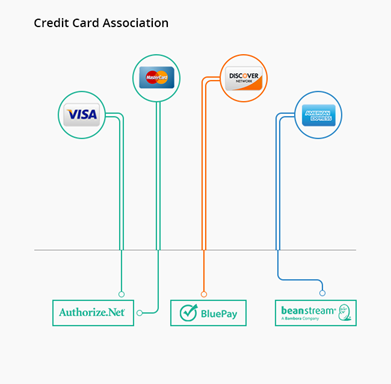
In the Marketplace it is mandatory to associate credit card types with gateways. For instance Visa may be assigned to Authorize.Net while American Express to Bambora. This association helps in directing credit card payments to relevant gateways. Following the above example, if a customer pays through a Visa card the transaction is processed by Authorize.Net while if the customer pays through American Express it is processed by Bambora.
Payment Gateways
Add New Payment Gateway
To add a new Payment Gateway from the top navigate to Configurations >> Payment Gateways. Click + Add New Gateway and specify the followings.
- Gateway Type: Select type of Gateway as Third Party, Merchant or IFrame.
- Gateway Name: Type name of the Gateway.
- Gateway URL: Type URL of the Gateway to be added.
- Amount Multiplier: Specify amount multiplier here. Amount multiplier is a multi-purpose feature which can be used for exchange rates, remitting merchant charges levied by payment gateways to customers or adding various charges to the actual amount. It multiplies the invoice amount by a multiplier. For e.g. if multiplier is 2 and the invoice amount is 10, the amount is multiplied by the multiplier 10 x 2 = 20. If multiplier is given then amount will be multiplied to it before sending to the gateway. Default value is “1” which means amount will be sent as it is to the gateway.
- Minimum Charge: Specify minimum charge here. Payment gateways charge fee for every transaction. Sometimes it’s not feasible to pay extra fee for every small transaction. To avoid these extra charges, the host can specify a minimum charge. While paying customers cannot specify an amount less than this minimum charge.