
| Product Documentation
HC Marketplace
PSiGate
PSiGate is one of the leading payment gateways in the payment solutions industry. Marketplace supports PSiGate as one of its premier payment processors. It is a secure payment system that allows reliable online transactions from the merchant's checkout page.
To configure PSiGate from the top, navigate to Configurations >> Payment Gateways. Configuration process include the followings.
Configure PSiGate
To configure PSiGate specify the followings.
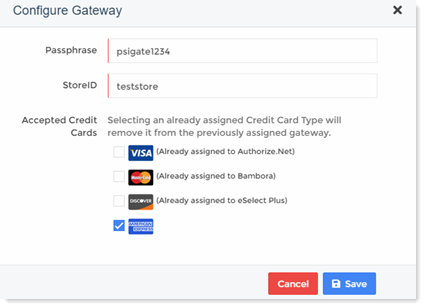
- Passphrase: Passphrase is case sensitive, and is provided by PSiGate in their first email.
- StoreID: Store ID is unique, case sensitive, and is provided by PSiGate in their first email.
- Accepted Credit Cards: Select your accepted credit cards.
If you select a credit card that is already assigned to some other Gateway then it will be removed from the previously associated Gateway.
Edit PSiGate
To modify PSiGate details specify the followings.
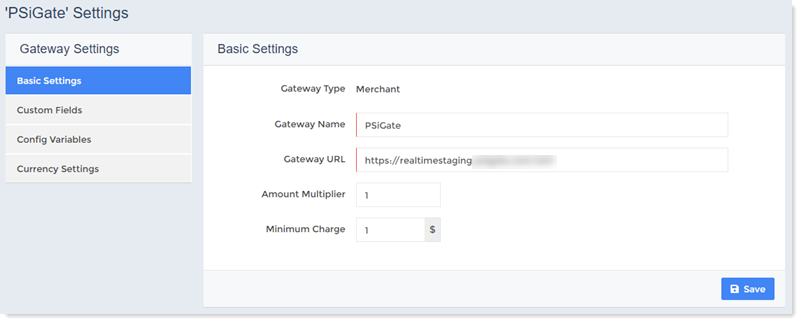
Basic Settings
To modify basic gateway settings modify the followings.
- Gateway Type: This reflects the type of the gateway. The type of PSiGate is Merchant.
- Gateway Name: This displays the name of the gateway.
- Gateway URL: This specifies the URL of the gateway.
- Amount Multiplier: This multiplies the invoice amount by the multiplier. For e.g. if multiplier is 2 and the invoice amount is 10, the amount is multiplied by the multiplier 10 x 2 = 20. If multiplier is given then amount will be multiplied to it before sending to the gateway. Default value is “1” which means amount will be sent as it is to the gateway.
- Minimum Charge: Payment gateways charge fee for every transaction. Sometimes it’s not feasible to pay extra fee for every small transaction. To avoid these extra charges, the host can specify a minimum charge. While paying customers cannot specify an amount less than this minimum charge.
Custom Fields
Custom fields are shown on the payment form. In this section you can add/modify/delete custom fields as required.
Add/Edit Custom Field
To add a new custom field click + Add Custom Field and specify the followings.
- Display Name:
- Field Name:
Edit Custom Field
To modify custom fields click Edit and modify fields information as required.
Delete Custom Field
To remove custom field click Delete.
Config Variables
In this section you can add/modify/delete configuration variables as required.
Add Variable
To add a new variable click + Add Variable and specify the followings.
- Variable Name: Type variable name to be added.
- Description: Type a brief description of the variable name.
- Help Text: This is an additional text displayed to briefly describe the variable.
- Has Fixed Value: If this check box is selected, you can specify some fix value for the variable like True/False.
Edit Variable
To modify any variable click Edit and modify information as required.
Delete Variable
To remove any variable click Delete.
Currency Settings
Marketplace allows the host to choose any available currency. However once an invoice is generated in a specific currency, the currency cannot be changed.
Default Currency
This displays the default currency, which has already been selected as the currency of choice. All transactions will be conducted in this currency.
Gateway Currency
Select Gateway currency from the list. Sometimes the gateway currency can be different than the default currency. If the gateway currency is different than the default currency, the host needs to specify a proper exchange rate.
Exchange Rate
This displays the Exchange rate.
Activate/Deactivate PSiGate
To activate or deactivate PSiGate click Activate or Deactivate respectively.