
| Product Documentation
HC Marketplace
PayPal
PayPal is an Internet business which allows the transfer of money between email users, avoiding traditional paper methods such as cheques and money orders. PayPal also performs payment processing for e-commerce vendors, auction sites, and other corporate users, for which they charge a fee. It is a web-based service that enables Internet users to send and receive payments electronically. To open a PayPal account, users register and provide their credit card details. When they decide to make a transaction via Pay Pal, their card is charged for the transfer. It is widely used and accepted throughout the world.
To configure PayPal from the top, navigate to Configurations >> Payment Gateways. Configuration process includes the following.
Configuring PayPal
To configure PayPal specify the followings.
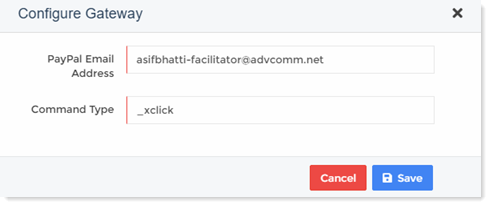
- PayPal Email Address: This is the PayPal merchant account email address.
- Command Type: Type command type here. Depending on these command types and payment modes, PayPal user interface is shown.
For Example - If your command type is simple payment type then just an optional description field is displayed on the PayPal payment form. If command type is purchase request then the PayPal payment form asks for item details also. - Amount Multiplier: This multiplies the invoice amount by the multiplier. For e.g. if multiplier is 2 and the invoice amount is 10, the amount is multiplied by the multiplier 10 x 2 = 20. If multiplier is given then amount will be multiplied to it before sending to the gateway. Default value is “1” which means amount will be sent as it is to the gateway.
- Minimum Charge: Payment gateways charge fee for every transaction. Sometimes it’s not feasible to pay extra fee for every small transaction. To avoid these extra charges, the host can specify a minimum charge. While paying customers cannot specify an amount less than this minimum charge.
Custom Fields
Custom fields are shown on the payment form. In this section you can add/modify/delete custom fields as required.
Add/Edit Custom Field
To add a new custom field click + Add Custom Field and specify the followings.
- Display Name: This is the name displayed in your general profiles for this custom field.
- Field Name: This is the name that is needed for the database at the back-end.
Edit Custom Field
To modify custom fields click Edit and modify fields information as required.
Delete Custom Field
To remove custom field click Delete.
Config Variables
In this section you can add/modify/delete configuration variables as required.
Add Variable
To add a new variable click + Add Variable and specify the followings.
- Variable Name: Type variable name to be added.
- Description: Type a brief description of the variable name.
- Help Text: This is an additional text displayed to briefly describe the variable.
- Has Fixed Value: If this check box is selected, you can specify some fix value for the variable like True/False.
Edit Variable
To modify any variable click Edit and modify information as required.
Delete Variable
To remove any variable click Delete.
Currency Settings
Marketplace allows the host to choose any available currency. However once an invoice is generated in a specific currency, the currency cannot be changed.
Default Currency
This displays the default currency, which has already been selected as the currency of choice. All transactions will be conducted in this currency.
Gateway Currency
Select Gateway currency from the list. Sometimes the gateway currency can be different than the default currency. If the gateway currency is different than the default currency, the host needs to specify a proper exchange rate.
Exchange Rate
This displays the Exchange rate.
Activate/Deactivate PayPal
To activate or deactivate PayPal click Activate or Deactivate respectively.