
| Product Documentation
ExSign
Licensing for Exchange Server
ExSign for Exchange is licensed per mailbox, not per server, so it doesn't matter how many Exchange servers or DAGs you're running. You only pay for the mailboxes that actually need a signature applied.
Try It First
You can run ExSign free for 30 days on up to 10 mailboxes before paying anything. Download the trial. When you're ready to buy, you won't need to reinstall anything; just enter your license key to upgrade the same installation from trial to full.
How Many Licenses Do You Need?
Since licensing is per mailbox, not per server, here's how to count:
- Servers don't add cost. Whether you have one Exchange server or several in a DAG, they're all covered under the same mailbox count, no extra licenses for extra servers.
- You only license the mailboxes you actually want stamped. If your company has 200 mailboxes but only 150 need a signature or disclaimer applied, you only need 150 licenses.
- Anything that can send mail counts. This includes aliases and shared mailboxes; if it can send an outgoing email, it counts toward your license total, not just your named employee accounts.
Example: A company with 300 employee mailboxes, 20 shared team mailboxes, and 5 service accounts that send automated mail, but where only the 300 employee mailboxes need signatures, would need 300 licenses, not 325.
Pricing varies by license category. For a quote based on your mailbox count, contact sales@hostingcontroller.com
Choosing a Subscription
ExSign offers two billing options:
|
Plan |
Billed |
Billing Cycle |
|
Monthly |
Every month |
Monthly |
|
Annual |
Once a year |
Annual |
Please select as per your feasiblity in terms of price as there is no functional difference between the two.
Buying and Activating
- Purchase: Contact
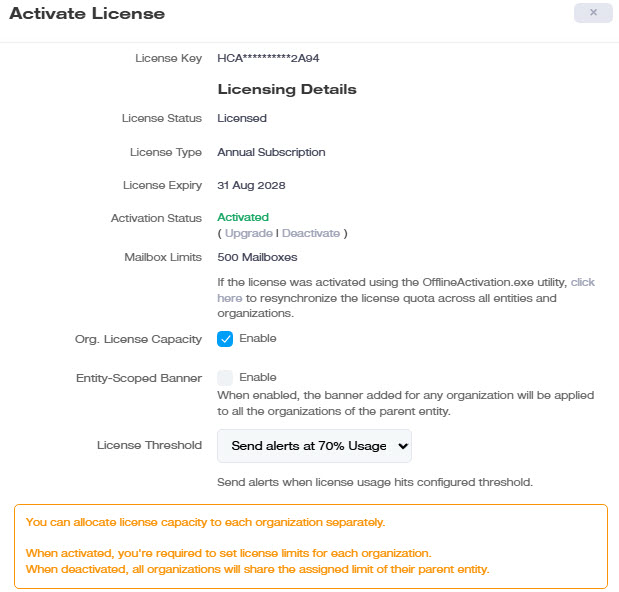
sales@hostingcontroller.comwith your mailbox count to get a quote and complete your purchase. - Activate: Log in as ExSign Admin, go to System >> Activate License, and enter your license key. This upgrades your existing trial installation; no reinstall needed.
Managing Your Subscription
To cancel, email sales@hostingcontroller.com with a cancellation request. Our team will follow up with the cancellation steps and next actions.