
| Product Documentation
ExSign
Managing Billing Profiles
Billing profiles help you organize your organization's payment information, including credit or debit card details used for subscription billing. You can add a profile when you purchase a subscription for the first time, or you can directly go to Billing Profiles and add a profile there. As you may need to add more than one credit card to pay for your subscriptions, you can have more than one billing profile in the ExSign Billing Portal.
To manage billing profiles, click Billing Profiles.
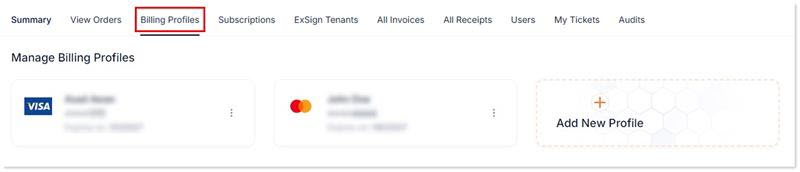
Add New Profile
You can have more than one billing profile.
To add a new profile, click + Add New Profile and specify the following information:
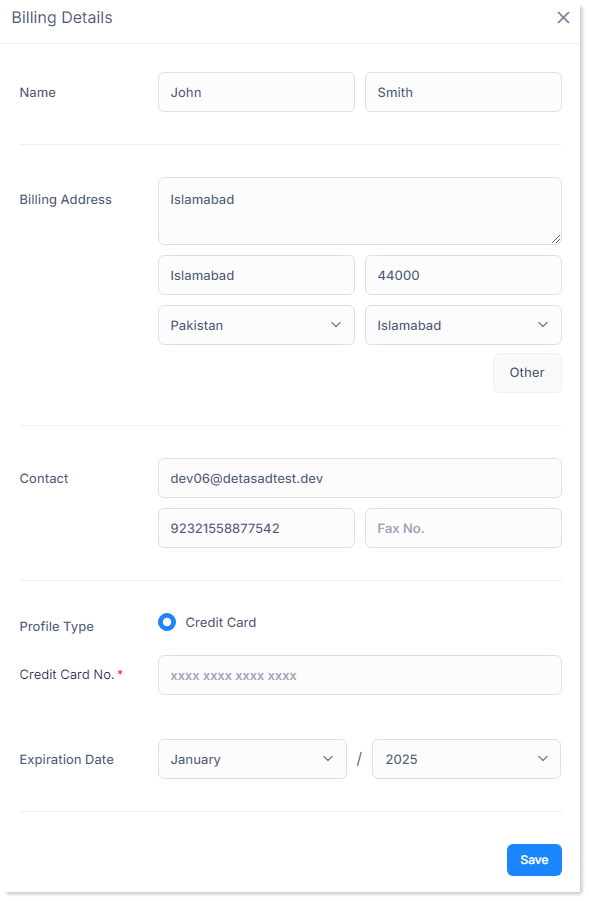
- Name: Type your first and last name.
- Billing Address: Type complete billing address with city, zip code, country, and state name.
- Contact: Type your contact details like email address, phone number and fax number.
- Profile Type: It shows the type of profile. The profile type can only be credit/debit card.
- Credit Card Number: Type the credit card number. This is a required field and cannot be left empty.
- Expiration Date: Select the expiry date for the card.
Edit Billing Details of Existing Profile
To update billing details for an existing profile, such as the billing address or contact number, use the edit option. To modify details, click  button, and then Edit.
Change / Update Payment Method
If you need to change or update your payment method, for example, because your card has expired, you will need to add a new billing profile with new card details.
Delete Profile
To delete profile, click  button, and then Delete.