
| Product Documentation
ExSign
Publishing and Managing Rules
A rule has no effect until it's published; creating and saving it isn't enough. What happens when you publish depends on your workflow settings (see Decide on an approval workflow).
To manage and publish rules, navigate to the left menu under View by Entities and then Rules.
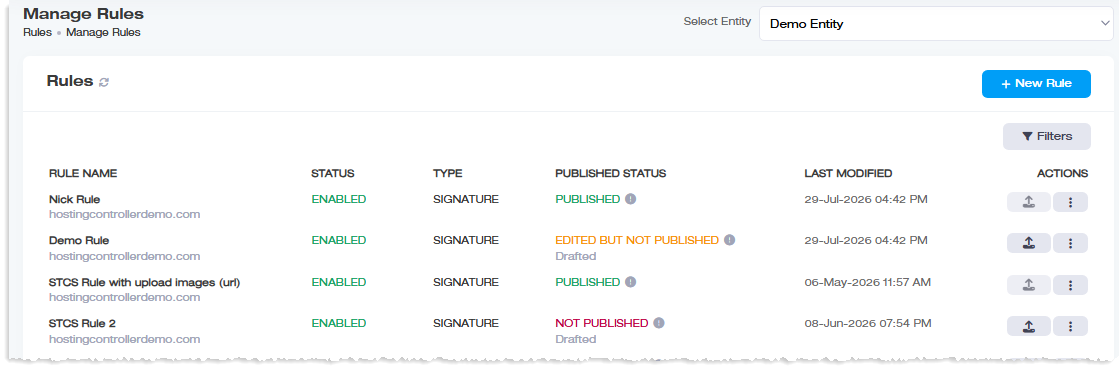
| Workflow Setting | What Happens |
| Default | ExSign Admins and Exchange Admins can publish directly by clicking the publish icon under Actions; no approval needed. |
| Entity Level or Organization Level | Publishing requires sign-off. A new rule can be saved as a Draft or sent for approval; its status shows as Drafted or In Process accordingly. Approval Managers review and approve the request before it actually publishes. A drafted rule can be sent for approval later via Actions. |
Reusing a Rule
Need a similar rule for a different department, with only minor changes. Use Make a Copy (under Actions) to clone an existing rule, adjust what's different, and save, instead of building it from scratch. See Reusing an Existing Rule for a worked example.
Auditing and Reverting Changes
- Publishing History: see where and when a rule has been published, under Actions.
- Review Changes: when you edit an existing rule, ExSign lets you compare the current published version against your edits side by side before committing.
- Published: the rule currently live: its name, status, conditions, and a preview of the current signature.
- Edited: what it will look like after your changes: new name, new status, new conditions, and a preview of the edited signature.
- Revert Changes: undo your edits and keep the current published version.
- Publish Now: go ahead and publish the edited version.
Removing a Rule
Click  under Actions and then Delete. Unlike deleting a server, there's no prerequisite step here, a rule can be deleted directly.