| Product Documentation
ExSign
Embedded Images
Typically, images used in email signatures are not embedded directly within the email itself but are hosted externally on the Internet. To include such images in a signature, you must provide the URL of their hosted location. When an email is sent, these images are delivered as linked resources rather than embedded content. As a result, recipients must download the images when opening the email to view them. If image downloading is disabled or blocked in the recipient’s email client, the images will not be displayed.
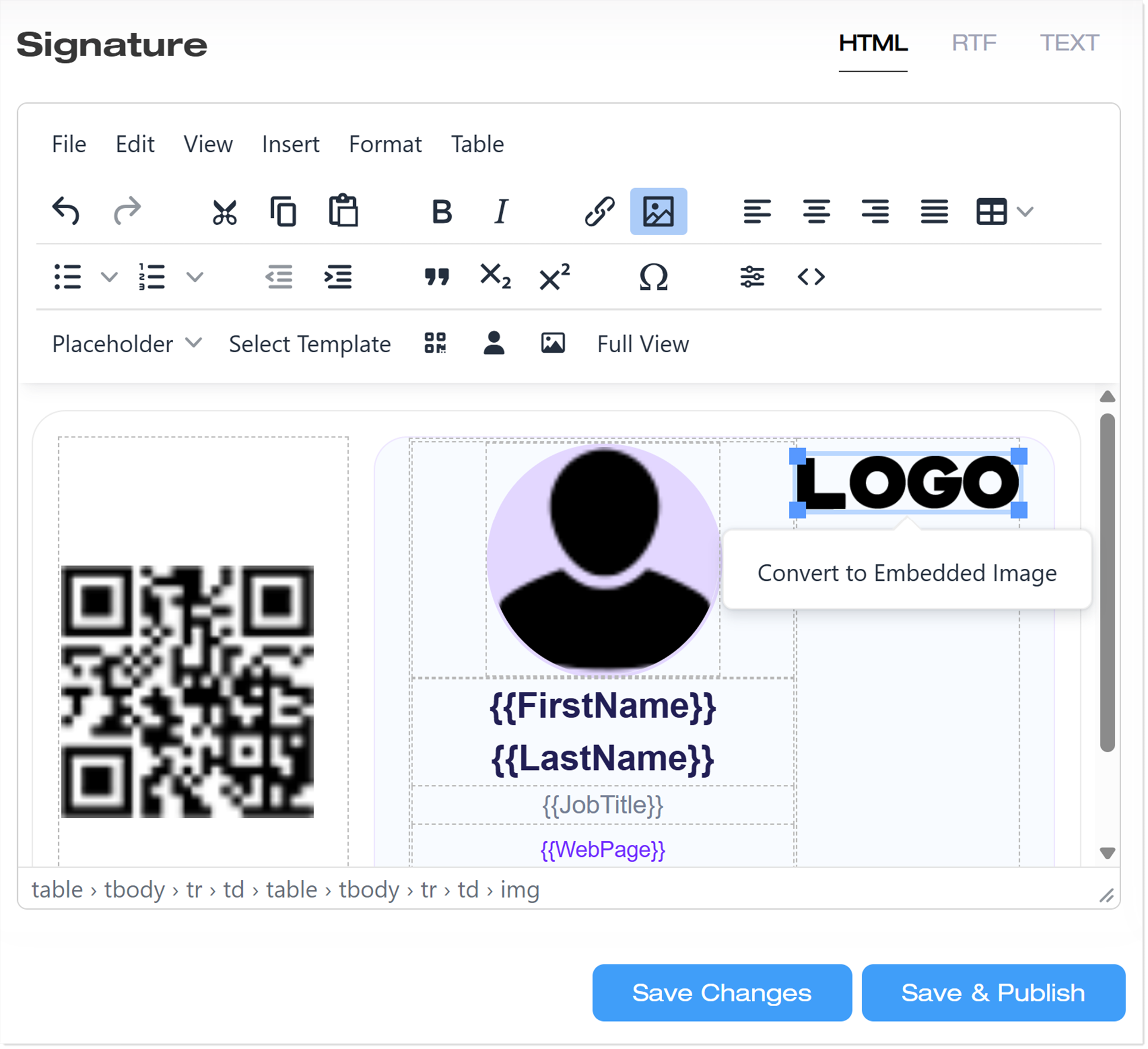
ExSign allows you to embed images directly into the email body instead of linking them from an external source. With embedded images, the image becomes an integral part of the email content, ensuring recipients can view it without downloading external resources or having internet access to load the images. To embed an image, select the image in the editor and click Convert to Embedded Image. It will automatically convert the image to an embedded image.
Advantages/Disadvantages
The following are the advantages and disadvantages of using embedded images compared to hosted images:
| Hosted Images | Embedded Images |
| Advantages | |
|
|
| Disadvantages | |
|
|
How to Achieve This with ExSign
To achieve this in ExSign, create a signature rule and define a signature for it. In the editor, insert an image, select it, and then click the Convert to Embedded Image. ExSign will automatically convert the selected image into an embedded image.