
| Product Documentation
ExSign
Testing Rules
Before a rule affects real email, you can simulate a message to see exactly what would happen, which signature or disclaimer would be stamped, and what it would look like, without sending anything for real.
This is especially useful given how conditions work (see Setting Conditions and Exceptions): since all conditions in a rule must match, it's easy for a rule to silently not apply because of one mismatched condition. Testing lets you catch that before it affects real users, not after someone notices a missing signature.
The rule you want to test must already be published. Test Rules can't evaluate a rule that's still unpublished, if a test isn't returning the result you expect, confirm the rule's Published Status first.
Running a Test
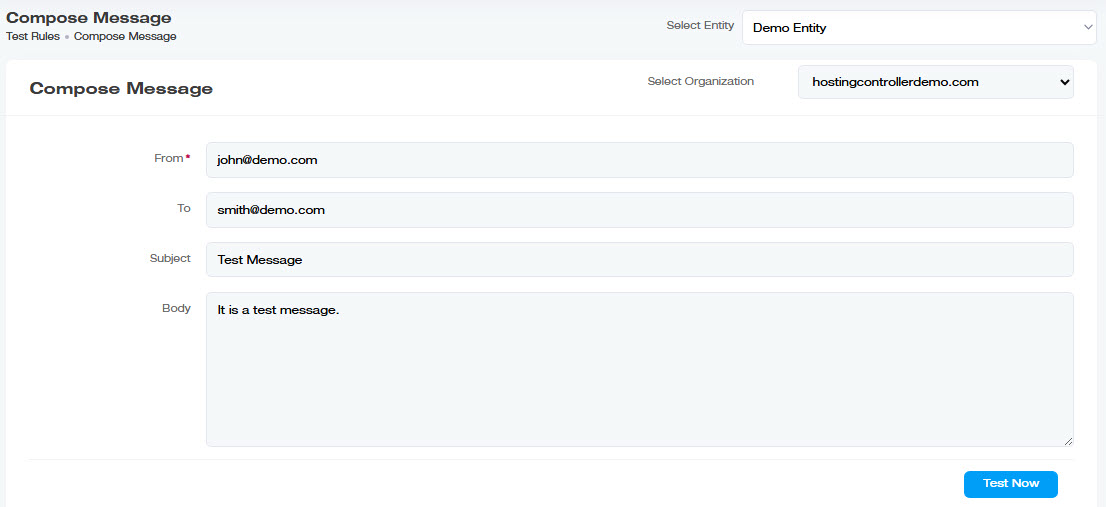
Navigate to the left menu, under View By Entities, and click Test Rules. Fill in a simulated email:
| Field | What to Enter |
| Select Entity | The entity whose rules you want to test against |
| Select Organization | The organization (OU) within that entity |
| From |
The sender address you want to simulate, use one that matches the scenario you're testing (e.g., an address in the department your rule targets) |
| To | The recipient address |
| Subject |
A subject line, especially useful if your rule includes a subject-based condition |
| Body |
The message body, useful if your rule checks for specific body content |
What You'll See
ExSign shows which signature or disclaimer (if any) would be stamped on a message matching what you entered and lets you preview it, the same result the real recipient would eventually see, without an actual email being sent.
When to Use This
- Right after creating or editing a rule, before considering it finished, confirm it actually matches the scenarios you intended.
- When troubleshooting a report like "my signature isn't showing up." Recreate the exact scenario (sender, subject, etc.) the user described here to see which condition is failing, rather than guessing.