
| Product Documentation
ExSign
Managing Subscriptions
ExSign Cloud Signature licenses are sold as subscriptions. You can subscribe to any number of mailboxes for your Microsoft 365 tenant. Signatures will be applied to the mailboxes covered by your subscription. You may purchase monthly or annual subscriptions for your licenses. Monthly subscriptions have monthly billing cycles, while yearly subscriptions have yearly billing cycles. However, annual subscriptions offer a lower monthly rate compared to paying month-to-month
Pay less with annual subscriptions, as they offer a reduced monthly rate compared to monthly subscriptions.
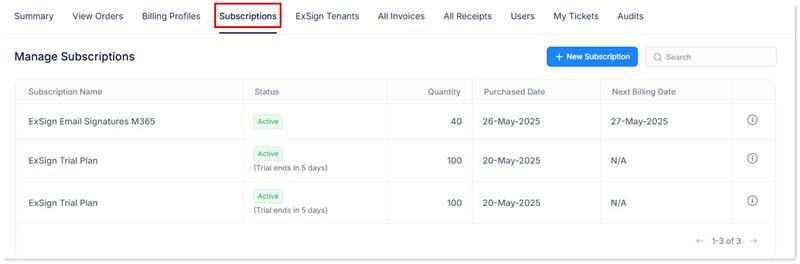
To manage subscriptions, click Subscriptions.
|
Manage Subscriptions page shows following information:
|
View Subscription Details
ExSign Billing Portal also allows you to view the details of each subscription. To view subscription details, click  icon.
icon.
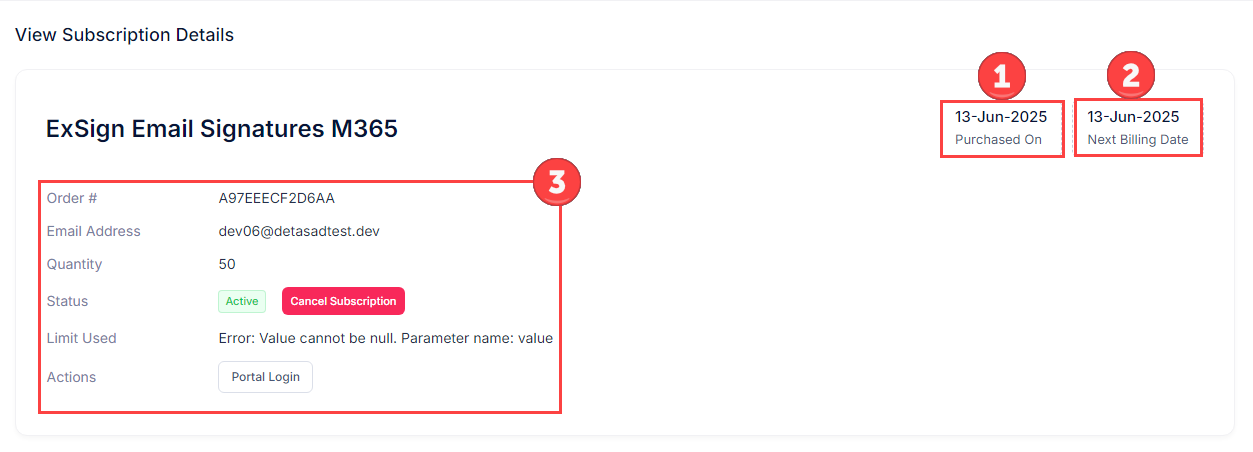
- Purchased On: It shows the date when the order is purchased.

- Next Billing Date: It shows the date when the next bill is due.

- Order Details: It shows order details like unique order number, concerned email address, number of subscriptions purchased, status of the subscription (active/inactive), maximum number of usage, and automatic login option.

- Order #: It displays the order number. The order number is always unique.
- Email Address: It displays the concerned email address. It is the email address of the user who manages the tenant in the ExSign Portal. It can only be a Microsoft 365 global admin.
- Quantity: It shows the total number of mailboxes purchased in the subscription.
- Status: It shows the status of the subscription. You may cancel the subscription anytime.
- Limit Used: It shows the usage out of the assigned limit.
- Actions: It allows you to log in to the ExSign Portal. ExSign uses Microsoft Authentication to sign you in to the interface.