
| Product Documentation
ExSign
Signatures for Out-of-Office Replies
Out-of-office replies are automated email responses sent on your behalf when you’re unavailable. They inform senders that you are out of the office, whether due to vacation, sick leave, or attending a conference, and set clear expectations about your availability and return date.
Out-of-office replies are set up in the Exchange Admin Center (EAC) or the Microsoft 365 Admin Center by the admins.
Once out-of-office replies are set, ExSign enables you to stamp specific signatures on these replies. This means it allows you to stamp personalized signatures on out-of-office messages.
Scenario
Suppose you, as an admin, have configured a rule through the Exchange Control Panel (ECP) in your user mailboxes to automatically send specific messages in reply to all incoming e-mails when your users are not in the office. Now, ExSign will help you stamp different signatures on out-of-office replies.
How to Achieve This with ExSign
To implement this in ExSign, create an out-of-office rule that applies to all mailboxes across your organization and configure personalized signatures for the rule. Once the rule is published, employees’ regular email signatures are automatically replaced with these out-of-office signatures whenever they are not in the office.
Follow the steps below to practically achieve this with ExSign:
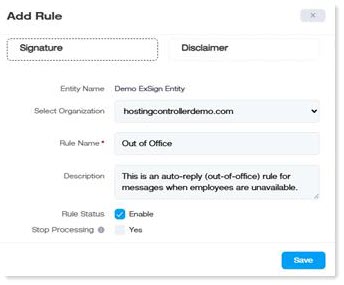
- Create a new rule and call it “Out of Office”.
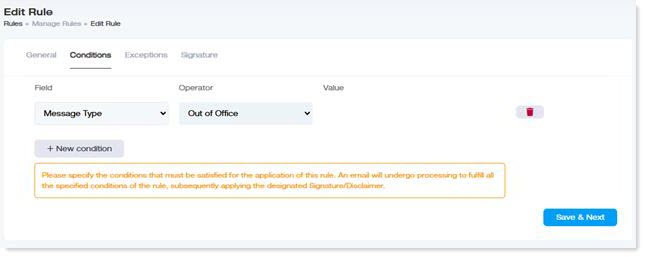
- In the Conditions tab, add a new condition where the field is Message Type and the operator is “Out of Office”. Then click Save & Next.
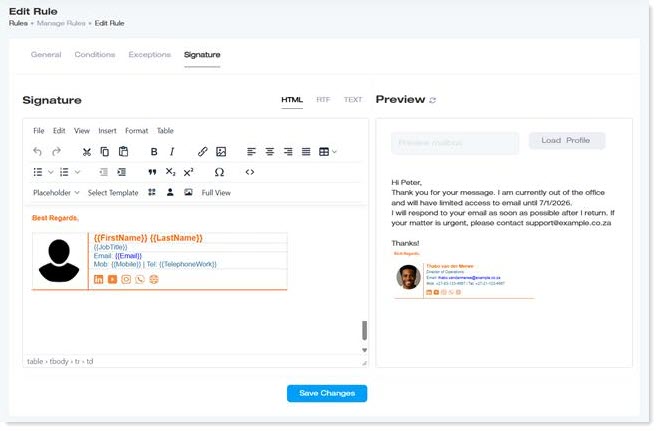
- In the Signature tab, either create your signature from scratch or choose a predefined template. Insert the signatures that should be used when your employees are out of the office.
- That's it! Now, whenever employees are away from the office for an extended period (such as vacations or business trips), these signatures will be automatically applied to their out-of-office replies to incoming emails.