| Product Documentation
ExSign
Architecture Overview
This article describes the architecture of ExSign. The system is designed to provide a rule-based signatures and disclaimers solution for outgoing Exchange emails. With ExSign, administrators can centrally create signatures and disclaimers for their employees based on pre-defined rules and allow ExSign to dynamically decide which signatures and disclaimers to stamp on outgoing emails.
ExSign provides a rule-based signature and disclaimers solution for outgoing Exchange Emails.
To understand how to plan, install, and manage ExSign for Exchange, it helps to understand the journey an email takes and which piece of ExSign handles each step.
Email Journey
- An admin defines the rules. Using the ExSign Web Portal, an ExSign Admin, Exchange Admin, or OU Admin sets up which signature or disclaimer should apply to which users, and under what conditions.
- The email is sent. As it passes through your Exchange Mailbox Server, the ExSign Transport Agent, installed directly on that server, checks the rules and stamps the message with the right signature or disclaimer.
- The sender sees the message. Normally, a signature added this way is invisible to the sender, i.e., it happens server-side, so it won't even show up in their own Sent Items. The Sent Items Update Agent fixes this by updating the copy in the sender's Sent Items folder to match what was actually sent.
- Everything is stored centrally. All rules, signatures, and settings live in a database on your SQL Server, so the Portal and every Agent are always working from the same source of truth.
Communication between ExSign Portal, ExSign Agent, and Sent Items Update Agent is carried over a secure SSL-based channel, which ensures data security.
Local SQLite Caching
When you publish a rule centrally from the Portal, it isn't fetched live by each mailbox server every time an email is sent. Instead, the Portal pushes a copy of the rule out to every Mailbox Server's ExSign Transport Agent, and each agent stores its own local copy in a lightweight SQLite database on that server. This provides the ExSign agent an opportunity to fetch rules from local storage rather than from the remote ExSign Portal.
High Availability Benefit
Another advantage of this design is that it provides high availability. As the ExSign agent is present on all the mailbox servers, for example, in a DAG, it provides failover contingency in case of failure. If a mailbox server goes down, the stamping process continues unabated from the other mailbox servers.
Installations
This flow maps directly to the deployment decision from the Prerequisites page:
|
Component |
Installed Where |
Why |
|
Web Portal |
One server (or two, for HA). It can be standalone or domain-joined. It can be a VM. |
This is your control server for rules, signatures, and disclaimers. Since it's often public-facing, many environments keep it on its own server, separate from Exchange. |
|
Transport Agent |
Every Exchange Mailbox Server in the entity. |
It needs to intercept mail right as it's sent, so it must sit on the same servers that process the mail, i.e., the Exchange Mailbox Servers. |
|
Sent Items Update Agent |
The Portal server, or its own standalone server. |
It just needs network access to update mailboxes; it doesn't need to sit on Exchange itself. |
|
Database |
A separate SQL Server cluster. |
Keeping it separate makes backup, scaling, and high availability easier to manage independently of the other components. |
Access Rights
Rules and signatures aren't limited to a single "ExSign Admin" role; they can also be created or edited by anyone in your Exchange Admins or OU Admins security groups. Therefore, it is worth deciding upfront who on your team should have this access, since it determines who can change what employees' emails look like.
ExSign Web Portal
The ExSign Web Portal is a web-based application and one of the main components of the solution. The machine on which it is installed will serve as the control server for the solution. The portal provides a central location for all ExSign rules, signatures, and disclaimers. Moreover, it extends self-serve portals to different admins (ExSign Admin, Exchange Admins, and OU Admins) for adding and editing signature and disclaimer rules.
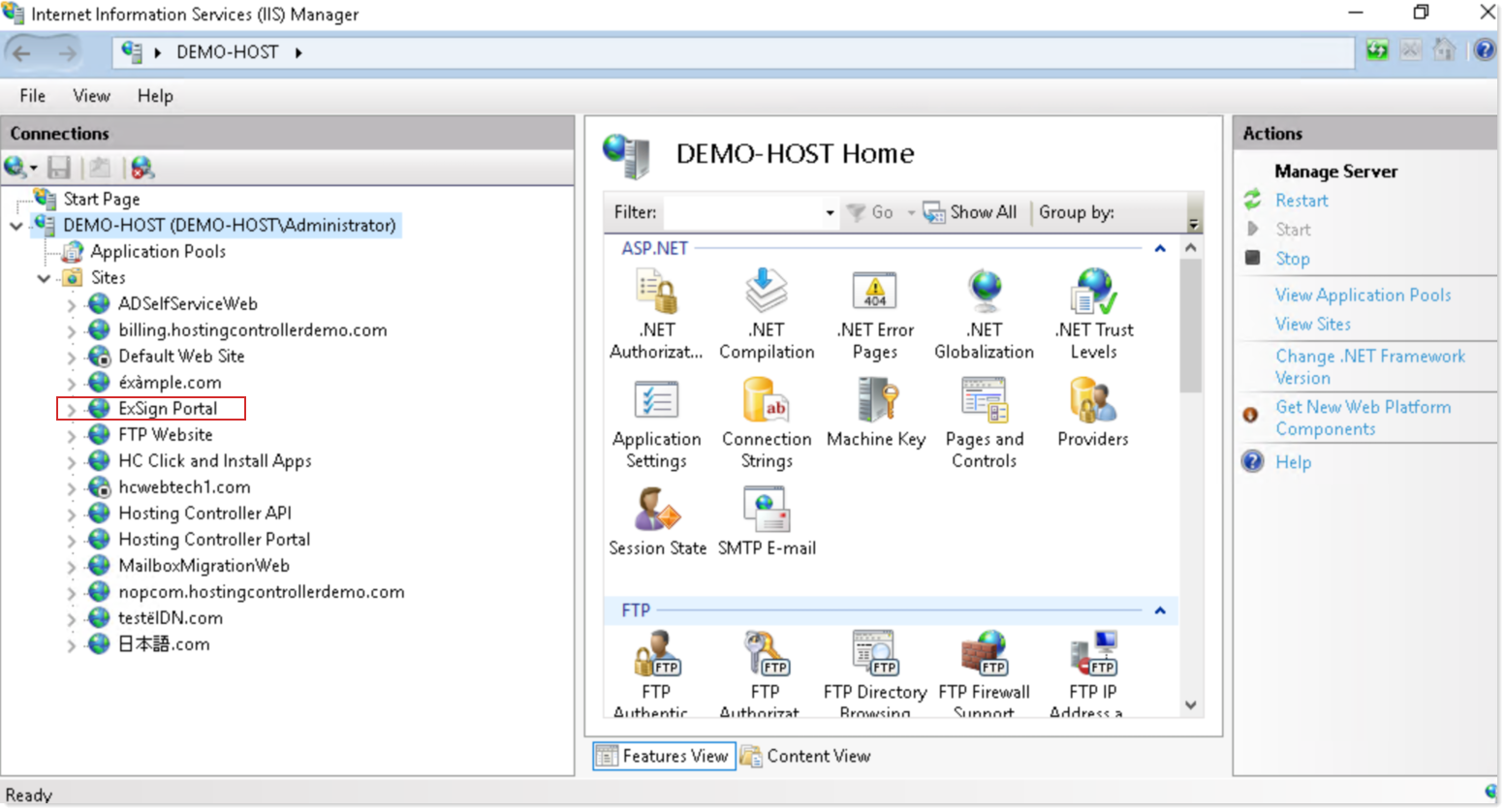
ExSign Portal Websites
Websites
- ExSign Portal: This is the main website (administration site) that allows users to access the ExSign Panel interface.
Application Pools
ExSignPortalAppPool: Used with ExSign administration website.
ExSign Portal Services
- ExSign Email Service: This service is responsible for sending all the scheduled emails. Its Startup is Automatic.
- ExSign Publishing and Analytics Service: This service serves as a connection hub for the ExSign Publishing and Analytics data.
ExSign Portal Physical Directories
By default, ExSign Portal installs in the physical drive C:\Program Files\ExSign Portal
ExSign Transport Agent
The ExSign Transport Agent is a desktop utility of ExSign and one of its main components. It is installed on all the Exchange Mailbox Servers in the entity.
ExSign Agent Service
- ExSign Agent Service: This service is responsible for sending all the scheduled emails. Its Startup Type is Automatic and logs on as Local System.
ExSign Agent Physical Directories
By default, ExSign Agent installs in the physical drive C:\Program Files\ExSign Agent
Sent Items Update Agent
When the email is sent out, the user cannot see how the added signature or disclaimer looks. This is because the signatures and disclaimers are added by Exchange on the server side and are not visible to the user. Normally, they don’t display even in the Sent Items folder. To give the user an idea of how signatures really look, ExSign allows users to see signatures and disclaimers in their Sent Items folder.
The Sent Items Update Agent is the service responsible for letting users see signatures and disclaimers in their Sent Items folder. It updates messages in the Sent Items folder with signatures and disclaimers.
Sent Items Update Service
- Sent Items Update Service: This service is responsible for updating the sent items folder with the appropriate signatures and disclaimers.
ExSign Sent Items Agent Physical Directories
By default, ExSign Sent Items Agent installs in the physical drive C:\Program Files\ExSign Sent Items
ExSign System Database Server
ExSign stores its database in Microsoft SQL Server. It’s recommended to have a separate SQL Server cluster to host ExSign’s database. ExSign supports any edition of SQL Server 2014 or above. SQL Server Collation must be SQL_Latin1_General_CP1_CI_AS.
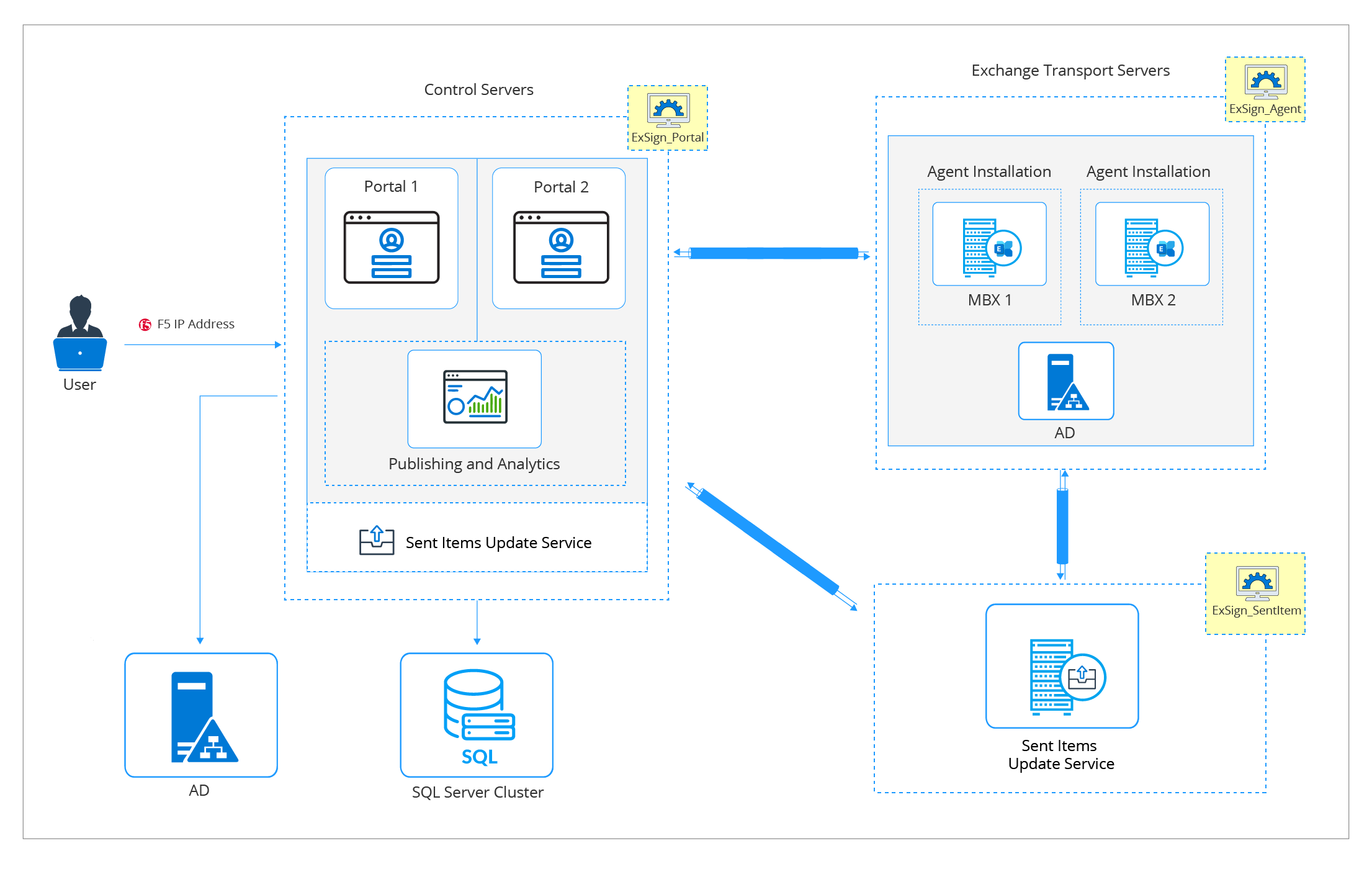
Installation Logical Diagram
The diagram is the installation logical diagram of ExSign.