| Product Documentation
ExSign
Configuring Sent Items Update for M365
Sent Items Update is available for Microsoft 365 only. It is not available for Google Workspace.
With Microsoft 365 server-side stamping, ExSign adds the signature after sending, so the sender may not see it while composing. Sent Items Update refreshes the message in the sender's Sent Items folder, so the stored copy matches what recipients received.
Why Use It
Without Sent Items Update, Microsoft 365 users often cannot see the stamped signature or disclaimer in Sent Items, even though recipients received it. Enabling this feature gives senders an accurate view of the final message.
Configure Sent Items Update (Microsoft 365)
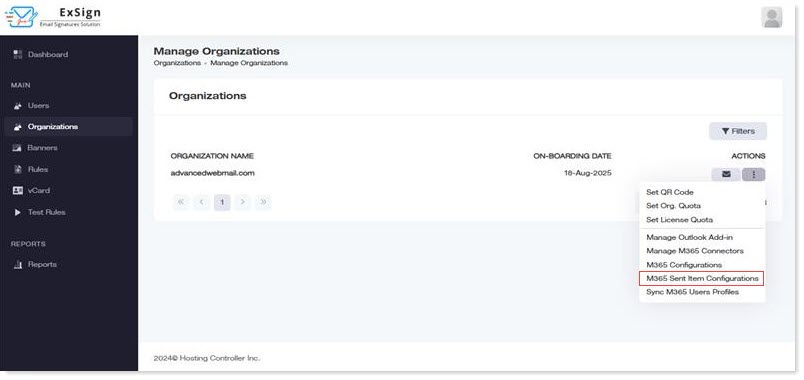
- Sign in to the ExSign Portal.
- Open Organizations.
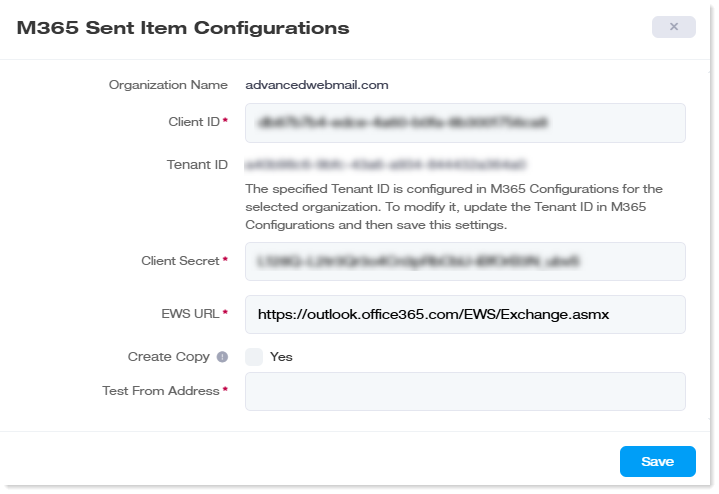
- Under Actions for the Microsoft 365 organization, click M365 Sent Item Configurations.
- Complete the configuration as prompted and save.