
| Product Documentation
ExSign
Managing Invoices for Cloud Signatures
Invoices are the official bills for ExSign Cloud subscriptions. ExSign generates an invoice automatically when you purchase a subscription. Each invoice has a unique invoice number, issue date, covered period, and amount due.
Open Invoices
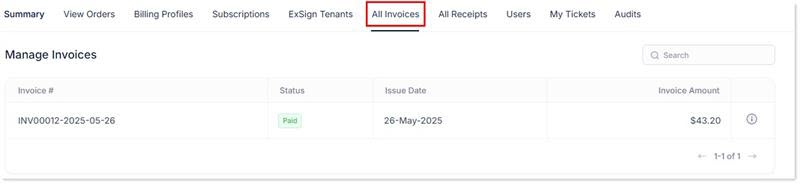
- Sign in to the Billing Portal
- Click Invoices.
What the Invoices List Shows
| Field | Meaning |
| Invoice # | Unique invoice number |
| Status | Paid or Unpaid |
| Issue Date | Date the invoice was issued |
| Invoice Amount | Amount due |
View Invoice Details
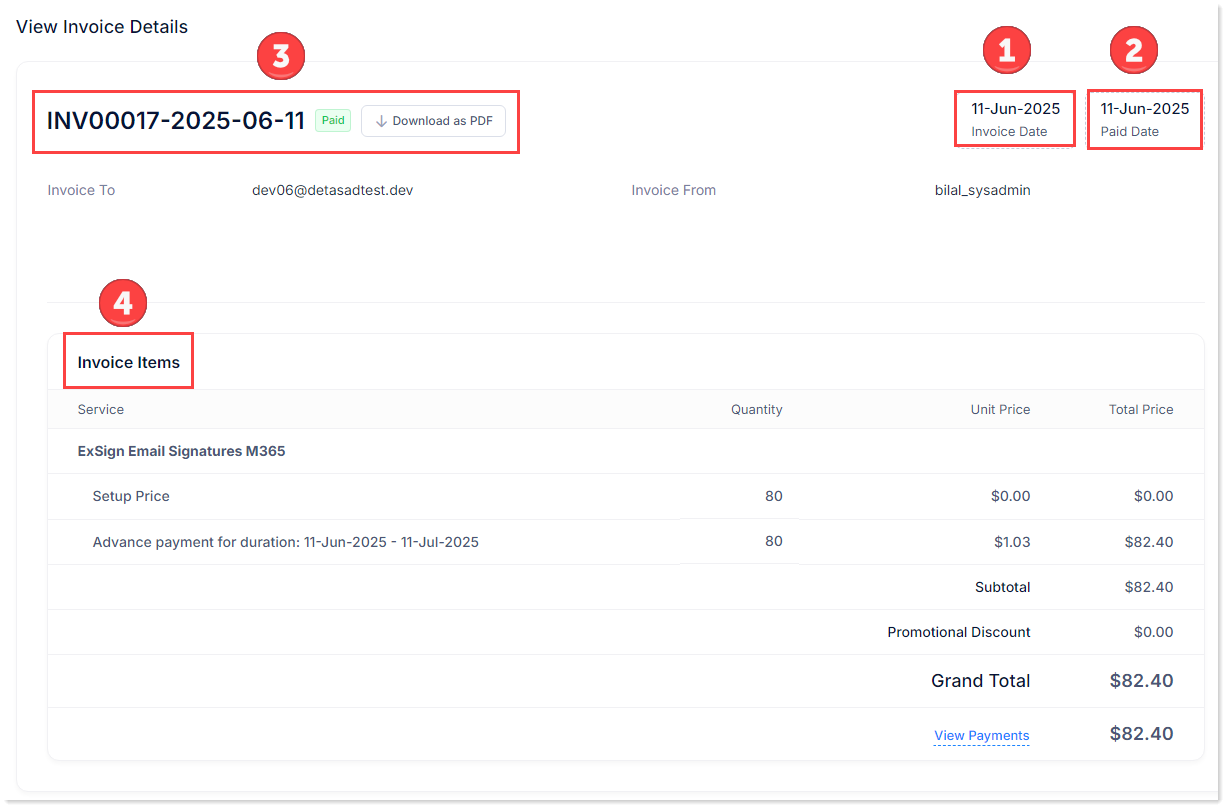
- Open the details action for an invoice.
- Review:
| Detail | Meaning |
| Invoice Date | Date the invoice was sent |
| Paid Date | Date the invoice was paid (if paid) |
| Invoice Details | Invoice number, PDF download option, and billed party information |
| Service | Purchased service |
| Quantity |
Quantity purchased |
| Unit Price |
Unit price |
| Total Price |
Line total |
| View Payments |
Payments applied to the invoice |
How Payments are Applied
If you have outstanding invoices, a payment settles those invoices first. Any remaining amount stays in your wallet for future purchases. See Viewing Summary and Managing Receipts.