
| Product Documentation
ExSign
Applying Legal Disclaimers
A disclaimer rule works like a signature rule, but for legal or compliance text- required wording (confidentiality notices, regulatory statements, etc.) that needs to go out on some or all of your organization's email, reliably and without depending on individual employees to include it.
This is exactly the scenario server-side stamping is built for. As covered in Server-side vs. Client-side Email Signatures, a client-side disclaimer can be edited or skipped by the sender; a server-side disclaimer, applied by ExSign, cannot. If your disclaimer exists to satisfy a legal requirement, that reliability is the entire point; treat it as a hard requirement when deciding how to deploy a disclaimer rule, not just a nice-to-have.
What's Different from a Signature Rule
Creating a disclaimer rule uses the same New Rule flow described in Creating a Rule, click New Rule and select the Disclaimer tab instead of Signature.
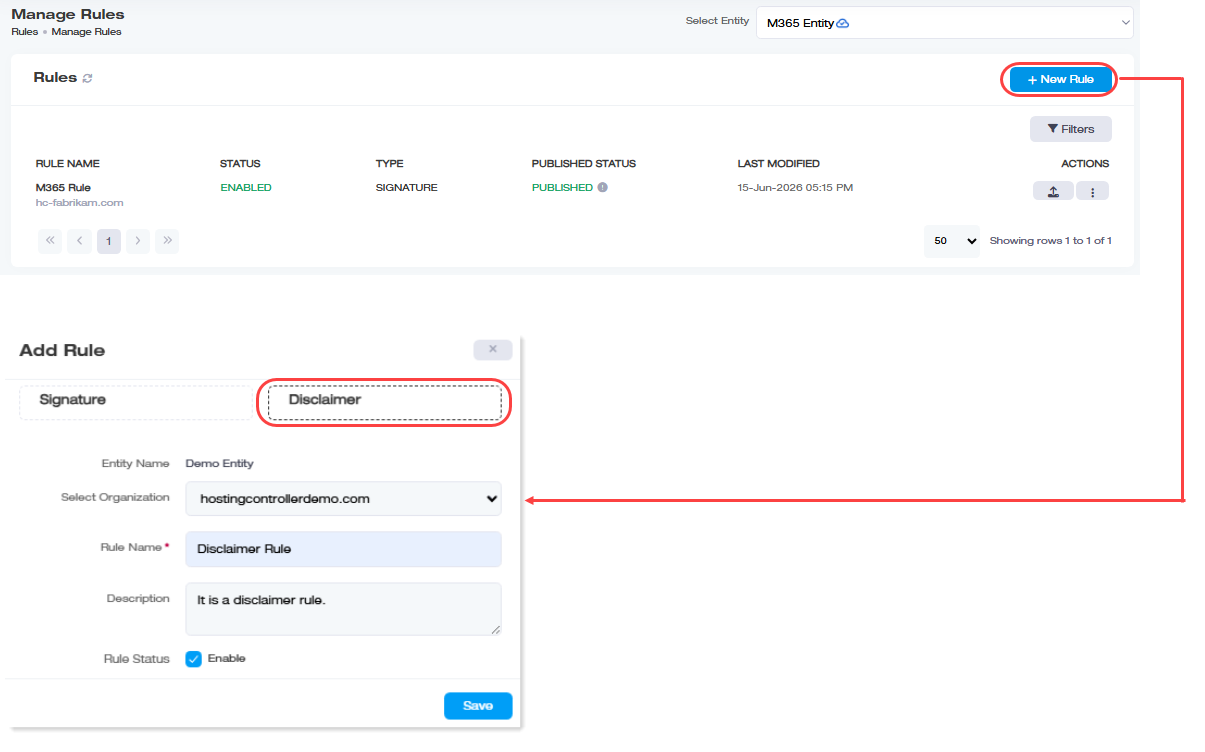
From there:
- Conditions and Exceptions work identically: see Setting Conditions and Exceptions. Nothing about how you target which emails get a disclaimer changes.
- Publishing, testing, copying, and workflow approval all work identically too, see Publishing and Managing Rules, Testing Rules Before They Go Live, and Configuring Approval Workflows.
- Some fields available to Signature rules don't appear to apply to Disclaimer rules, specifically Entity/Organization assignment and Stop Processing. This is based on how the source material describes the two rule types, and it's worth confirming directly in the interface rather than assuming it's intentional, since it could equally be a documentation gap rather than an actual feature difference.