
| Product Documentation
ExSign
Adding and Managing Banners
A banner is an image ExSign places below a user's signature, a free, always-on way to put announcements, offers, or achievements in front of everyone your company emails. ExSign can run a banner for a set window of time and automatically remove or swap it when that window ends, so a campaign banner doesn't require manual cleanup later.
Begin in a Few Simple Steps
New to ExSign Banners? View the video tutorial below to learn how to place banners through ExSign.
Who Can Do What?
| Action | ExSign Admin | Exchange Admin | OU Admin |
| Create a banner |  |
|
|
| Publish a banner | |
|
|
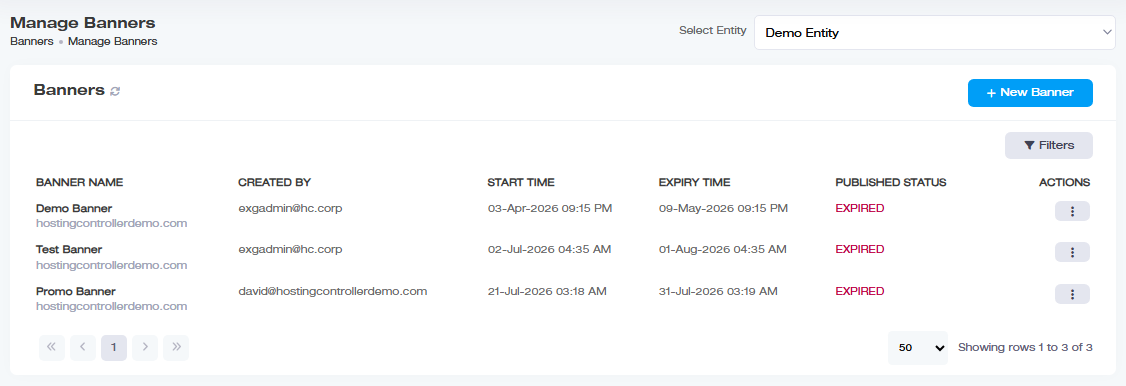
Viewing Your Banners
Go to the left menu, under View by Entities, and click Banners:
| Column | Shows |
| Banner Name | Name of the banner |
| Created By | Who created it |
| Start Time | When it starts appearing |
| Expiry Time | When it stops appearing |
| Published Status |
Published, unpublished, or expired, click through for which servers it's published to, and whether each publish succeeded. |
| Actions |
Edit, copy, or delete |
Creating a New Banner
To create a banner, navigate to the left menu under View by Entities section and click Banners.
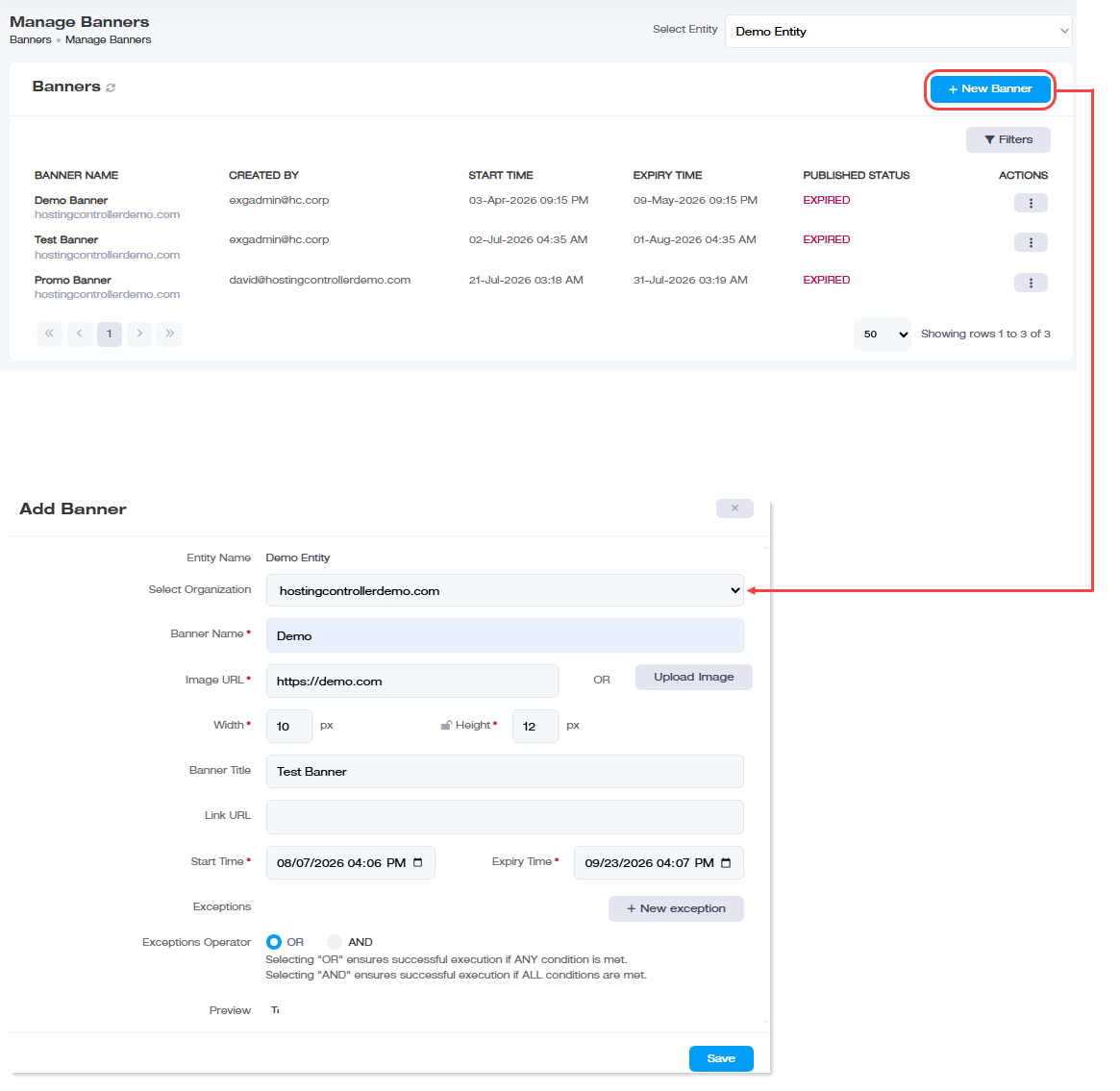
Click + New Banner and provide:
| Field | What to Enter |
| Entity Name | Which entity this banner applies to |
| Select Organization | Which organization within that entity |
| Banner Name | A friendly name |
| Image URL or Upload Image | Either link to an already-hosted image, or upload one directly. If linking, the URL must be live and point to the assets/Images/ directory on the Portal server, where your image actually ends up depends on your Image Upload Settings (local vs. cloud) |
| Width / Height | Size of the banner, in pixels |
| Banner Title | Shown as a tooltip when a recipient hovers over the banner |
| Link URL |
Where the banner takes the recipient if clicked, this is where your call to action (an offer, announcement, "read more," etc.) actually lives |
| Start Time | When the banner should start appearing, e.g., the start of a campaign or event |
| Expiry Time |
When the banner should stop appearing |
| Exceptions |
Organizations or users to exclude, specify a Field and Value (e.g., a sender address) to skip; anyone not listed still gets the banner |
| Preview |
See how the banner will actually look before saving |
If you're creating a lot of banners for one entity, check whether you've hit the Max Banners Limit set for it (see Adding Entities and Organizations), ExSign won't let you publish past that cap.
Publishing a Banner
A banner does nothing until it's published, creating it only saves it as unpublished. All three (ExSign Admins, Exchange Admins and OU Admins) can create and publish banners.
Managing Existing Banners
- Edit: Click Edit under Actions, update any field, and save. (Not available once a banner has expired, see above.)
- Make a Copy: Clone an existing banner under Actions >> Make a Copy, adjust details, and save. Useful for reusing a banner design for a new campaign or a different organization instead of rebuilding it.
- Publishing History: Under Actions >> Publishing History, see where and when the banner has been published.
- Delete: Click Delete under Actions to remove it.