
| Product Documentation
ExSign
Designing vCards M365
A vCard is a digital business card, created when a recipient scans an Internal-type QR code in a signature (see Adding Entities and Organizations (M365)). This page covers designing the vCard itself.
Viewing Your vCards
Go to the left menu, under View By Entities, click vCard, then select the relevant Entity.
| Column | Shows |
| Organization Name | Which organization the vCard belongs to |
| Last Modified | When it was last changed |
| Actions | Edit or delete |
Adding a vCard
Click + New vCard and provide:
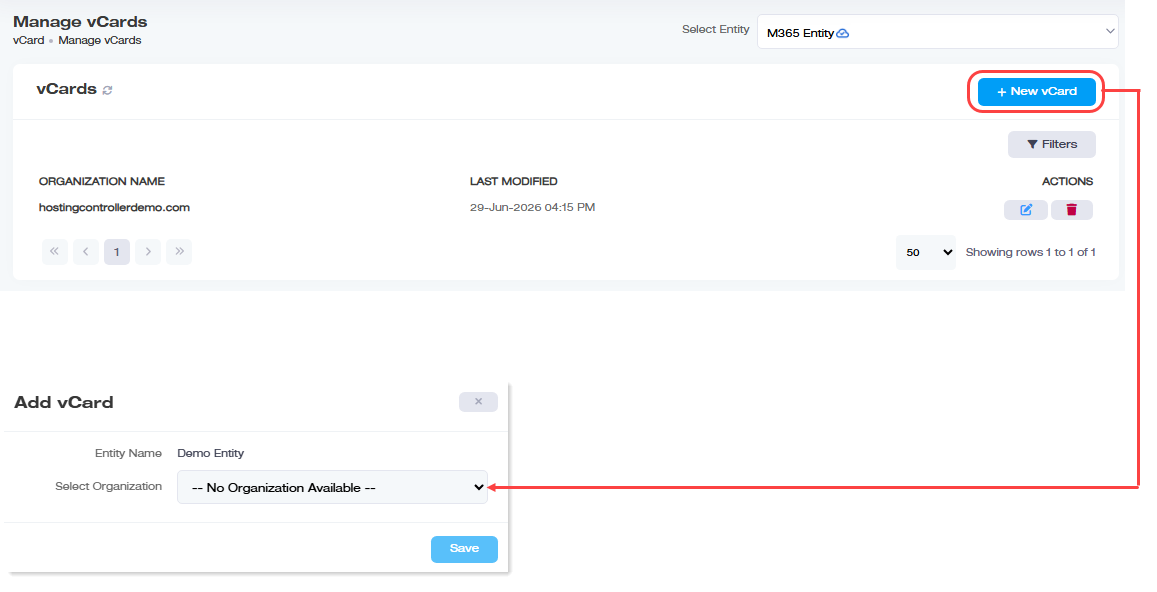
| Field | What to Enter |
| Entity Name | Shown automatically, based on the entity you selected |
| Select Organization | The organization this vCard will represent, only organizations that don't already have one appear here. |
Designing the vCard
Click  under Actions column to open the vCard editor. You can build from scratch or start from a Template; several built-in styles are available for admins?who'd?rather adjust an existing design than start blank.
- Placeholder: insert Active Directory attributes anywhere in the vCard; they're replaced with each user's actual profile data when their QR code is scanned. This likely works the same way as signature placeholders, see Personalizing content with placeholders.
- Source Code: view or edit the vCard's underlying HTML directly.
You can't save an empty source code window, at least one line of content needs to be present - Preview: see how the vCard will actually look before saving.
Finding a vCard
Click Filters and search by name or organization.
Deleting a vCard
Click  under Actions, then confirm.