
| Product Documentation
ExSign
Viewing Orders
To place an order, select the number of mailboxes you want to include and choose your preferred subscription plan: monthly or yearly. Select the desired number of mailboxes, choose a monthly or annual billing cycle, add the selection to your cart, and complete your purchase securely using a credit or debit card. Each order is generated with a unique order number. It also reflects the date the order was placed and the order amount. All your orders can be viewed in one place in the ExSign Billing Portal.
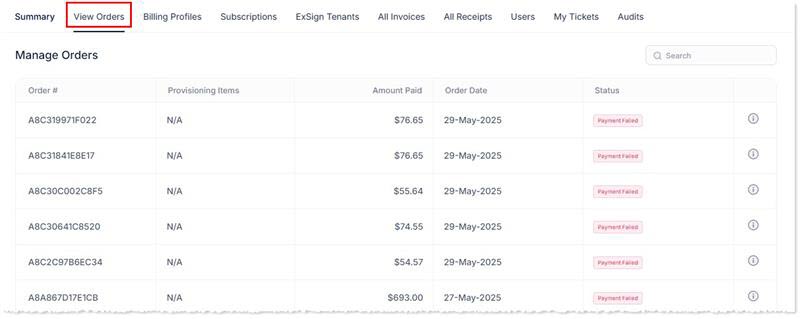
To view orders history, click Orders.
|
Manage Orders page shows following information:
|
 icon.
icon.View Order Details
You can also view each order individually to access detailed information, including the order date, total amount, and other relevant details.
To view order details, click  icon.
icon.
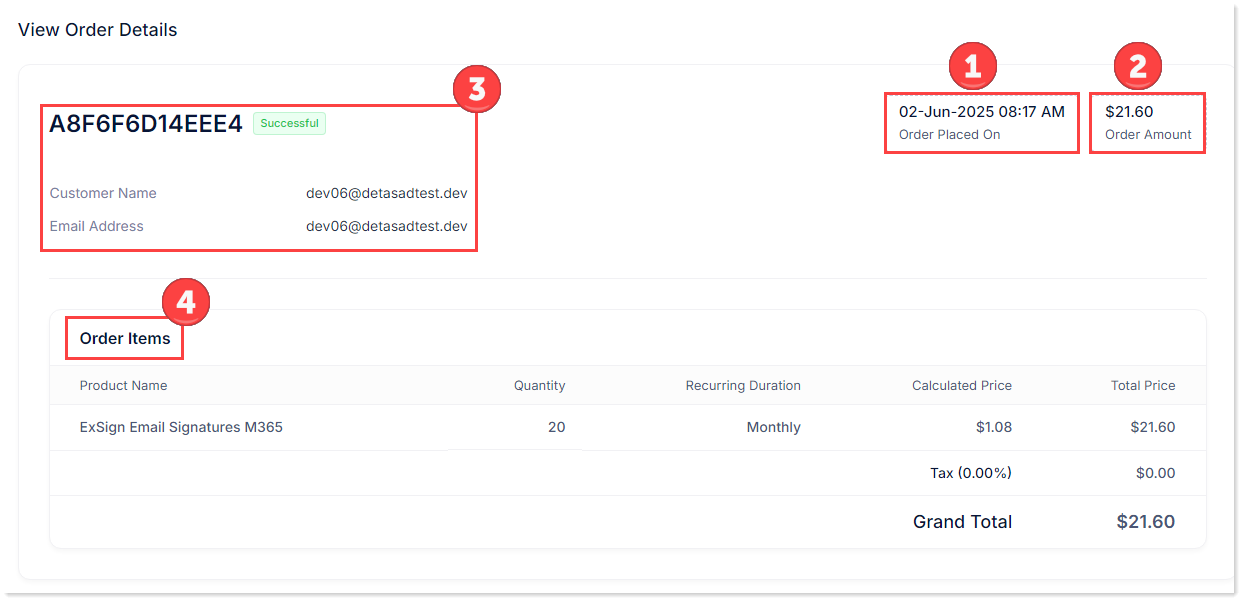
- Order Placed On: This reflects the date the order was placed.

- Order Amount: This reflects the total amount of the order, including taxes.

- Order Number: This displays the unique order number, the name of the organization that placed the order, and the corresponding email address.

- Order Items: Order items display the following details

- Product Name: It reflects the name of the product. The product is ExSign Email Signatures M365 — a cloud-based service designed to automatically apply email signatures to messages sent from Microsoft 365 mailboxes.
- Quantity: It reflects the number of mailboxes for which the order was placed.
- Recurring Duration: It displays the duration of the billing cycle. The durations can be monthly or yearly.
- Calculated Price: This indicates the price per mailbox. For monthly billing, it shows the cost of one mailbox per month. For annual billing, it shows the cost of one mailbox per year.
- Total Price: It reflects the total price of the order, including tax.