
| Product Documentation
ExSign
Managing Receipts for Cloud Signatures
Receipts are proof of payments made against invoices or wallet top-ups. When you pay online with a credit or debit card, ExSign generates a receipt with a unique payment number.
Open Receipts
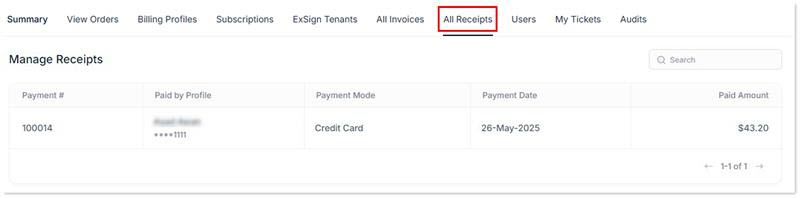
- Sign in to the Billing Portal
- Click All Receipts.
What the Receipts List Shows
| Field | Meaning |
| Payment # | Unique payment/receipt ID |
| Paid by Profile | Billing profile and card used for the payment |
| Payment Mode | Payment method, such as credit card, cash, or check |
| Payment Date | Date the payment was received |
| Paid Amount |
Amount paid |
Because you can keep more than one billing profile, receipts help you see which profile was used for each payment. See Managing Billing Profiles.