
| Product Documentation
Hybrid Control Panel (v10)
HC10 API Overview
Overview
The HC10 API uses REST API principles, providing access to resources (data entities) via URI paths and standard HTTP methods like GET, POST, PUT and Delete for accessing, creating, updating, or deleting resources.
Authentication
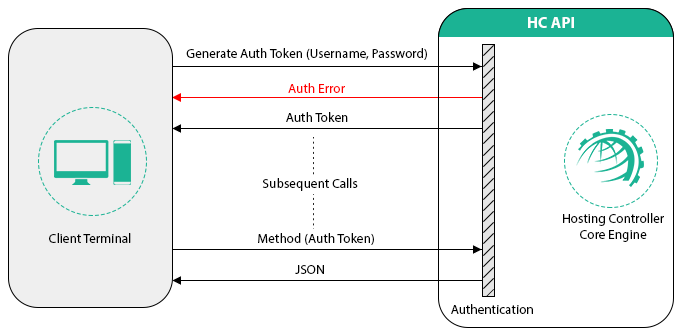
HTTP requests to HC10 API are protected with HTTP Basic authentication. There are two ways to authenticate your requests to APIs:
- Using your Hosting Controller username and password directly in HTTP authorization header such as:
Authorization: Basic QWxhZGRpbjpPcGVuU2VzYW1l
(QWxhZGRpbjpPcGVuU2VzYW1l is base64 encoded value of username:password) - Issuing an authentication token for a specified number of hours, using your HC username and password by calling auth-tokens API endpoints and then using that token in subsequent requests to HC API as:
Authorization: Token QWxhZGRpbjpPcGVuU2VzYW1l(QWxhZGRpbjpPcGVuU2VzYW1l is base64 encoded value of your token returned by auth-token api endpoint)
In case of a failed authentication the API will return a HTTP 401 error.
Authorization
Not all endpoints of HC10 APIs can be used by all HC user roles. Each endpoint has its permissions defined for the allowed roles and only those specified roles can call the given endpoints. If a user with a role, not allowed to call an endpoint, tries to do so then the API will return a HTTP 403 error.
Sometimes, it is possible that an endpoint returns a limited set of data for one role and a complete resource representation for a different (generally a parent) role.
Furthermore, a user can perform operations on HC resources (websites, mailboxes etc.) provisioned by/for itself or by/for its decedents (up to the nth level), but not on resources of other siblings or parent user.
Sub-admins (Staff Members) can consume API on behalf of their owner but they are restricted to specific sections of the APIs. Therefore, if a sub-admin tries to consume an API method or a HC resource which it is not allowed to, it will be returned a HTTP 403 error by the API.
Request and Response Data Format
HC10 API supports JSON and XML request and response formats. To get a response in XML format, send HTTP Accept header with the request to the API and set its value to “application/xml” or “text/xml” for XML, and “application/json” or “text/json” for response in JSON format.
For Example:
For response in XML:
Accept: application/xml
For response in JSON:
Accept: application/json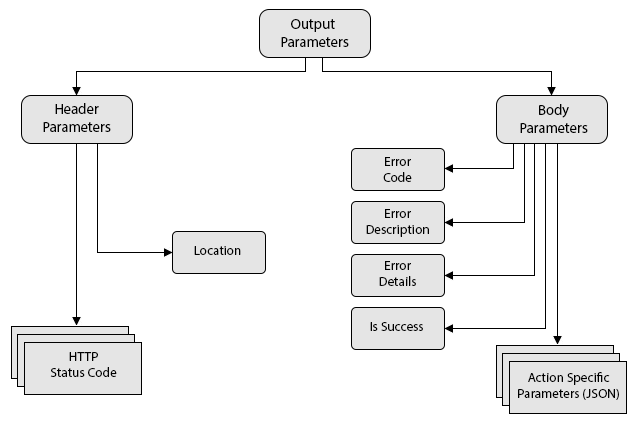
For Example:
For request in XML:
Content-Type: application/xml
For request in JSON:
Content-Type: application/json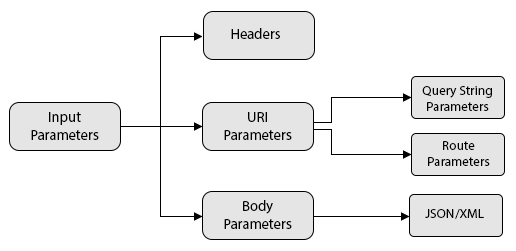
Getting Familiar with HC APIs
Following is the detail of the HTTP verbs/methods with their detail and possible response codes. These can be used to perform different operations in different scenarios:
| HTTP Verb | HTTP Detail | HTTP Error |
| POST |
Used to Create a new resource. New resource detail can be sent in the request body. API will return ID of the resource (with other properties) in case of successful completion of the operation.
|
200 (Resource Created Successfully), 'Location' header will contain the new resource address 400 (Invalid input Data) 404 (Not Found) 409 (Conflict) if resource already exists |
| GET |
Used to retrieve detail of a single resource e.g /panel-users/897 or a list of users which can be filtered based on different provided filters for different endpoints /panel-users?UserName=admin&ExacMatch=True Used to retrieve details of resources with owner id e.g. /dns-zones?ownerid=398 Use pagination for collections/lists. Each list endpoint will have two input parameters for pagination: |
200 (OK) 404 (Not Found), if ID not found or invalid 500 (Error)
|
| PUT |
Used to update a resource with specified ID. e.g. panel-users/897 Expect Authorization error (403) if API user does not have sufficient right on the user with ID = 897 |
200 (Resource Updated Successfully) 400 (Invalid input Data) 404 (Not Found), if ID not found or invalid 500 (Error) |
| DELETE |
Used to delete a resource with specified ID. e.g. panel-users/897 Expect Authorization error (403) is API user does not have sufficient right on the user with ID = 897 |
200 (Resource Deleted Successfully) 404 (Not Found), if ID not found or invalid 500 (Error) |
Other than standard HTTP response codes which convey the status of the action, each response from the HC10 API contains following two properties:
- ErrorCode: It is an 8 digit number that refers to an error described in HC language file.
- ErrorDesc: It is a friendly and brief description of the result of any action performed.