| Product Documentation
Hybrid Control Panel (v10)
Managing Sync Organizations
At times certain Exchange resources are moved or changed at the back-end without them being reflected in Hosting Controller. To handle such changes HC10 makes available a facility for keeping such resources synchronized. HC10 holds the provision for synchronizing:
• Organizational Units (O.U) with Mailbox Databases
• Active Directory (AD) User Profiles
• Mailboxes, Distribution Lists, Mail Contacts etc.
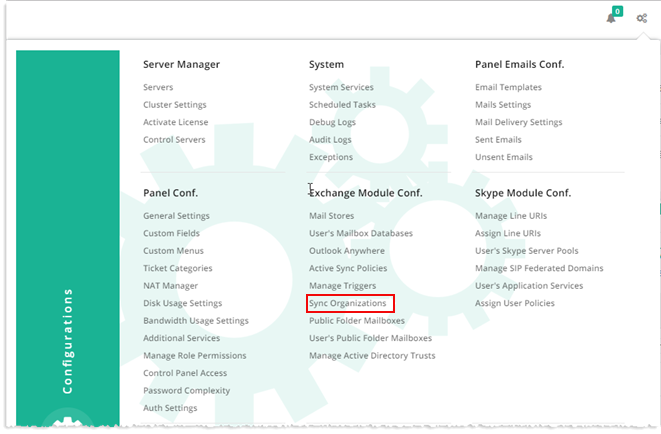
To manage sync organizations, from top right corner of your screen, click  and then go to Exchange Module Configuration >> Sync Organizations.
|
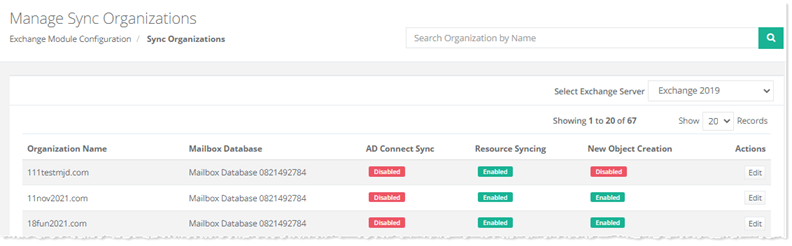
Sync Organizations page shows list of existing organizations with additional information as:
|
AD Connect Sync
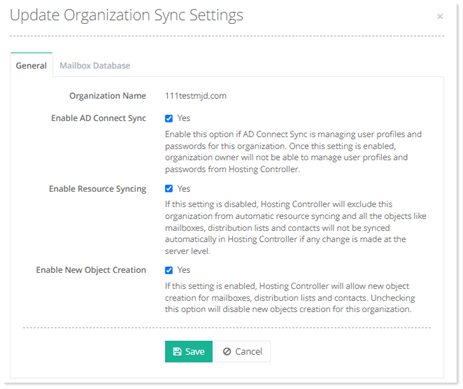
At times a synchronization utility may already be in place to synchronize on-premises Active Directories (AD) with hosted environment. If such is the case then it is required that user profile updates should only be one-way. Changes made in user profiles on on-premises ADs should be reflected in the hosted environment and not the other way round. To prevent users in certain O.Us from updating their profiles (General Properties) from the wrong end, HC10 offers the feature of Sync AD. It disables users from updating their profiles in the hosted environment thus ensuring one-way synchronization.

Resource Syncing
It has been noted that Exchange providers normally wish for a mechanism to keep their Exchange resources (Mailboxes, Distribution Lists, Mail Contacts) synchronized with their automation solution, in case those have been changed or moved manually. Resources Sync feature in HC provides just that. It allows users to synchronize resources for a particular organization (O.U) at a specified time interval.

New Object Creation
This setting controls the creation of new AD objects for mailboxes, distribution lists and contacts. If this setting is enabled, tenants will be able to create new AD objects for Exchange mailboxes, distribution lists and contacts. Unchecking this option will disallow new objects creation for this organization.
To enable or disable Organization Sync Settings, click Edit under Actions column.
Organization Sync Settings
Edit Mailbox Databases
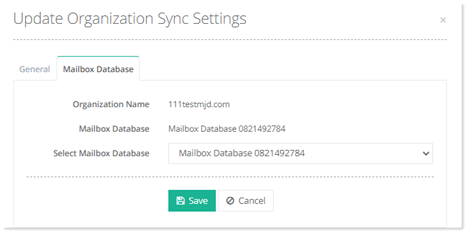
Users are often presented with a problem when they reassign an Organization (O.U) to a new Mailbox Database directly from the Exchange PowerShell at the backend. The change, not being reflected in HC, causes disruption in operations. Mailbox Database Sync seeks to remedy this. It allows the reassigned organizations (which were manually reassigned at the backend in Exchange) to be synchronized with the new Mailbox Databases on the fly hence, minimizing the chance of a mismatch in HC database.