
| Product Documentation
Hybrid Control Panel (v10)
Configuring Mail Settings
Some events require prompt and regular notifications to relevant users. These may include the events of setting up a new account, generation of an invoice, registration of a payment or a detailed disk utilization report to name a few. HC10 allows notifications in the form of emails to be sent out to various users. Mail Settings are the settings performed to notify a user regarding any event through an email from HC panel.
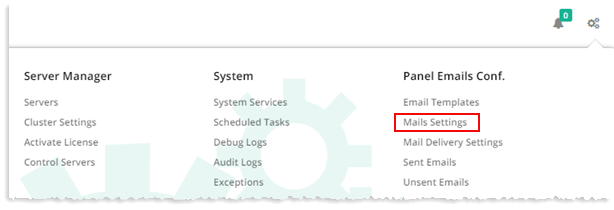
To configure mail settings, from top right corner of your screen, click  and then go to Panel Emails Configuration >> Mail Settings.
All Users
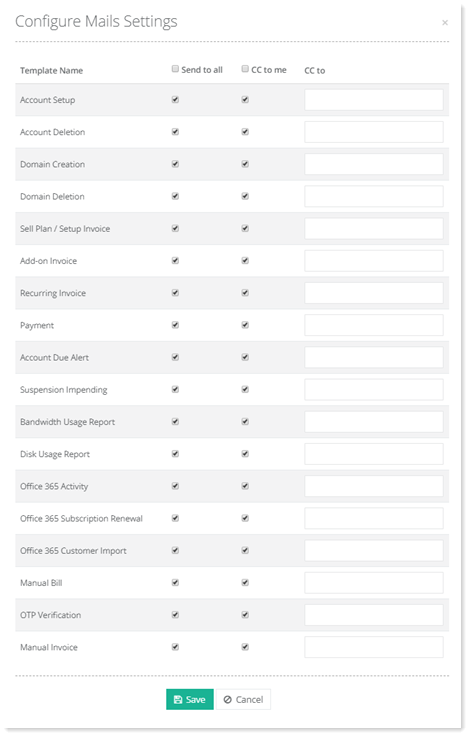
Use this option to send the email templates to all users.
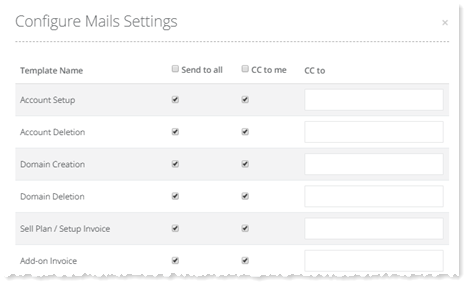
- Template Name: shows names of the email templates.
- Send to all: allows you to either send all the mail templates to all users or send selected templates to the selected users. In case you want to send all the templates to all the users, select the Send to all users check box, otherwise leave it unchecked.
- CC to me: Selecting this check box, keeps you in the CC list while sending all the templates to users. If you don't want to be in the CC list of all the mails, leave this check box unchecked.
- CC to: allows you to keep someone else in the CC list while sending mail templates to users. Type email address of the user, you want to add in the CC list in the fields under CC to column.
Selected Users
To send the email templates to the selected users, click Advanced Settings ?and specify required information.
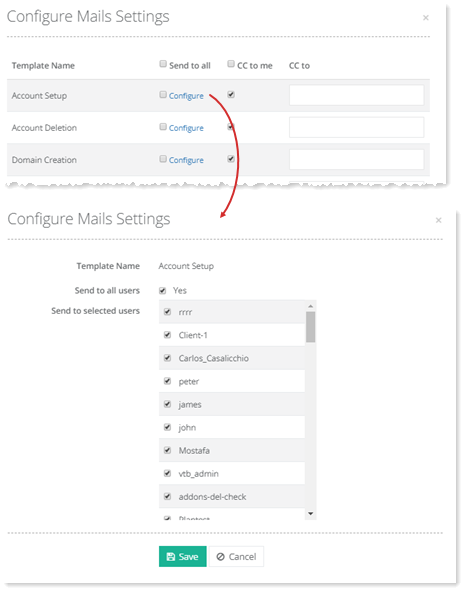
- Send to all users: Keep Yes check box unchecked to avoid sending your mail to all the users.
- Send to selected users: Select required users to send mail to.