
| Product Documentation
Hybrid Control Panel (v10)
Adding a Linux Web Server
Prior to add a Linux Web server, make sure you have enabled the server roles under Cluster Settings. If you have not configured it yet, please configure it now to proceed further.
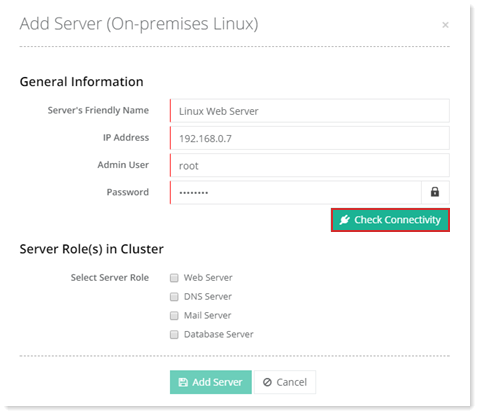
To add a web server, specify General Information and click Check Connectivity. Once you are connected successfully, only then you can add a web server. Apache is the designated web server for the Linux category.
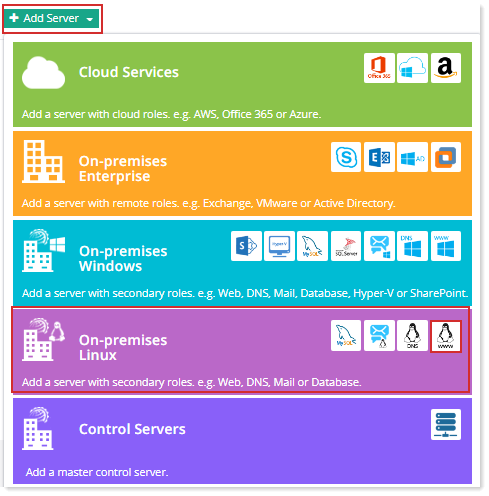
Fields marked in red are required fields and cannot be left empty.
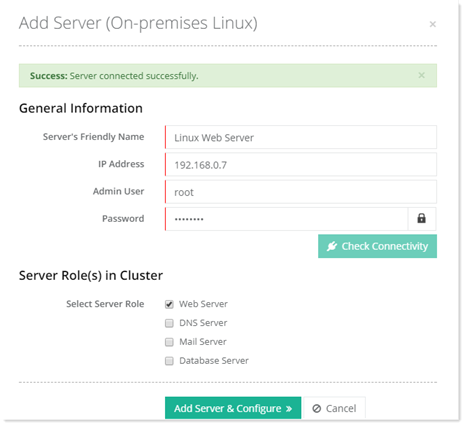
Click Add Server & Configure. Specify required information for Web Server.
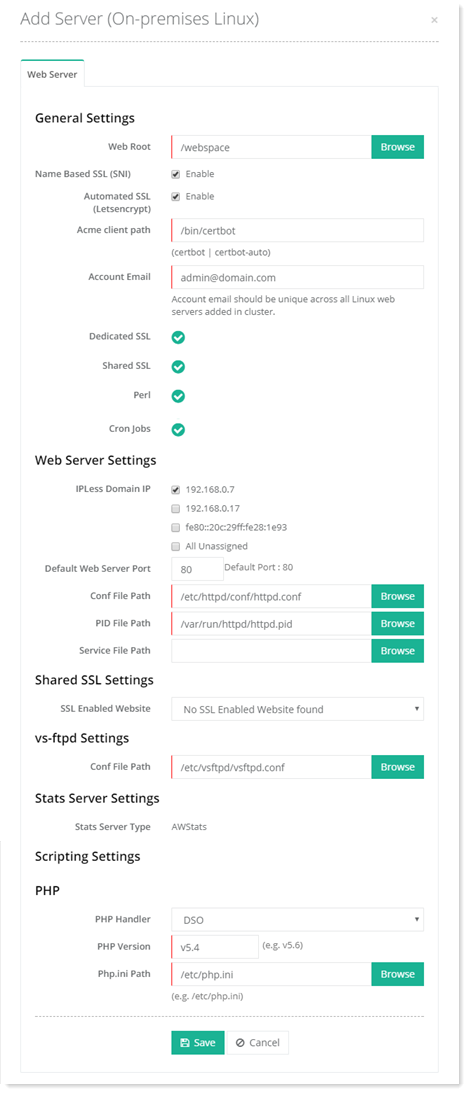
General Settings
- Web Root: Web Root is the path where HC creates folders for websites. The hierarchy followed is X:\Webspace\domain.com. 'domain.com' folder contains four sub-folders:
-- .www
-- .special
-- .log
-- .db - Name Based SSL (SNI): Server Name Indication (SNI) allows multiple SSL certificates to run on the same IP address. Multiple websites can exist on the same IP address. These are known a name based sites. Without SNI all these name based sites would be required to use the same certificate. SNI enables them to utilize multiple certificates. Hosting Controller allows you to enable SNI through the panel and thus secure multiple websites on a single IP address. For further details, refer to How to install SSL certificate.
- Automated SSL (Let's Encrypt): Let’s Encrypt is a free, automated, and an open certificate authority (CA). It gives users the digital certificates they need in order to enable HTTPS (SSL/TLS) for their websites, for free. HC gives you the option to install free SSL using Let's Encrypt for its Linux platform. For more information on how to use Let’s Encrypt with HC, see How to use Let’s Encrypt in HC.
- Acme client path: The Automatic Certificate Management Environment (ACME) protocol is a communications protocol for automating interactions between certificate authorities (CA) and their users' web servers. Certification authorities (CA) in the Web Public Key Infrastructure (PKI) are trusted to verify that an applicant for a certificate legitimately represents the domain name(s) in the certificate. Previously this was done through a collection of ad hoc mechanisms. ACME automates the process of verification and certificate issuance. It allows the automated deployment of public key infrastructure without any human intervention. With ACME it is possible to set up an HTTPS server and have it automatically obtain a browser-trusted certificate, without any user interaction. The ACME protocol was originally developed by the Internet Security Research Group (ISRG) for its public CA, Let’s Encrypt.
To get a Let’s Encrypt certificate, a piece of ACME client software is required. This is known as an ACME client. There are a large number of ACME clients available but Let’s Encrypt recommends Certbot. Certbot is a free, open source client for automatically using Let’s Encrypt certificates on manually-administrated websites to enable HTTPS. It’s easy to use, works on many operating systems, and has great documentation. Certbot client is required to be installed prior to configuring Let’s Encrypt with HC. Acme client path will be automatically fetched as you have installed Certbot client on your webserver. - Account Email: This is the email to which all emails related to Let’s Encrypt will be sent.
- Dedicated SSL: Dedicated SSL enables web hosts and Internet Service Providers (ISPs) to offer dedicated SSL (Secure Sockets Layer) certificates with their hosting services. HC allows you to install dedicated SSL on your Linux websites.
- Shared SSL: A shared SSL certificate enables Internet Service Providers (ISPs) to provide SSL encryption and business authentication to Web business customers, but without the need to issue unique digital certificates to each hosted customer. The service offers ISPs the convenience and streamlined management of a single specially licensed SSL digital certificate to share among multiple hosted websites. Being a web host HC enables you to share a single certificate across your domains. The field shows whether shared SSL is enabled/disabled for the Linux web server to be added.
- Perl: Perl is a high-level programming language with an eclectic heritage originally written by Larry Wall. It’s process, ?le, and text manipulation facilities make it particularly well-suited for tasks involving quick prototyping, system utilities, software tools, system management tasks, database access, graphical programming, networking, and world wide web programming. Perl may stand for PERL or Practical Extraction and Report Language. HC offers Perl as one of its supported scripting languages on Linux platform. The field shows whether Perl is enabled/disabled for the Linux web server being added.
- Cron Jobs: Linux Cron utility is an effective way to schedule a routine background job at a specific time and/or day on an on-going basis. Most commonly these are administrative or system maintenance jobs but generally can be anything. HC Linux provides a user friendly interface to manage scheduled jobs from within the panel. The field shows whether cron jobs are enabled/disabled for the Linux web server being added.
Web Server Settings
- IPLess Domain IP: IPLess Domains are domains sharing the same IP.
- Default Web Server Port: This is the default port the web server listens to. By default the web server listens on port 80. By default, Apache web server is instructed to listen for incoming connections on port 80. However the default can be changed to some other if required.
- Conf File Path: Apache HTTP Server is configured by placing directives in plain text configuration files. The main configuration file is usually called httpd.conf. This indicates the location path of the httpd.conf file.
- PID File Path: A PID file is a file containing the process identification number (PID) of a given program. It is a regular text file and is stored in a well-defined location of the filesystem thus allowing other programs to find out the PID of a running script. It is called httpd.pid. When Apache starts up, it writes its own process ID in httpd.pid in a human-readable format. This indicates the location path of the httpd.pid file.
Shared SSL Settings
vs-ftpd settings
- Conf File Path: vsftpd is an FTP server for Linux. It is one of the most secure FTP daemons available. vsftpd is the default FTP server for the Ubuntu, CentOS, Fedora etc. distributions. vsftpd.conf is the configuration file for vsftpd. vsftpd.conf is used to control various aspects of vsftpd's behaviour. This field indicates the location path of the vsftpd.conf file.
Stats Server Settings
- Stats Server Type: HC Linux supports AWStats, SmarterStats and Webalizer as statistics servers. This indicates the statistics server specified for the web server.
Scripting Settings.
Scripting Settings
- PHP Handler: Apache does not natively support PHP scripts without a special module. The module that tells Apache how to communicate with PHP scripts is known as a PHP handler. There are many different PHP handlers. Each has a distinct way of parsing PHP code, and has its own advantages and drawbacks. The four main PHP handlers are:
- PHP-FPM: PHP FastCGI Process Manager (PHP-FPM) is an alternative FastCGI implementation for PHP that mostly has features useful for heavy-loaded sites. In other words, allows a website to handle high loads. It speeds up the performance of the PHP environment.
- Adding PHP Versions: To add a PHP version, click + Add PHP Version and provide details as:
- PHP Version: Type PHP version to be added.
- PHP-FPM Config File: Specify path for configuration file.
- Adding PHP Versions: To add a PHP version, click + Add PHP Version and provide details as:
- DSO: It is one of the fastest PHP handlers available. It is an older handler that runs PHP as an Apache module. All PHP scripts are executed as the Apache user "nobody", which although allows for faster execution, but prevents the ability to track and identify individual users/accounts on the server since all PHP scripts are owned and executed as the nobody user.
- PHP Version: Type PHP version to be added.
- Php.ini Path: The php. ini file is the default configuration file for running applications that require PHP. It is used to control variables such as upload sizes, file timeouts, display errors and resource limits. It is one of the essential configuration files in PHP. It is located at a path such as /etc/php/7.2/cli/php.ini This gives the exact path where the php.ini file is located.
- suPHP: suPHP is a more secure and better-performing handler than its predecessors. It offers secure execution of PHP files with proper set permissions of their owners. Because of this, it’s been considered the most secure of the handlers to be used for webservers.
- PHP Version: Type PHP version to be added.
- Php.ini Path: The php. ini file is the default configuration file for running applications that require PHP. It is used to control variables such as upload sizes, file timeouts, display errors and resource limits. It is one of the essential configuration files in PHP. It is located at a path such as /etc/php/7.2/cli/php.ini This gives the exact path where the php.ini file is located.
- PHP CGI Path: Specify CGI path.
- FastCGI: FastCGI: It is one of the fastest handlers and provides a number of benefits over the older CGI handler. It allows scripts to be executed as the user that owns the domain or subdomain instead of the default nobody user.
- Adding PHP Versions: To add a PHP version, click + Add PHP Version and provide details as:
- PHP Version: Type PHP version to be added.
- Php.ini Path: The php. ini file is the default configuration file for running applications that require PHP. It is used to control variables such as upload sizes, file timeouts, display errors and resource limits. It is one of the essential configuration files in PHP. It is located at a path such as /etc/php/7.2/cli/php.ini This gives the exact path where the php.ini file is located.
- PHP CGI Path: Specify CGI path.
- suEXEC Enabled: Select to enable suEXEC.
- Adding PHP Versions: To add a PHP version, click + Add PHP Version and provide details as:
- PHP-FPM: PHP FastCGI Process Manager (PHP-FPM) is an alternative FastCGI implementation for PHP that mostly has features useful for heavy-loaded sites. In other words, allows a website to handle high loads. It speeds up the performance of the PHP environment.
See how to configure Let's Encrypt on Linux server.