
| Product Documentation
Hybrid Control Panel (v10)
Managing Multiple Active Directories with Exchange
Organizations often need to maintain separate Active Directories for an Exchange environment. This essentially means that user accounts that access the Exchange servers are not present within the associated Active Directory. Rather they are present in child Active Directories or remote Active Directories elsewhere.
Many companies have good reasons to maintain multiple Active Directories talking to a single Exchange environment. The reasons could be acquisitions, consolidations, or mergers. Organizations looking to break off into offshore departments may need to maintain separate Active Directories for their departments. Similarly, organizations intending to acquire new companies or branch off into subsidiaries may need to maintain separate Active Directories for the new employees.
In all cases, organizations may need to centralize Exchange for all user accounts that are not present within the main on-premises Active Directory.
How to Achieve this through Hosting Controller?
Hosting Controller allows users present in various remote Active Directories to access central Exchange, through a variety of methods. The following use cases describe all the methods through which this can be achieved.
Use Case 1: Child Domain Controllers Accessing Central Exchange
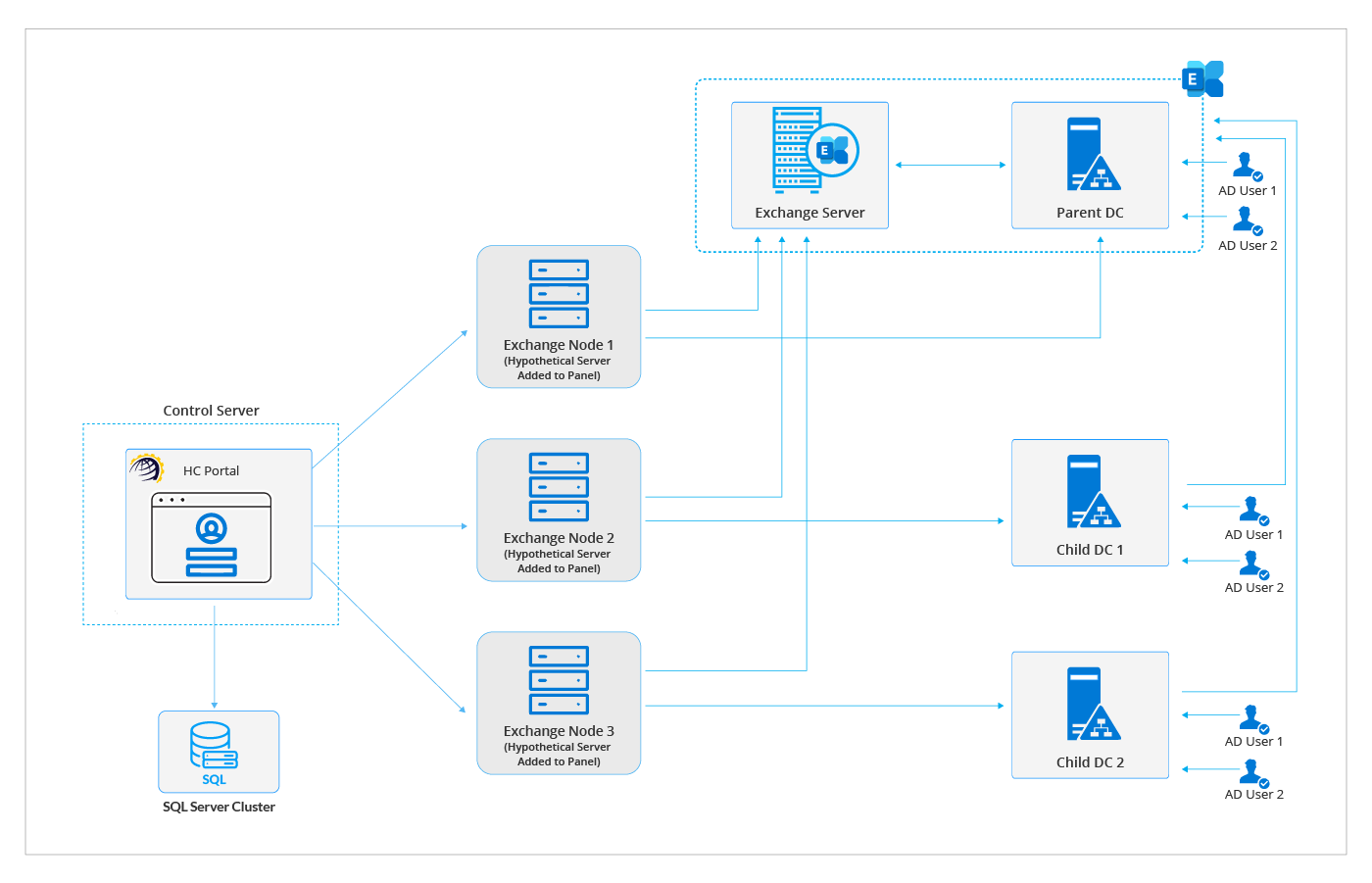
One of the scenarios is business units or departments hosting their own child domain controllers internally but reaching out to Exchange servers associated with the parent domain. Child domains are useful when sub-businesses or geographically distinct units may want to keep their Active Directory policies and structure separate from the parent company. For instance, a company based in Europe may want to open offices in North America and delegate the administration of IT to a local team. In this case, it can set up a parent domain like “base.company” and let the branch office have its own child domain such as “na.base.company”.
Hosting Controller allows such offshore departments or subsidiaries to access the central Exchange servers associated with the parent domain controllers. Distinct Exchange nodes (hypothetical servers) for each offshore department can be added to the control panel and the users of these departments can then access the central Exchange for their mailbox needs.
Use Case 2: Synchronizing Remote Active Directory Objects
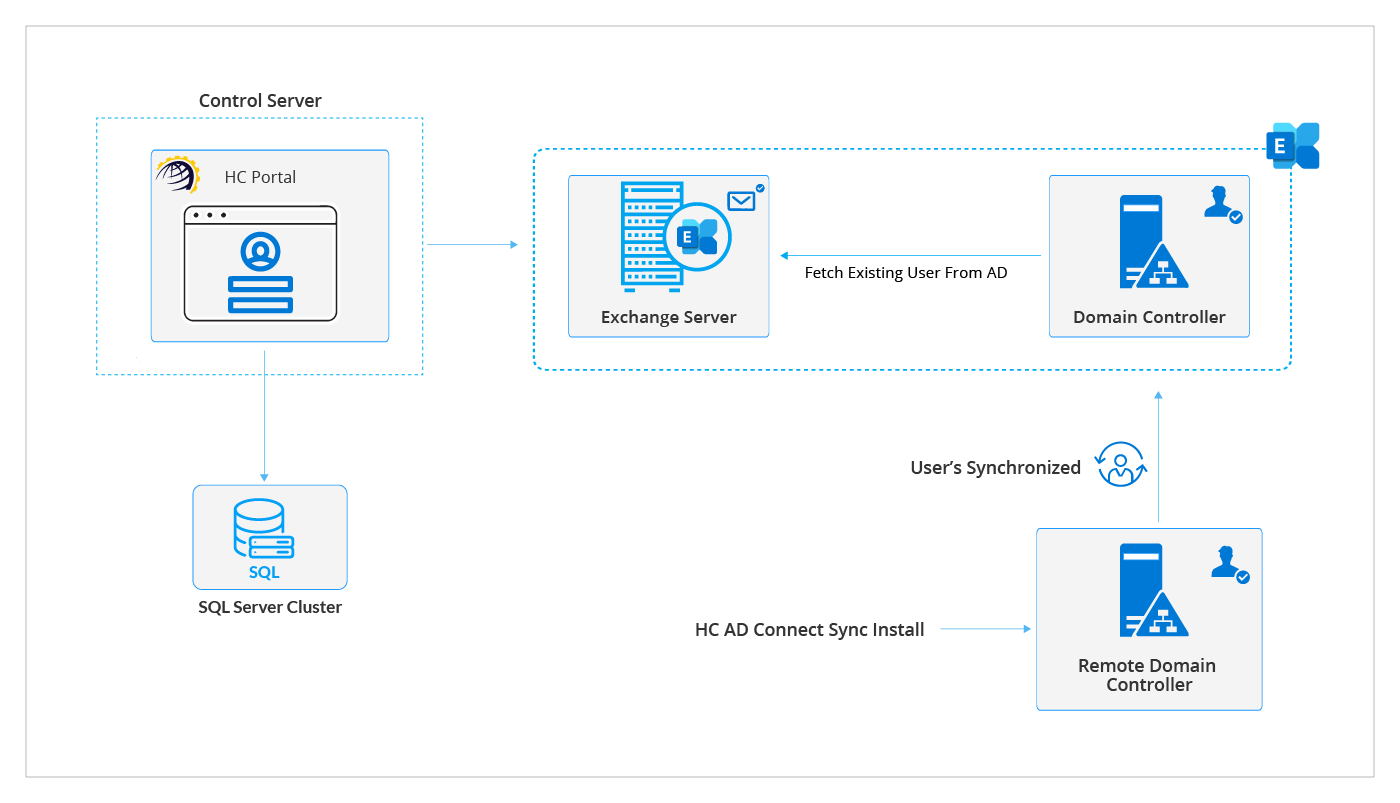
One of the most popular use cases is the synchronization of objects from a remote Active Directory to the main Active Directory through the Hosting Controller’s AD Connect Sync utility. A remote Active Directory with its own domain controllers may want to utilize Exchange servers in a completely different forest.
Hosting Controller enables users in a remote Active Directory to access the Exchange of an entirely different Active Directory through its AD Connect Sync tool. The AD Connect Sync utility will be deployed on the remote domain controllers and will synchronize users to the main Active Directory. Once the users are replicated to the main Active Directory, Hosting Controller can enable mailboxes on them through the panel.
Use Case 3: Linked Mailboxes
The third and last resort is linked mailboxes. Hosting Controller also holds the provision for linked mailboxes. However, for linked mailboxes to work it’s necessary that a trust is established between the Exchange forest and the account forests.
Linked mailboxes allow access to the central Exchange by user accounts that don’t exist in the forest where Exchange is deployed. They exist in an external Active Directory. Therefore, a disabled user account that exists in the same forest as Exchange is created and associated with the corresponding linked mailbox.
Linked mailboxes can be created, and trusts can be managed through Hosting Controller.