
| Product Documentation
Hybrid Control Panel (v10)
Managing Unsent Emails
Unsent emails are a list of all emails that have not yet been delivered to the recipients. As soon as these emails are delivered to their respective receivers, they are moved to the Sent Emails section.
To manage unsent emails, from top right corner of your screen, click  and then go to Panel Emails Configuration >> Unsent Emails.
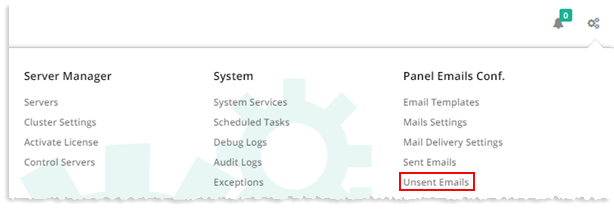
Unsent Emails is a list of all those emails which are sent but not delivered to the recipients yet. As soon as these emails are delivered to their respective receivers, they are moved in the Sent Emails section.
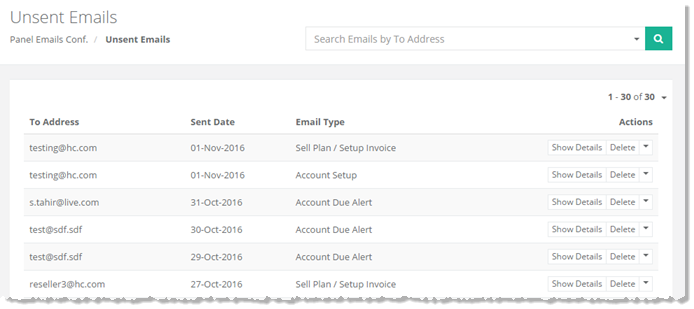
|
Unsent Emails page shows all the unsent emails and additional information as:
|
Unsent Emails section allows viewing details/deleting of any of the unsent email as per your requirements. For further details, refer to the following sections:
Toggle Heading
To view details of any of the unsent email, click Show Details.
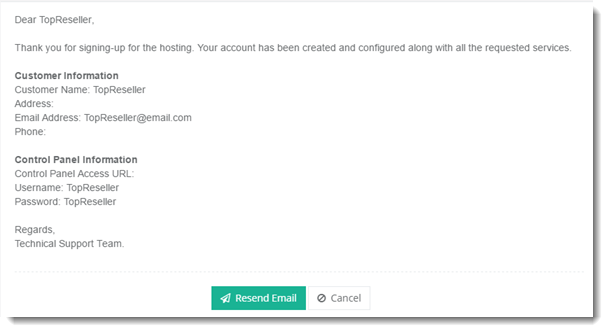
If you want to send the email again, click Resend Email or Cancel to close the details window.
Delete Options
Delete Options~There are different options available to delete an email from the list such as:
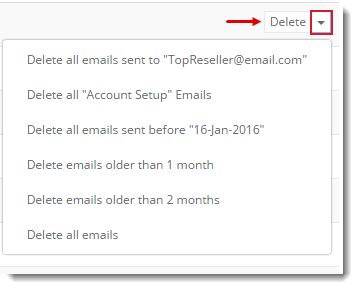
Select any of the available option as required and click Delete.