
| Product Documentation
Hybrid Control Panel (v10)
Assign Organizations
Assigning of organizations is only available for the Organization Sub-admin role. Organization Sub-admin can be assigned to any parent OU and all or any child OUs under it.
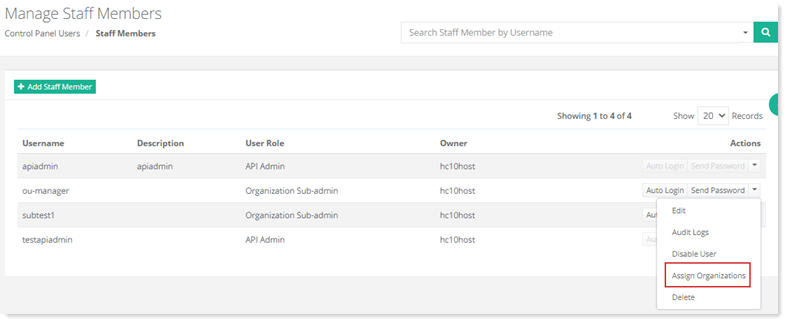
To assign an organization, go to Panel Users >> Staff Members and click Assign Organizations under Actions column.
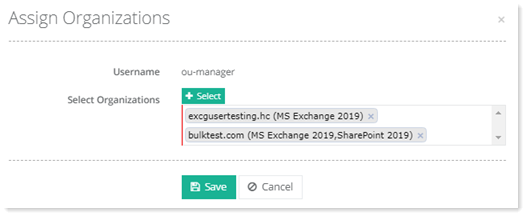
- Username: This is the staff member with the Organization Sub-admin role. It can be assigned to any parent OU and all or any child OUs under it.
- Select Organizations: Here you can select the OUs that are to be assigned to the Organization Sub-admin. You can select more than one OUs here.
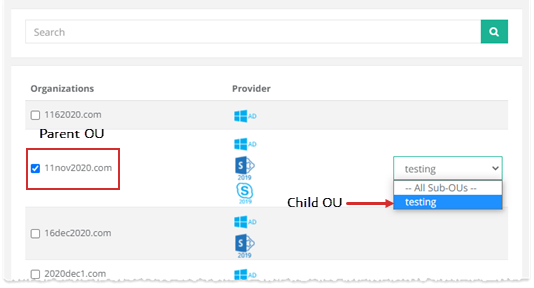
- Organization: You should select a Parent OU first and once its selected the child OUs drop down will appear on the right. From the drop down you may select all the child OUs or a particular OU. The selected OU will then be assigned to the Organization Sub-admin.