
| Product Documentation
Hybrid Control Panel (v10)
Creating Exchange mail domain
The email domain name is the part that comes after the @ symbol in an email address. For example in the email address user@mycompany.com, “mycompany.com” is the email domain name. An Exchange email domain is an accepted domain, with an SMTP namespace and for which Exchange server sends or receives email.
To create a Mail Domain, click + Create Mail Domain and specify required information to proceed.
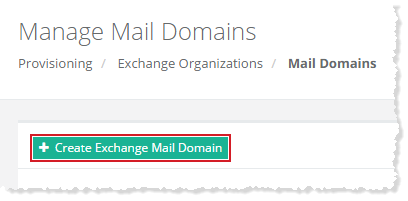
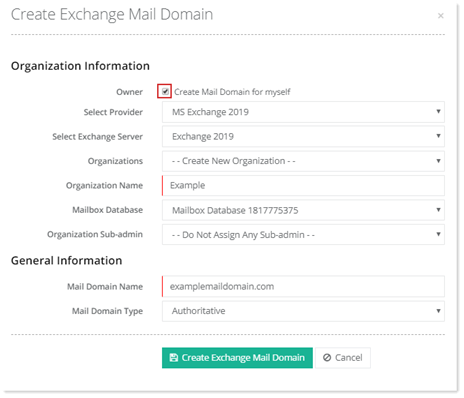
Myself
To create a mail domain for myself, select Create Mail Domain for Myself checkbox and specify information to proceed.
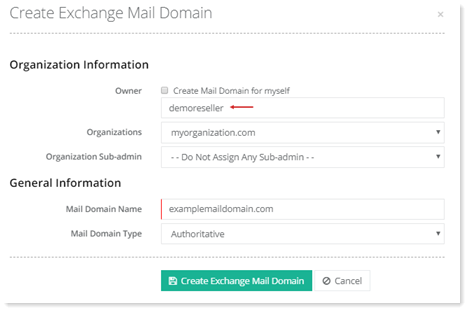
Specified User
To create a mail domain for specific user, specify user name and specify other information to proceed.
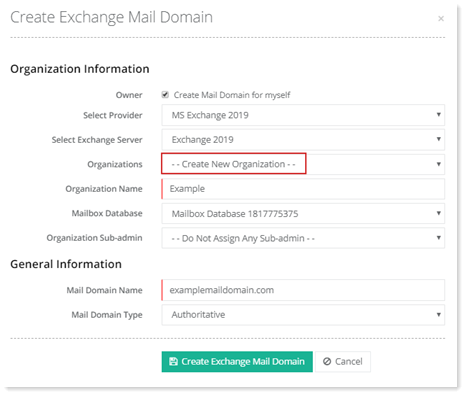
New Organization
To create a mail domain with new organization, select Create New Organization from the drop-down list and specify information to proceed.
Existing Organization
To create a mail domain with existing organization, select any organization from the list and specify information to proceed.
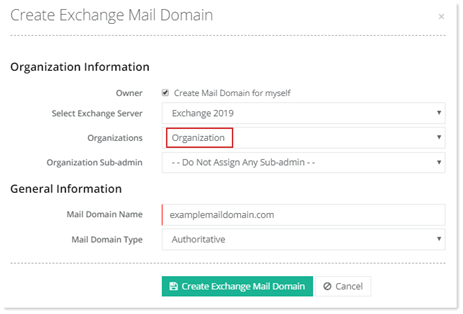
- Organization Information: Organizational information covers the server aspect of the Mail Domain creation. It requires the server details for the server the Mail Domain is to be created in. A Mail Domain can be created in any of the selected Exchange 2010, 2013, 2016 and 2019 servers. A particular Mailbox Database should be selected and specified at the time of creation.
- Mailbox Database: If Database Selection Mode while Adding a Microsoft Exchange server is set as manual, mailbox databases will be displayed at the time of OU and mail domain creation and the user will be allowed to select from these mailbox databases however if the mode is set as automatic, databases will not be displayed at the time of OU creation and Exchange will decide itself which database to assign.
- Organization Sub-admin: This is the additional staff member responsible for handling Exchange organizations.
- General Information: General information specifies the name and type of the Mail Domain to be created. The mail domain can be a second-level domain or a subdomain. The following types of Mail Domains can be created:
- Mail Domain Type: Select required mail domain type from the drop-down list box.
- Authoritative - An accepted domain is authoritative if email is to be delivered to recipients only in this Exchange organization.
- Internal Relay - An accepted domain is internal relay if email is to be delivered to recipients in this Exchange organization or relayed to an SMTP server outside this Exchange organization. Keep this setting if the domain is shared by this Exchange organization and another messaging system.
- External Relay - An accepted domain is external relay if email is to be relayed to an email server outside this Exchange organization.
- Mail Domain Type: Select required mail domain type from the drop-down list box.