
| Product Documentation
Hybrid Control Panel (v10)
Configuring Disk Usage Settings
Disk usage reporting is an indispensable requirement for hosting companies. Disk usage reporting in HC10 encompasses usage reports for Web, Mail, Database, Virtual Machines and other on-premises services.
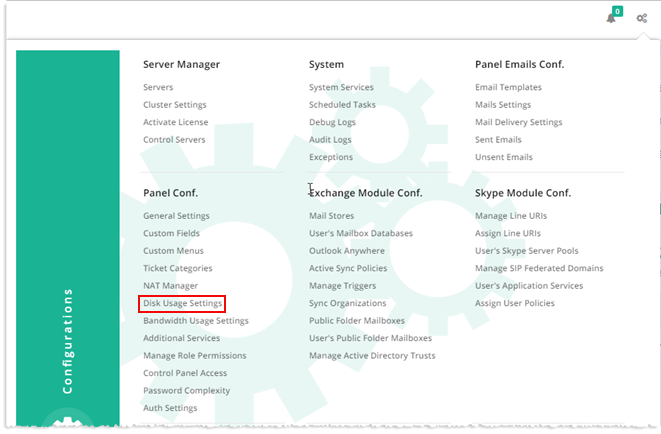
To configure disk usage settings, from top right corner of your screen, click  and then go to Panel Configuration >> Disk Usage Settings.
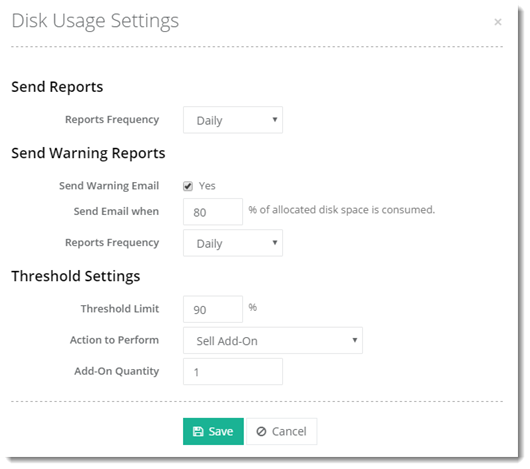
- Reports Frequency: It is the time interval for sending reports.
- Never - This option, if selected, no disk usage report is sent ever.
- Daily - This option, if selected, disk usage report is sent daily.
- Weekly - This option, if selected, disk usage report is sent weekly.
- Monthly - This option, if selected, disk usage report is sent monthly.
- Send Warning Email: Select Yes check box to send usage alerts to customers when disk usage reaches a certain size limit.
- Send Email When: The size limit is represented in terms of percentage of disk used. When disk usage reaches this size limit, an email is sent.
- Reports Frequency: It is the time interval for sending usage alerts.
- Daily - This option, if selected, usage alert is sent daily after a certain size limit is reached.
- Weekly - This option, if selected, usage alert is sent weekly after a certain size limit is reached.
- Monthly - This option, if selected, usage alert is sent monthly after a certain size limit is reached.
- Threshold Limit: Sometimes on jumping the disk usage threshold, service providers are required to take some action such as suspend services.
- Action to Perform: As soon as the disk usage exceeds the specified threshold limit, three subsequent actions can be performed.
- Do Nothing - This option, if selected, no subsequent action is taken when disk usage exceeds the specified threshold.
- Sell Add-On - This option, if selected, sells an add-on when disk usage exceeds the specified threshold.
- Suspend Resource - This option, if selected, suspends services like virtual machines and websites, when disk usage exceeds the specified threshold.
- Add-On Quantity: In Actions to Perform, if Sell Add-On is selected then specify its quantity as required.