
| Product Documentation
Hybrid Control Panel (v10)
Adding a DNS Server
HC agent must be installed on the DNS server. To learn how to install an HC agent, see HC Agent Installation.
To add a DNS server, specify General Information and click Check Connectivity. Once you are connected successfully, only then you can add a DNS server. Microsoft DNS and Simple DNS Plus are the designated DNS servers for the Windows category.
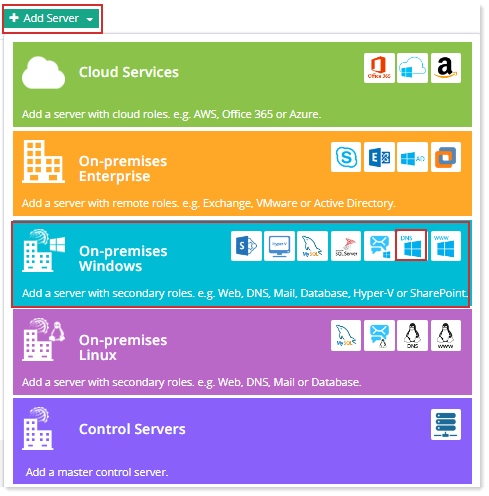
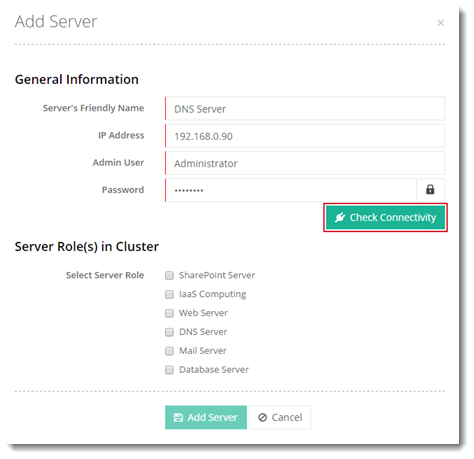
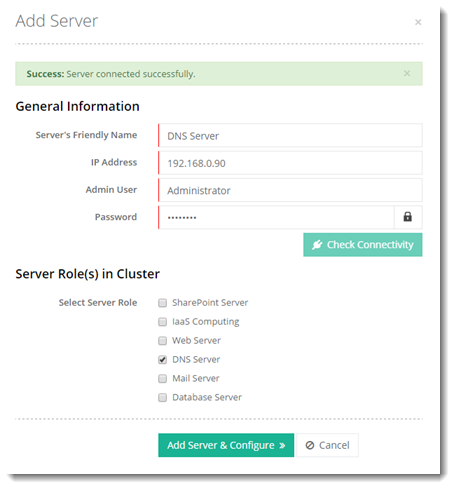
Click Add Server & Configure. Specify required information for DNS Server.
Custom Settings
HC lets you add various DNS records through its interface. Below are the DNS records allowed by HC.
- A (Host Record): An A record (Address Record) points a domain or subdomain to an IP address. For example domain.com can be pointed to 192.168.1.12, so that when the end user types in the easily recognizable domain name (domain.com) it gets pointed to the IP.
- AAAA (Host Record): An AAAA record is the same as an A record, but it allows you to point a domain to an IPv6 address instead of an IPv4 address.
- CNAME (Name Alias Record): CNAME points one domain or subdomain to another domain name, allowing you to update only one A record each time you make a change, without needing to change all the records that need pointing to the IP. For example www.domain.com can be pointed to domain.com. Now if the end user types in www.domain.com, it will be directed to domain.com.
- MX (Mail Exchange Record): An MX record routes email to a particular mail server. It shows the mail server that handles a domain's email. In simple words it tells the world which mail servers accept incoming mail for a domain. It contains the host name of the mail server and a priority code. The priority is used when more than one MX records are entered for any single domain name. This happens when more than one mail servers are configured. The priority identifies which mail server should be preferred. The mail server with the lower number has higher priority. For example in:
domain.com. IN MX 10 mail.domain.com.
domain.com. IN MX 15 domain.com.
The mail server with number 10 has higher priority. The server with the higher number (15) will be contacted only if the server with lower number is unavailable. MX entries always point to a domain and never point directly to an IP address. The domain must map directly to one or more address records (A, or AAAA) in the DNS, and must not point to any CNAME records. -
TXT (Text Data Record): The TXT record isn’t used to direct any traffic but instead to provide information to outside sources. These records are used to store text-based information related to your domain. The TXT record can be used for various purposes. TXT records can be used for:
-
Verification of domain ownership
-
Sender Policy Framework
-
DomainKeys (DKIM)
TXT records usually contain a lot of text and unlike other DNS records, the record can contain spaces and various special characters. For example
domain.com. IN TXT "v=spf1 a mx ptr ~all"
-
-
CAA: CAA record specifies which certificate authorities (CAs) are allowed to issue SSL/TLS certificates for a domain.
CAA records are only supported with Microsoft DNS. Not with Simple DNS Plus. -
SRV (Service Record): An SRV record is used to identify computers that host specific services such as VOIP or IM. For instance an SRV record can be used in Internet Telephony to define where a SIP service may be found.
The following table provides a sample of all the supported DNS records and their data:
Record Name Record Type Record Data domain.com A (Host Record) 192.168.1.12 domain.com AAAA (Host Record) 2001:0db8:85a3:0000:0000:8a2e:0370:7334 www.domain.com CNAME (Name Alias Record) domain.com domain.com MX (Mail Exchange Record) mail.domain.com domain.com TXT (Text Data Record) "v=spf1 a mx ptr ~all" _autodiscover._tcp SRV (Service Record) 0 0 443 yourSSLdomain.com
SPF Settings
SPF (Sender Policy Framework) is used to stop spam from being sent using unauthorized domain names. It can only stop the spammer for the From field in the e-mail and not from sending e-mails from any of its member domains.
- SPF Record: SPF records are a type of DNS TXT records commonly used for email authentication. SPF records indicate to mail exchanges, which hosts are authorized to send mail for a domain.
The domain which is sending emails must have an established SPF record entry in DNS. A default value is already present, but you can change this value if required.